
Research answer
What AppTrendKit can say about 비디오에서 MP3로 변환 앱, Video to MP3 today
비디오에서 MP3로 변환 앱, Video to MP3 has no estimate-backed download or gross-consumer-spend figure that meets the public evidence contract yet.
Observed App Store metadata, chart positions, and history are shown below. Missing, non-finite, undefined-currency, or undefined-metric evidence stays missing rather than becoming zero.
Performance intelligence
Observed trajectory and estimates
Store ranks are observations. Downloads and gross store consumer spend are AppTrendKit estimates and only appear when persisted evidence exists.
Estimated downloads · 30D
ModeledNo persisted estimate
The page does not turn missing evidence into zero.
Estimated App Store gross consumer spend · 30D
ModeledNo persisted estimate
The page does not turn missing evidence into zero.
Estimated downloads · 7D
ModeledNo persisted estimate
The page does not turn missing evidence into zero.
Estimated App Store gross consumer spend · 7D
ModeledNo persisted estimate
The page does not turn missing evidence into zero.
Evidence history
Collected daily performance
No daily metric history has been persisted yet.
Rank history
Observed chart positions
Lower rank is better. Only collected observations are shown.
Coverage note
What the ranks mean
A missing rank is not treated as zero downloads or zero revenue. Apple chart feeds are bounded and may return censored or not-ranked observations outside the visible chart depth.
Read the methodStorefront mix
Top countries by estimated contribution
Country estimates are aggregated only after country-level predictions exist.
Monetization
Observed store economics signals
These are listing and product observations. They are not company revenue, subscriber counts, or advertising revenue.
App details
Store metadata
- Version
- 3.7
- Released
- Jun 2, 2016
- Last updated
- Nov 14, 2025
- Content rating
- 4+
- Default storefront
- KR
Public IAP observations
Validated in-app purchase prices
Only persisted rows with an explicit public publication boundary are shown. Missing price, currency, country, or date values stay unknown.
Listing detail
What the store says
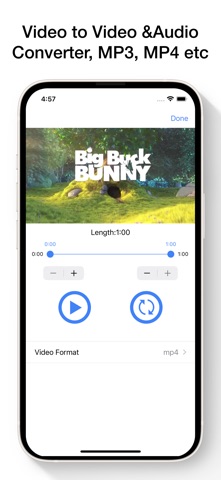
Media Converter는 iPhone 또는 iPad에서 다양한 비디오 및 오디오 파일을 쉽게 변환하고 편집할 수 있는 올인원 앱입니다. 비디오에서 오디오 추출, MP3 메타데이터 편집, 파일 자르기, 벨소리 만들기 등 모든 작업을 하나의 앱에서 오프라인으로 간편하게 수행하세요. MP4를 MP3로, MOV를 AVI로, MP3를 WAV로 – 다양한 형식 간 변환을 빠르고 쉽게 처리할 수 있습니다. 주요 기능: • 비디오 변환기 MP4, MOV, AVI, 3GP, FLV, MKV 등 인기 있는 형식으로 비디오를 변환하세요. • 오디오 변환기 MP3, M4A, AAC, WAV, FLAC, OGG, AC3, CAF 등 다양한 오디오 형식을 지원합니다. • 비디오에서 오디오 추출 동영상에서 고음질 오디오를 추출하여 MP3, M4A 등으로 저장하세요. 음악, 음성녹음, 강의 등 활용 가능. • 비디오 및 오디오 자르기 필요 없는 부분을 잘라내어 원하는 클립만 남기세요. 벨소리 제작이나 짧은 영상 편집에 유용합니다. • 벨소리 만들기 좋아하는 노래를 원하는 시작·종료 시점으로 설정하여 맞춤형 벨소리를 제작할 수 있습니다. • MP3 메타데이터 편집기 제목, 아티스트, 앨범, 장르 등 오디오 파일 정보를 자유롭게 편집하고 정리하세요. • 내장 미디어 플레이어 변환된 오디오 및 비디오를 앱에서 바로 재생할 수 있습니다. 대부분의 일반 포맷을 지원합니다. 지원 형식: • 오디오: MP3, M4A, AAC, WAV, FLAC, CAF, AIFC, OGG, AC3, RM 등 • 비디오: MP4, MOV, M4V, AVI, MKV, FLV, 3GP, RMVB, DIVX, MPV 등 파일 가져오기 방법: • iOS 미디어 라이브러리에서 가져오기 • iOS 파일 앱에서 열기 • URL을 통해 파일 다운로드 • Wi-Fi 파일 전송 지원 • iTunes 파일 공유를 통한 PC/Mac 간 파일 입·출력 • 이메일 등 다른 앱에서 파일 공유 가능 개인정보 보호 및 보안: • 암호 잠금, Face ID 및 Touch ID 지원 • 모든 파일은 기기 내부에만 저장되어 개인정보 안전하게 보호 Media Converter를 선택해야 하는 이유: • 간단하고 빠른 사용 • 광범위한 형식 지원 • 오프라인에서도 완전 사용 가능 • 직관적인 인터페이스 • 필요한 모든 미디어 도구를 하나의 앱에 통합 구독 안내: 구매 확정 시 iTunes 계정으로 결제됩니다. 현재 기간 종료 24시간 전까지 자동 갱신을 해제하지 않으면 구독이 자동 갱신됩니다. 구독 및 자동 갱신은 계정 설정에서 관리할 수 있습니다. 이용약관: https://www.fingerjoystudios.com/terms-of-service/ 개인정보 처리방침: https://www.fingerjoystudios.com/privacy-policy/ 지금 Media Converter를 다운로드하고, 나만의 오디오·비디오 파일을 자유롭게 변환하고 편집해 보세요! Media Converter is the ultimate app to convert video and audio files right on your iPhone or iPad. Easily change video formats, extract audio from videos, convert music files, trim clips, edit MP3 tags, and create custom ringtones — all in one simple, powerful app. Convert MP4 to MP3, MOV to AVI, MP3 to WAV, and more with just a few taps. Top Features: • Video Converter Convert videos to different formats like MP4, MOV, AVI, 3GP, FLV, MKV, and more. Perfect for changing formats for playback or editing. • Audio Converter Convert audio files between MP3, M4A, AAC, WAV, FLAC, OGG, AC3, CAF, and many others. Quickly change formats for compatibility or quality. • Video to Audio Converter Extract high-quality MP3 or M4A audio from any video file. Great for saving music, speeches, or soundtracks from video clips. • Trim Video & Audio Cut unwanted parts from videos or music files. Perfect for creating clips or ringtones. • Create Ringtones Turn your favorite songs into custom iPhone ringtones. Set start and end times easily. • Edit MP3 Tags Modify song title, artist, album, genre, and more. Keep your music library organized. • Built-in Media Player Play all your converted files directly in the app. Supports most popular video and audio formats. Supported Formats: Audio: MP3, M4A, AAC, WAV, FLAC, CAF, AIFC, OGG, AC3, RM, and more Video: MP4, MOV, M4V, AVI, MKV, FLV, 3GP, RMVB, DIVX, MPV, and others Import Options: • Import from iOS Media Library • Open files from the Files app • Download files using a URL • Wi-Fi transfer from PC or Mac • Add files using iTunes File Sharing • Receive files from other apps (Email, Messenger, etc.) Privacy & Security: • App lock with passcode, Face ID, or Touch ID • All files stay on your device — your media, your privacy Why Media Converter? • Fast and easy file conversions • Wide format support • No internet required for conversion • Clean and user-friendly interface • One app for all your video and audio needs Subscription Info: Payment will be charged to your iTunes account upon confirmation. Subscriptions automatically renew unless auto-renew is turned off at least 24 hours before the end of the current period. You can manage your subscription or turn off auto-renewal in your Account Settings. Terms of Service: https://www.fingerjoystudios.com/terms-of-service/ Privacy Policy: https://www.fingerjoystudios.com/privacy-policy/ Download Media Converter today and take full control of your video and audio files!
Publisher websiteStore creative
Screenshots



Competitive set
Similar apps
Deterministic links to real stored apps matched by category, publisher, and comparable performance bands.

Lector de Código QR y Creador
PENGHUI ZHAO

Zip & RAR File Extractor
PENGHUI ZHAO

104.7 The Cave KKLH
Mid-West Family Broadcasting
150 Radios Česká Republika (CZ) : Zprávy, Fotbal
Thomas Gesland

AI DJ - Mashup Maker Vocal
SCATE DIJITAL PAZARLAMA ANONIM SIRKETI

AI Song Maker - Soniva Music
Gotech Dijital Hizmetler Anonim Sirketi

Amarra Play
Sonic Studio LLC
Amplificador de Volumen & EQ
APPELIO DIGITAL SOLUTIONS - NIHAT DINC
Methodology and provenance
Read every number with its evidence
Metadata source: Apple iTunes Search API; observed Sep 7, 2026, 10:35 PM.
Rankings: collected chart positions from the listed storefront. Missing ranks are not zeros.
Economics: downloads and gross store consumer spend are estimated, not official Apple or publisher figures.
Model: No persisted model version.
Confidence: —; intervals widen when evidence or history is limited.
Last observation: Sep 7, 2026, 10:35 PM.
See how AppTrendKit separates observations, estimates, coverage, and confidence.
Open methodology