
Research answer
What AppTrendKit can say about Blood Pressure Grapher today
Blood Pressure Grapher has no estimate-backed download or gross-consumer-spend figure that meets the public evidence contract yet.
Observed App Store metadata, chart positions, and history are shown below. Missing, non-finite, undefined-currency, or undefined-metric evidence stays missing rather than becoming zero.
Performance intelligence
Observed trajectory and estimates
Store ranks are observations. Downloads and gross store consumer spend are AppTrendKit estimates and only appear when persisted evidence exists.
Estimated downloads · 30D
ModeledNo persisted estimate
The page does not turn missing evidence into zero.
Estimated App Store gross consumer spend · 30D
ModeledNo persisted estimate
The page does not turn missing evidence into zero.
Estimated downloads · 7D
ModeledNo persisted estimate
The page does not turn missing evidence into zero.
Estimated App Store gross consumer spend · 7D
ModeledNo persisted estimate
The page does not turn missing evidence into zero.
Evidence history
Collected daily performance
No daily metric history has been persisted yet.
Rank history
Observed chart positions
Lower rank is better. Only collected observations are shown.
Coverage note
What the ranks mean
A missing rank is not treated as zero downloads or zero revenue. Apple chart feeds are bounded and may return censored or not-ranked observations outside the visible chart depth.
Read the methodStorefront mix
Top countries by estimated contribution
Country estimates are aggregated only after country-level predictions exist.
Monetization
Observed store economics signals
These are listing and product observations. They are not company revenue, subscriber counts, or advertising revenue.
App details
Store metadata
- Version
- 2.7.5
- Released
- Dec 3, 2016
- Last updated
- Jan 14, 2024
- Content rating
- 4+
- Default storefront
- RO
Public IAP observations
Validated in-app purchase prices
Only persisted rows with an explicit public publication boundary are shown. Missing price, currency, country, or date values stay unknown.
Listing detail
What the store says
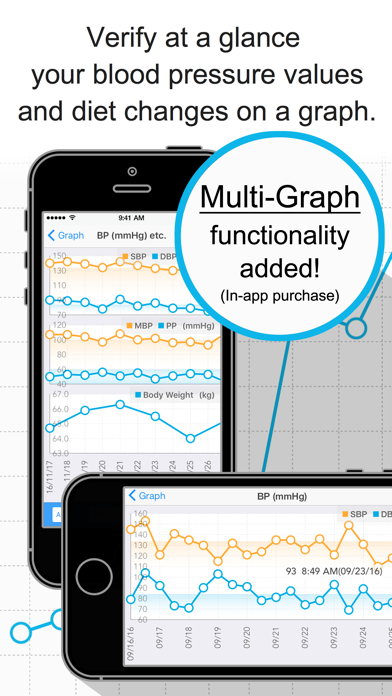
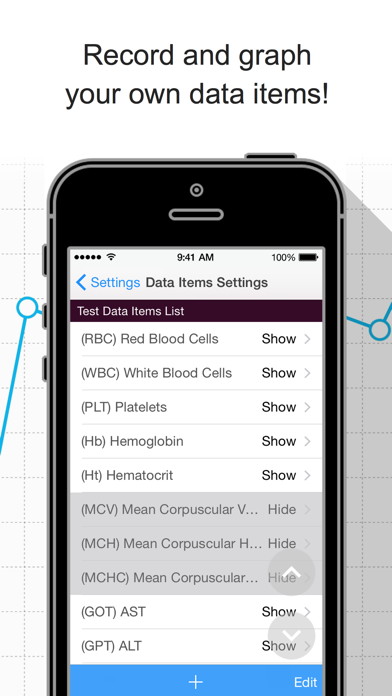
- Calculate your MBP(*1), PP(*1), ME Diff(*2), ME Ave(*2), body fat (kg/lb) and BMI. - Diets, blood test results, and medical expenses data can also be recorded. - Verify at a glance your records on a graph. - Data export functionality is available. - Check your latest measurements with widgets. - Receive notifications for your scheduled doctor visits and BP measurement times. - Multiple graphs on one screen. - Record numerical values in one go using one single screen. - Use it easily with just one hand! (Set the most frequently used buttons at the bottom of the screen, Right-swipe to go back to the previous screen.) - Execute quick operations offline (excluding the data export functionality). *1: An indicator of arteriosclerosis risk - MBP: Mean Blood Pressure - PP: Pulse Pressure *2: An indicator of stroke and heart disease risk - ME Diff: ME difference - ME Ave: ME Average § Recorded Data Items The following data items are recorded by default. (Any of the default data items can be hidden.) Apart from these data items, you can also record your own data items! Blood Pressure Data Items: - Morning BP - Evening BP - Blood Pressure & Pulse(3)~(8)* - Morning-Evening Difference (Auto-calc) - Morning-Evening Average (Auto-calc) - Medication Check(Morning) - Medication Check(Evening) - Medication Check(3)~(8)* - Memo "Blood Pressure & Pulse" items and "Medication Check" items can be recorded as many as eight times a day. Diet Data Items: - Body Weight - Body Fat Percentage - Body Fat (Auto-calc) - BMI (Auto-calc) - Running* - Walking* - Calories (Taken)* - Calories (Burned)* Test Data Items: - Red Blood Cells (RBC)* - White Blood Cells (WBC)* - Platelets (PLT)* - Hemoglobin (Hb)* - Hematocrit (Ht)* - Mean Corpuscular Volume (MCV)* - Mean Corpuscular Hemoglobin (MCH)* - Mean Corpuscular Hemoglobin Concentration (MCHC)* - AST (GOT)* - ALT (GPT)* - Gamma GTP* - Total Protein (TP)* - Albumin (ALB)* - Total Cholesterol (TC)* - HDL Cholesterol (HDL-C)* - LDL Cholesterol (LDL-C)* - Triglyceride (TG)* - Hemoglobin A1c (HbA1c)* - Blood Sugar (FPG)* *: Data items initially set as hidden. § Medical Visits Scheduling Screen By recording the medical institutions you are due to visit, as well as the date and time of your appointments, you can configure the app to send you notifications at a specified time. The time of the notifications can be changed in the Settings screen. § Data Records Screen This screen records the numerical values related to your BP, diet and so on. Configuration changes for adding new input data items, etc. can be made from the "Data Items Settings" on the Settings screen. § Graph Screen This screen allows you to verify the numerical data recorded on the Data Records screen by plotting it on a graph. § Settings Screen This screen allows you to configure basic information, display settings, record master data, etc. Please set your "Gender" and "Height". These values will be used for calculating the normal range of your test data items and your BMI. To use the hospital visits scheduling functionality and the medical expenses data export functionality, please record your medical institutions information from the "Medical Institutions (Pharmacies) List." § Data Export Functionality This functionality allows you to output BP data, diet data, test data, and medical expenses information recorded on the app onto files in CSV format, so they can be transferred to PCs, etc. This data can then be used by processing it on spreadsheet software such as Excel. The export functionality uses AirDrop and the e-mail app included with iOS. Cloud storage services (iCloud, etc. if installed.) are also available. Third party e-mail apps (Gmail, etc.) may appear on the list; however, some apps may not be able to attach CSV files, so we recommend using the e-mail app that is included with iOS.
Publisher websiteStore creative
Screenshots


Competitive set
Similar apps
Deterministic links to real stored apps matched by category, publisher, and comparable performance bands.

Blood Test Grapher
Ai Imai

Body Weight Grapher
Ai Imai

5Min Vet Lab Tests & Diag Proc
Skyscape Medpresso Inc

ADA Standards of Care
American Diabetes Association

amma: Embarazo Semana a Semana
PERIOD TRACKER & PREGNANCY AND BABY CALENDAR LIMITED

Amplificador de sonido, música
Evgenia Pervushina

Anatomy MCQs
Andrew WHITAKER

AO Surgery Reference
AOFoundation
Methodology and provenance
Read every number with its evidence
Metadata source: Apple iTunes Search API; observed Sep 7, 2026, 11:31 PM.
Rankings: collected chart positions from the listed storefront. Missing ranks are not zeros.
Economics: downloads and gross store consumer spend are estimated, not official Apple or publisher figures.
Model: No persisted model version.
Confidence: —; intervals widen when evidence or history is limited.
Last observation: Sep 7, 2026, 11:31 PM.
See how AppTrendKit separates observations, estimates, coverage, and confidence.
Open methodology