
TI-84 CE Calculator Manual
Research answer
What AppTrendKit can say about TI-84 CE Calculator Manual today
TI-84 CE Calculator Manual has no estimate-backed download or gross-consumer-spend figure that meets the public evidence contract yet.
Observed App Store metadata, chart positions, and history are shown below. Missing, non-finite, undefined-currency, or undefined-metric evidence stays missing rather than becoming zero.
Performance intelligence
Observed trajectory and estimates
Store ranks are observations. Downloads and gross store consumer spend are AppTrendKit estimates and only appear when persisted evidence exists.
Estimated downloads · 30D
ModeledNo persisted estimate
The page does not turn missing evidence into zero.
Estimated App Store gross consumer spend · 30D
ModeledNo persisted estimate
The page does not turn missing evidence into zero.
Estimated downloads · 7D
ModeledNo persisted estimate
The page does not turn missing evidence into zero.
Estimated App Store gross consumer spend · 7D
ModeledNo persisted estimate
The page does not turn missing evidence into zero.
Evidence history
Collected daily performance
No daily metric history has been persisted yet.
Rank history
Observed chart positions
Lower rank is better. Only collected observations are shown.
Coverage note
What the ranks mean
A missing rank is not treated as zero downloads or zero revenue. Apple chart feeds are bounded and may return censored or not-ranked observations outside the visible chart depth.
Read the methodStorefront mix
Top countries by estimated contribution
Country estimates are aggregated only after country-level predictions exist.
Monetization
Observed store economics signals
These are listing and product observations. They are not company revenue, subscriber counts, or advertising revenue.
App details
Store metadata
- Version
- 2.0.0
- Released
- Jan 10, 2017
- Last updated
- Aug 17, 2026
- Content rating
- 4+
- Default storefront
- PH
Public IAP observations
Validated in-app purchase prices
Only persisted rows with an explicit public publication boundary are shown. Missing price, currency, country, or date values stay unknown.
Listing detail
What the store says
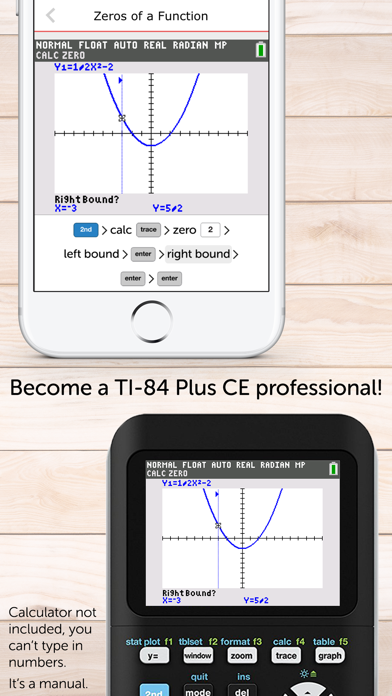
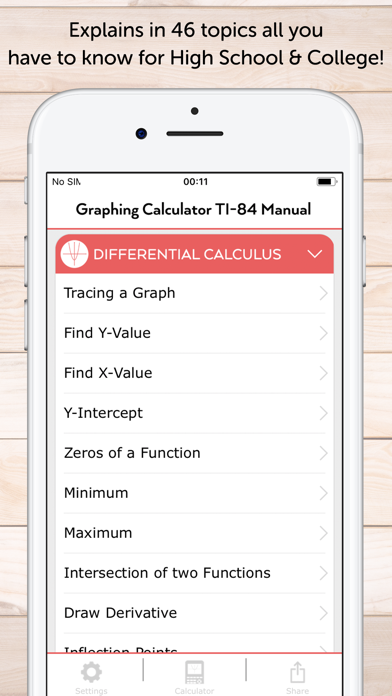
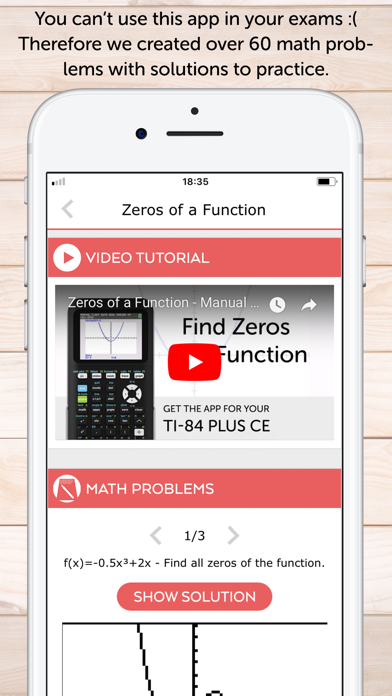
The must-have companion for your TI-84 Plus CE graphing calculator: • This manual shows all the important functions of the TI-84 Plus CE graphing calculator you need to know for high school or college. It comes with step-by-step key press sequences and some insider tips about your calculator. In total it covers 65 topics that will transform you into a TI-84 master. • The following chapters are available: First Steps, Graphing Basics, Differential Calculus, Solve Equations, Integral Calculus, Matrices, Statistics & Probability and The Apps Menu. • You can swipe through screenshots of the original graphing calculator that show every step you need to take (over 300 screenshots in total), watch animated key press sequences, or open video tutorials to see how it works on the TI-84 Plus CE! • 60 math problems with solutions and a quiz to practice your skills! • Ideal for exam preparation since you often won't remember all the calculator's commands after several months. It covers all you need to know for the SAT, ACT, and AP exams. • The app contains the following topics: FIRST STEPS • The Basics of the Basics • Mode Settings • Basic Arithmetic • Storing Variables • Working with Fractions • Testing Numbers • Converting Angles & DMS • Your Calculator on the SAT, ACT & AP Exams • Common Error Messages • Complex Numbers GRAPHING BASICS • Enter Functions • Enter Families of Functions • Formatting the Graph • Setting the Graph Window • Zooming the Graph Window • Using the Table • Parametric, Polar & Sequence Graphing DIFFERENTIAL CALCULUS • Tracing a Graph • Find Y-Value • Find X-Value • Y-Intercept • Zeros of a Function • Minimum • Maximum • Intersection of two Functions • Draw Derivative • Inflection Points • Calculate Tangent SOLVE EQUATIONS • Polynomial • Solve any Equation • Equation Solver INTEGRAL CALCULUS • Calculate Integral • Integral in GRAPH Menu • Find Area with Absolute Value • Area between two Functions • Integral Function MATRICES • Save Matrix • Delete Matrix • Put into Row-Echelon Form • Solve Matrix • Transpose of a Matrix • Identity Matrix • Inversion of a Matrix • Determinant of a Matrix • Matrix Arithmetic Operations STATISTICS & PROBABILITY • Permutations, Combinations & Factorials • Random Numbers • Lists & Statistical Data • Histogram, Box Plot & Scatter Plot • Statistical Data Analysis • Regression • Probability Distributions • TESTS Menu: Hypothesis Tests & Confidence Intervals THE APPS MENU • Finance (TVM Solver) • CabriJr (Interactive Geometry) • Conics (Conic Graphing) • Inequalz (Inequality Graphing) • Periodic (Periodic Table) • PlySmlt2 (Root Finder & Simultaneous Equation Solver) • Prob Sim (Probability Simulation) • Python (CE Python Models) • SciTools (Science Tools) • Transfrm (Transformation Graphing) • The Rest of the Menu • Sharing Files: the LINK Menu MATH PROBLEMS & QUIZ • Practice with 60 math problems with solutions and test yourself with the built-in quiz. We also have manual apps for the TI-84 Plus, TI-Nspire CX (and CAS), and CASIO fx-9860GII. And if you are looking for the calculator itself, check out our graphing calculator app Taculator 84. NO ACTUAL GRAPHING CALCULATOR INCLUDED. THE APP IS A MANUAL! TI-84 Plus and TI-84 Plus CE are trademarks of Texas Instruments Incorporated. This app is an independently developed manual and is not affiliated with, sponsored by, or endorsed by Texas Instruments.
Publisher websiteStore creative
Screenshots


Competitive set
Similar apps
Deterministic links to real stored apps matched by category, publisher, and comparable performance bands.

AnyStories-Top Novels & Books
READ ASAP LTD

Audible: Ouça Audiolivros
Audible, Inc.

Biblia română Pro : Cornilescu
Naim Abdel

District Of Columbia Code
Lyker Labs LLC

Dix Versets - Lecture du Coran
THE KF COMPANY

DjVu Reader - Viewer for djvu and pdf formats
LTD DevelSoftware

eBoox - fb2 ePub book reader
REDIT, OOO

EG Reader
Eternal Ganges Press Private Limited
Methodology and provenance
Read every number with its evidence
Metadata source: Apple iTunes Search API; observed Sep 7, 2026, 8:37 PM.
Rankings: collected chart positions from the listed storefront. Missing ranks are not zeros.
Economics: downloads and gross store consumer spend are estimated, not official Apple or publisher figures.
Model: No persisted model version.
Confidence: —; intervals widen when evidence or history is limited.
Last observation: Sep 7, 2026, 8:37 PM.
See how AppTrendKit separates observations, estimates, coverage, and confidence.
Open methodology