Turn Off the Lights for Safari
Research answer
What AppTrendKit can say about Turn Off the Lights for Safari today
Turn Off the Lights for Safari has no estimate-backed download or gross-consumer-spend figure that meets the public evidence contract yet.
Observed App Store metadata, chart positions, and history are shown below. Missing, non-finite, undefined-currency, or undefined-metric evidence stays missing rather than becoming zero.
Performance intelligence
Observed trajectory and estimates
Store ranks are observations. Downloads and gross store consumer spend are AppTrendKit estimates and only appear when persisted evidence exists.
Estimated downloads · 30D
ModeledNo persisted estimate
The page does not turn missing evidence into zero.
Estimated App Store gross consumer spend · 30D
ModeledNo persisted estimate
The page does not turn missing evidence into zero.
Estimated downloads · 7D
ModeledNo persisted estimate
The page does not turn missing evidence into zero.
Estimated App Store gross consumer spend · 7D
ModeledNo persisted estimate
The page does not turn missing evidence into zero.
Evidence history
Collected daily performance
No daily metric history has been persisted yet.
Rank history
Observed chart positions
Lower rank is better. Only collected observations are shown.
Coverage note
What the ranks mean
A missing rank is not treated as zero downloads or zero revenue. Apple chart feeds are bounded and may return censored or not-ranked observations outside the visible chart depth.
Read the methodStorefront mix
Top countries by estimated contribution
Country estimates are aggregated only after country-level predictions exist.
Monetization
Observed store economics signals
These are listing and product observations. They are not company revenue, subscriber counts, or advertising revenue.
App details
Store metadata
- Version
- 4.6.6
- Released
- Sep 19, 2017
- Last updated
- Feb 25, 2026
- Content rating
- 17+
- Default storefront
- IE
Public IAP observations
Validated in-app purchase prices
Only persisted rows with an explicit public publication boundary are shown. Missing price, currency, country, or date values stay unknown.
Listing detail
What the store says
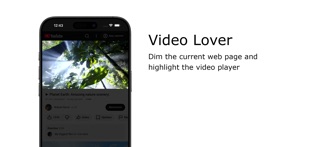
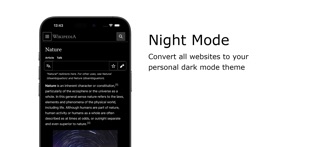
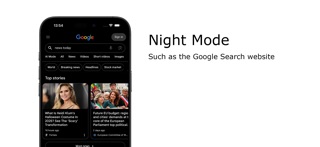
Immerse yourself in a cinematic atmosphere while watching videos online with Turn Off the Lights. This powerful browser extension dims everything on the web page except for the video you are watching, bringing your focus to the content that matters most. Turn Off the Lights browser extension has also been featured on several popular websites, including Lifehacker, CNET, ZDNet, BuzzFeed, and PC World. With its growing popularity and positive feedback, it is no surprise that the Turn Off the Lights browser extension has become one of the most popular and trusted browser extensions in the market. Please share your feedback, suggestions, and thoughts with us https://www.turnoffthelights.com/support Browser extension features: ◆ Turn the lights back on by clicking on the black layer ◆ Supports multiple video sites: YouTube, Dailymotion, Vimeo, Twitch, and more ◆ Customize your YouTube experience: - Auto HD: Set videos to play in HD automatically, with options ranging from highres > 8K > 5K > 4K > 1080p > 720p > 480p > 360p > 240p > 144p > default - Auto Wide: Automatically plays videos in the widest mode - 60 FPS Block: Disable YouTube 60 FPS for Auto HD 30 FPS video quality ◆ Easter Eggs: Shortcut key: T -> Experience a real movie theater feeling ◆ Darken the screen when the user clicks on the play button ◆ Toggle fade in and fade out effects ◆ Customize colors ◆ Enable Multimedia Detection ◆ Display Dimness Level Bar ◆ Eye Protection for nighttime browsing, with a whitelist/blacklist filter ◆ Atmosphere lighting to create a glow around the video player ◆ Show the dark layer on top of the window ◆ Shortcut Keys: Ctrl + Shift + L: Toggle the lights Alt + F8: Restore default opacity value Alt + F9: Save current opacity value Alt + F10: Enable/disable the Eye Protection feature Alt + (Arrow Up): Increase opacity Alt + (Arrow Down): Decrease opacity Alt + *: Toggle lights on all open tabs ◆ Mouse Wheel Volume Control for each HTML5 video player ◆ Apply filters to the current HTML5 video player (grayscale, sepia, invert, contrast, saturate, hue rotation, brightness) ◆ Audio Visualization effect on top of the current HTML5 video (Blocks, Frequency, and Music Tunnel) ◆ Loop the current HTML5 video player ◆ Night Mode switch to toggle YouTube in black or white theme, with whitelist/blacklist filter - Timestamp: Activate Night Mode within the chosen time - Blackout: Dim web page and activate Night Mode ◆ Stop YouTube and HTML5 videos from automatically playing ◆ And more… Do not forget to Like & Follow Us: Facebook https://www.facebook.com/turnoffthelight X https://www.x.com/TurnOfftheLight Pinterest https://www.pinterest.com/turnoffthelight Instagram https://www.instagram.com/turnoffthelights YouTube https://www.youtube.com/@turnoffthelights Project Information: https://www.turnoffthelights.com/browser Note: YouTube is a trademark of Google Inc. Use of this trademark is subject to Google Permissions.
Publisher websiteStore creative
Screenshots
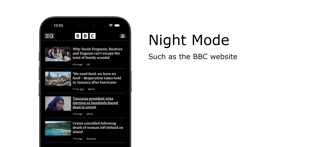
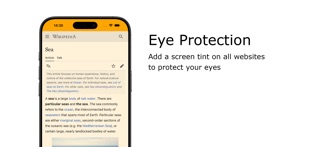


Competitive set
Similar apps
Deterministic links to real stored apps matched by category, publisher, and comparable performance bands.

Zoom for Safari
Stefan Van Damme

AdLock: Ad Blocker for Browser
Hankuper s.r.o.

AgroRK
Kristijan Hrek

Al-Jawdah LS
Rubik Smart Solutions

AQ
Quanta Computer Inc.

AVG Secure VPN & Proxy server
AVG eCommerce CY Limited

Awesome Screenshot for Safari
Diigo

AYOA - Mind Mapping
OpenGenius Limited
Methodology and provenance
Read every number with its evidence
Metadata source: Apple iTunes Search API; observed Sep 7, 2026, 8:37 PM.
Rankings: collected chart positions from the listed storefront. Missing ranks are not zeros.
Economics: downloads and gross store consumer spend are estimated, not official Apple or publisher figures.
Model: No persisted model version.
Confidence: —; intervals widen when evidence or history is limited.
Last observation: Sep 7, 2026, 8:37 PM.
See how AppTrendKit separates observations, estimates, coverage, and confidence.
Open methodology