
Screen Mirroring App - TV Cast
Research answer
What AppTrendKit can say about Screen Mirroring App - TV Cast today
Screen Mirroring App - TV Cast has no estimate-backed download or gross-consumer-spend figure that meets the public evidence contract yet.
Observed App Store metadata, chart positions, and history are shown below. Missing, non-finite, undefined-currency, or undefined-metric evidence stays missing rather than becoming zero.
Performance intelligence
Observed trajectory and estimates
Store ranks are observations. Downloads and gross store consumer spend are AppTrendKit estimates and only appear when persisted evidence exists.
Estimated downloads · 30D
ModeledNo persisted estimate
The page does not turn missing evidence into zero.
Estimated App Store gross consumer spend · 30D
ModeledNo persisted estimate
The page does not turn missing evidence into zero.
Estimated downloads · 7D
ModeledNo persisted estimate
The page does not turn missing evidence into zero.
Estimated App Store gross consumer spend · 7D
ModeledNo persisted estimate
The page does not turn missing evidence into zero.
Evidence history
Collected daily performance
No daily metric history has been persisted yet.
Rank history
Observed chart positions
Lower rank is better. Only collected observations are shown.
Coverage note
What the ranks mean
A missing rank is not treated as zero downloads or zero revenue. Apple chart feeds are bounded and may return censored or not-ranked observations outside the visible chart depth.
Read the methodStorefront mix
Top countries by estimated contribution
Country estimates are aggregated only after country-level predictions exist.
Monetization
Observed store economics signals
These are listing and product observations. They are not company revenue, subscriber counts, or advertising revenue.
App details
Store metadata
- Version
- 2.3.1
- Released
- Sep 11, 2018
- Last updated
- Apr 29, 2025
- Content rating
- 4+
- Default storefront
- FR
Public IAP observations
Validated in-app purchase prices
Only persisted rows with an explicit public publication boundary are shown. Missing price, currency, country, or date values stay unknown.
Listing detail
What the store says
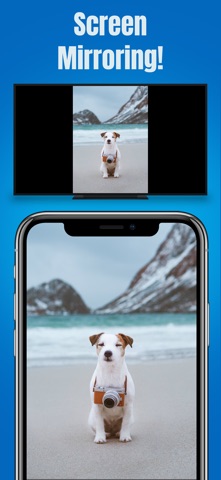
* Wirelessly Mirror Any App – or Anything Else – on your iPhone/iPad Screen to your TV or Device via your Home Network! * Cast Videos, Music, and Photos to your TV or Device! * No Wires, No Additional Hardware, and No Hassles! Simple and Easy! The Screen Mirroring app can wirelessly mirror your iPhone/iPad screen to your TV or device via your Wi-Fi network. Just follow the instructions below, and your iPhone/iPad screen will appear instantly on your TV! It's great for watching movies, viewing photos, making presentations, web browsing, and much more! KEY FEATURES: • Mirror anything and any app on your iPhone/iPad screen to your TVs or devices in high quality. • Cast videos, music, and photos to your TVs or devices. • Supports popular brands of Smart TVs, Smart Devices, Set-Top Boxes, TV Sticks, Streaming Media Players, etc. (This app is based on DLNA technology) • Supports both portrait and landscape orientations for screen mirroring. • Consumes fewer resources, so your iPhone/iPad won't run slowly during screen mirroring. USER'S GUIDE: To Start Screen Mirroring: 1. Make sure your iPhone/iPad and your TV/device are connected to the same Wi-Fi network. 2. Open the app, tap the "Screen Mirroring" button, tap "Start Broadcast", and then tap anywhere to quit this screen. 3. Tap the "Connect" button in the top right corner. It will scan your network. Once your TV/device is found, please select it from the list to start mirroring! Soon you should see your iPhone/iPad screen mirroring on TV/device! How to Stop Screen Mirroring: 1. Tap the "Screen Broadcast" button in the top right corner, then tap "Stop Broadcast". Screen mirroring will stop. When you want to mirror again, just follow the steps above. KNOWN ISSUES: • You may experience latency (delay) on your TV screen during mirroring; it's impossible to achieve zero-second latency. • DRM-protected content can't be mirrored. TROUBLESHOOTING: • Please follow the steps shown above carefully. If you follow them correctly, everything should work fine. • The app may take up to 15 seconds to discover your TVs/devices on the network. If it fails to find them or fails to mirror, please restart your router, iPhone/iPad, and TVs/devices. • For other problems, please contact our technical support directly. Auto-Renewable Subscription: • Payment will be charged to your iTunes Account when your purchase is confirmed. • Subscription automatically renews unless auto-renew is turned off at least 24 hours before the end of the current billing period. • Account will be charged for renewal within 24 hours before the end of the current billing period. The cost depends on the selected plan. • Subscriptions may be managed by the user. Auto-renewal may be turned off in Account Settings after purchase. • Any unused portion of a free trial period (if offered) will be forfeited when the user purchases a subscription. Privacy Policy: http://www.9bestapp.com/resources/privacy-policy.html Terms: http://www.9bestapp.com/terms/
Store creative
Screenshots


Competitive set
Similar apps
Deterministic links to real stored apps matched by category, publisher, and comparable performance bands.

Air Mirror: Smart TV & Console
Best App Limited

Find My Lost Bluetooth Device
Best App Limited

Volume Booster + Bass Booster
Best App Limited

8FEED
XTLab

AI Mirror: AI Photo Editor
POLYVERSE ENTERTAINMENT INC.

All Video Saver & Player
Dabhade Jagannath
APCam
Shenzhen Sricctv Technology Co., Ltd.

Background Eraser AI BG Editor
Ozgur Yuksel
Methodology and provenance
Read every number with its evidence
Metadata source: Apple iTunes Search API; observed Sep 7, 2026, 9:44 PM.
Rankings: collected chart positions from the listed storefront. Missing ranks are not zeros.
Economics: downloads and gross store consumer spend are estimated, not official Apple or publisher figures.
Model: No persisted model version.
Confidence: —; intervals widen when evidence or history is limited.
Last observation: Sep 7, 2026, 9:44 PM.
See how AppTrendKit separates observations, estimates, coverage, and confidence.
Open methodology