
Dark Mode for Safari: NightEye
Research answer
What AppTrendKit can say about Dark Mode for Safari: NightEye today
Dark Mode for Safari: NightEye has no estimate-backed download or gross-consumer-spend figure that meets the public evidence contract yet.
Observed App Store metadata, chart positions, and history are shown below. Missing, non-finite, undefined-currency, or undefined-metric evidence stays missing rather than becoming zero.
Performance intelligence
Observed trajectory and estimates
Store ranks are observations. Downloads and gross store consumer spend are AppTrendKit estimates and only appear when persisted evidence exists.
Estimated downloads · 30D
ModeledNo persisted estimate
The page does not turn missing evidence into zero.
Estimated App Store gross consumer spend · 30D
ModeledNo persisted estimate
The page does not turn missing evidence into zero.
Estimated downloads · 7D
ModeledNo persisted estimate
The page does not turn missing evidence into zero.
Estimated App Store gross consumer spend · 7D
ModeledNo persisted estimate
The page does not turn missing evidence into zero.
Evidence history
Collected daily performance
No daily metric history has been persisted yet.
Rank history
Observed chart positions
Lower rank is better. Only collected observations are shown.
Coverage note
What the ranks mean
A missing rank is not treated as zero downloads or zero revenue. Apple chart feeds are bounded and may return censored or not-ranked observations outside the visible chart depth.
Read the methodStorefront mix
Top countries by estimated contribution
Country estimates are aggregated only after country-level predictions exist.
Monetization
Observed store economics signals
These are listing and product observations. They are not company revenue, subscriber counts, or advertising revenue.
App details
Store metadata
- Version
- 6.1.0
- Released
- Mar 18, 2019
- Last updated
- Jun 10, 2026
- Content rating
- 4+
- Default storefront
- IE
Public IAP observations
Validated in-app purchase prices
Only persisted rows with an explicit public publication boundary are shown. Missing price, currency, country, or date values stay unknown.
Listing detail
What the store says
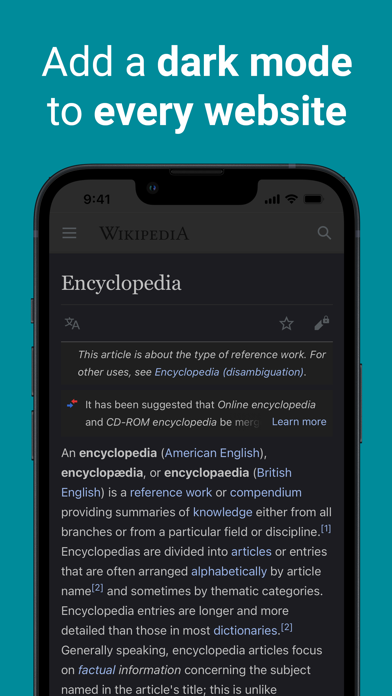
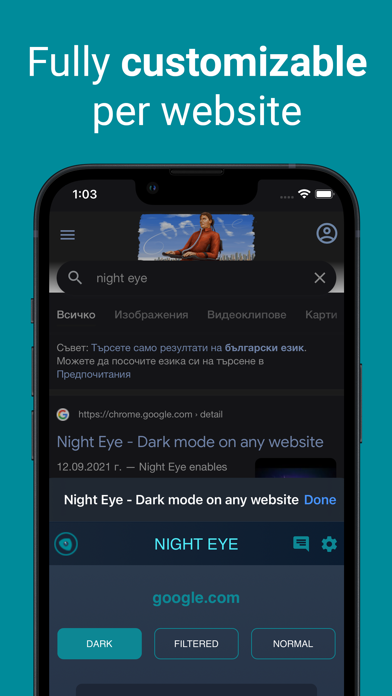
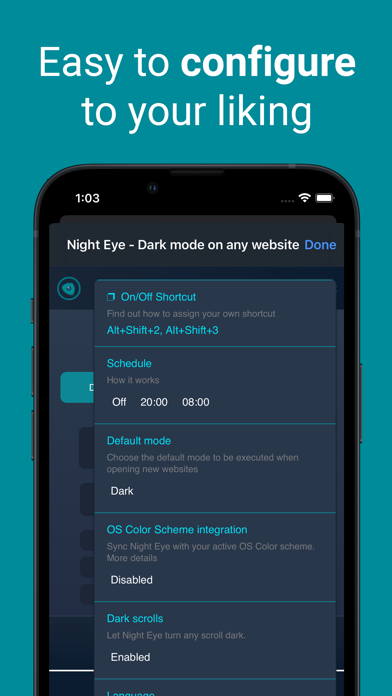
Night Eye is a browser extension that enables dark mode on any website using a "dark mode" algorithm that analyzes and converts all colors for a smooth and consistent dark theme. Dark mode is better for your eyes as it reduces strain, especially if you have photophobia or work in low light environments. There are also studies that suggest ambient light can affect sleep cycles. Night Eye allows you to enable dark mode on websites like Facebook, Quora, Github, StackOverflow, Wikipedia and more. Plus, with the ability to control built-in dark themes on supported websites, you'll have complete control over your online experience. AVAILABLE MODES Our extension offers three modes: Dark, Filtered, and Normal. - In Dark mode, all colors, small images, and icons are converted to provide the best dark experience. - In Filtered mode, the website's colors are not changed, but you can adjust brightness, contrast, warmth, and more. - Normal mode allows you to switch back to the website's regular theme. GLOBAL OPTIONS - OS/Browser Color scheme integration - integrate with your operating system's or browser's color scheme - Deep integration with websites that have their own built-in dark themes. - Scheduling for dark mode to turn on and off - Custom dark mode for online PDFs - Export/Import data between your browsers DARK MODE OPTIONS PER WEBSITE You can customize Night Eye's settings for a single website or globally, including adjusting contrast, blue light filter, and dimming. - Images - Night Eye analyses and converts only the small images and icons in a website to give you even smoother experience. Facebook posts and other significant media are not converted. - Brightness / Saturation / Contrast - Adjust the brightness, the contrast and the saturation to match the recommended healthy levels and protect your eyes. The default setting for each is 50%, but you can customize each to the preferred levels. - Blue Light - Take care of your eyes by eliminating the blue light coming from your screen. Highly recommended especially during late night browsing. Simply slide to the preferred level of warmth. - Dim - Extremely useful if you are working in a dark space/room and the screen is the only source of light in the room. The default setting is set to 50%, but you can customize it as you please. WE CARE ABOUT PRIVACY Safari will alert you that the extension may read and change all your data on the websites that you visit. Here is why: This extension analyses the colors of each webpage and converts them in order to give you a smooth and consistent dark mode. There is no other way the extension can convert the colors without the privilege to access them. However, we NEVER collect any of your data. Our business model relies on subscriptions and not on storing and selling your data. Last but not least, we are also internet users and don’t want to be evil. ALWAYS AVAILABLE SUPPORT Built-in support - we provide reliable support with any issues you might experience with the extension. PLANS Night Eye comes with to plans: - Night Eye Lite - Night Eye Pro Before going to Lite, we would like to invite you to try out Night Eye Pro for free for 3 months - no credit card, no payment asked - simply install and try it out. WHY TO USE DARK MODE WHILE BROWSING - Eye strain: Bright screens can cause eye strain, especially after prolonged use. Dark mode can reduce the amount of strain on the eyes, making it easier to use screens for long periods of time. - Sleep: Some people find that using a bright screen before bed can disrupt their sleep cycle. Dark mode can reduce the amount of blue light emitted by screens, making it easier to fall asleep after using a device. - Aesthetics: Some people simply prefer the look of dark mode and find it easier on the eyes. - Productivity: Some studies have suggested that using dark mode can improve productivity, as it may reduce distractions and make it easier to focus on the content being displayed.
Publisher websiteStore creative
Screenshots

Competitive set
Similar apps
Deterministic links to real stored apps matched by category, publisher, and comparable performance bands.

3d Scanner App™
AI Photo Editor Lab SRL

Adult Emoji Animated GIFs
艳 王

Anywhere Proxy
Argsment Limited

Avira Mobile Security
Avira Holding GmbH & Co. KG

CG Balancer
Vincent Toegel

CHOP VPN: Fast & Secure
Smart Soft Engineering LLC

CNH do Brasil
Servicos e Informacoes do Brasil

Decibel X PRO: dBA Noise Meter
SkyPaw Co., Limited
Methodology and provenance
Read every number with its evidence
Metadata source: Apple iTunes Search API; observed Sep 7, 2026, 8:37 PM.
Rankings: collected chart positions from the listed storefront. Missing ranks are not zeros.
Economics: downloads and gross store consumer spend are estimated, not official Apple or publisher figures.
Model: No persisted model version.
Confidence: —; intervals widen when evidence or history is limited.
Last observation: Sep 7, 2026, 8:37 PM.
See how AppTrendKit separates observations, estimates, coverage, and confidence.
Open methodology