
Smart Data QR File Transfer
Research answer
What AppTrendKit can say about Smart Data QR File Transfer today
Smart Data QR File Transfer has no estimate-backed download or gross-consumer-spend figure that meets the public evidence contract yet.
Observed App Store metadata, chart positions, and history are shown below. Missing, non-finite, undefined-currency, or undefined-metric evidence stays missing rather than becoming zero.
Performance intelligence
Observed trajectory and estimates
Store ranks are observations. Downloads and gross store consumer spend are AppTrendKit estimates and only appear when persisted evidence exists.
Estimated downloads · 30D
ModeledNo persisted estimate
The page does not turn missing evidence into zero.
Estimated App Store gross consumer spend · 30D
ModeledNo persisted estimate
The page does not turn missing evidence into zero.
Estimated downloads · 7D
ModeledNo persisted estimate
The page does not turn missing evidence into zero.
Estimated App Store gross consumer spend · 7D
ModeledNo persisted estimate
The page does not turn missing evidence into zero.
Evidence history
Collected daily performance
No daily metric history has been persisted yet.
Rank history
Observed chart positions
Lower rank is better. Only collected observations are shown.
Coverage note
What the ranks mean
A missing rank is not treated as zero downloads or zero revenue. Apple chart feeds are bounded and may return censored or not-ranked observations outside the visible chart depth.
Read the methodStorefront mix
Top countries by estimated contribution
Country estimates are aggregated only after country-level predictions exist.
Monetization
Observed store economics signals
These are listing and product observations. They are not company revenue, subscriber counts, or advertising revenue.
App details
Store metadata
- Version
- 2.4.2
- Released
- Apr 15, 2021
- Last updated
- Jan 30, 2026
- Content rating
- 4+
- Default storefront
- SA
Public IAP observations
Validated in-app purchase prices
Only persisted rows with an explicit public publication boundary are shown. Missing price, currency, country, or date values stay unknown.
Listing detail
What the store says
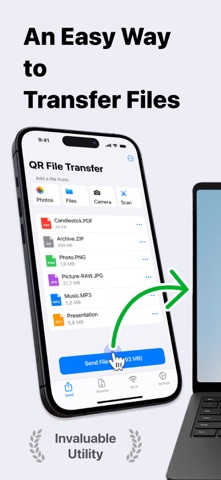
Effortless File Sharing Made Simple Sharing files, photos, and documents between your iPhone and any computer has never been easier. With QR File Transfer, you can securely transfer your files in just a few simple steps— no login or complicated setup required. How It Works: Upload Your Files: Use the app to quickly upload the files you want to share. Scan the QR Code: Open a browser on your PC or any device and visit ios2web.com. Instant Access: Scan the QR code displayed on the website, and instantly access your files. Why Choose QR File Transfer? – No Account Required: Skip the hassle of creating accounts or remembering passwords. Just scan and go! – Secure and Private: We prioritize your privacy. Files are shared directly and securely between your devices. – Universal Access: Works with any computer or device — Windows PCs, public computers, or even tablets. – Supports All Popular File Types: QR File Transfer makes sharing all types of files seamless. Photos and Images: JPG, PNG, GIF, HEIC, BMP, TIFF, WEBP Videos: MOV, MP4, AVI, MKV, FLV, WMV, 3GP, M4V Audio: MP3, WAV, M4A, AAC, OGG, FLAC Documents: PDF, DOC, DOCX, XLS, XLSX, PPT, PPTX, TXT, RTF, ODT, CSV Archives: ZIP, RAR, 7Z, TAR, GZ, ISO, DMG If you encounter a file format that is not supported, please let us know by contacting our team. – Easy-to-Use Interface: Designed for simplicity so anyone can share files with ease. – No Cables, No Limits: Enjoy a wireless file-sharing experience without the need for USB drives or adapters. Perfect For: – Quickly sharing work documents between your iPhone and office computers. – Uploading personal files to access on a friend’s laptop or public computer. – Sharing photos, videos, and memories with family and friends without email or messaging limitations. Getting Started is Easy: Download QR File Transfer from the App Store. Install and open the app on your iPhone. Upload files, visit ios2web.com on any computer, and scan the QR code to transfer your files instantly. Common Use Cases: Question: How can I quickly send files from my phone to a school computer without needing to log in? Answer: To send files from your phone to a school computer without logging in, you can use QR File Transfer: Open the app on your phone and upload the files you want to share. On the school computer, visit ios2web.com in a browser. Scan the QR code shown on the website using the app. Your files will be instantly accessible on the computer. Question: How can I quickly send files from a school computer to my phone without needing to log in? Answer: To transfer files from a school computer to your phone, use QR File Transfer: On the computer, go to ios2web.com in a browser and upload the files. Open the app on your phone and scan the QR code displayed on the website. The files will be instantly downloaded to your phone. Why Users Love It: "No frills, no logins — just quick file sharing when I need it." "A lifesaver when working on public computers." "So simple, even my parents figured it out!" Download QR File Transfer Today Simplify file sharing and enjoy the freedom to transfer your files anywhere, anytime. Whether you're at work, at home, or on the go, QR File Transfer is the easiest way to keep your files accessible without compromising security or convenience. – A Great Alternative to Popular Apps: QR File Transfer is an excellent alternative to apps like Shareit: Transfer, Share Files, Zapya - File Sharing, WeTransfer: Transfer Files, Xender: File Share, Share Music, Send Anywhere - File Transfer, and Transfer my data - MobileTrans, File Transfer - Snapdrop, Copy my data - Smart Transfer, AirDroid - File Transfer&Share, Air Transfer, Links: Privacy Policy – https://ios2web.com/privacy-policy/ Terms of Use – https://ios2web.com/terms-of-service/ Get started now and experience the easiest file-sharing solution on the App Store!
Publisher websiteStore creative
Screenshots


Competitive set
Similar apps
Deterministic links to real stored apps matched by category, publisher, and comparable performance bands.

Radio CH
Ion Postolachi

Radio Italia –FM Sound Radddio
Ion Postolachi

Radio Stations – FM Player App
Ion Postolachi

AdLock: Ad Blocker for Browser
Hankuper s.r.o.

AgroRK
Kristijan Hrek

Al-Jawdah LS
Rubik Smart Solutions

AQ
Quanta Computer Inc.

AVG Secure VPN & Proxy server
AVG eCommerce CY Limited
Methodology and provenance
Read every number with its evidence
Metadata source: Apple iTunes Search API; observed Sep 7, 2026, 8:37 PM.
Rankings: collected chart positions from the listed storefront. Missing ranks are not zeros.
Economics: downloads and gross store consumer spend are estimated, not official Apple or publisher figures.
Model: No persisted model version.
Confidence: —; intervals widen when evidence or history is limited.
Last observation: Sep 7, 2026, 8:37 PM.
See how AppTrendKit separates observations, estimates, coverage, and confidence.
Open methodology