Research answer
What AppTrendKit can say about SPLnFFT Noise Meter today
SPLnFFT Noise Meter has no estimate-backed download or gross-consumer-spend figure that meets the public evidence contract yet.
Observed App Store metadata, chart positions, and history are shown below. Missing, non-finite, undefined-currency, or undefined-metric evidence stays missing rather than becoming zero.
Performance intelligence
Observed trajectory and estimates
Store ranks are observations. Downloads and gross store consumer spend are AppTrendKit estimates and only appear when persisted evidence exists.
Estimated downloads · 30D
ModeledNo persisted estimate
The page does not turn missing evidence into zero.
Estimated App Store gross consumer spend · 30D
ModeledNo persisted estimate
The page does not turn missing evidence into zero.
Estimated downloads · 7D
ModeledNo persisted estimate
The page does not turn missing evidence into zero.
Estimated App Store gross consumer spend · 7D
ModeledNo persisted estimate
The page does not turn missing evidence into zero.
Evidence history
Collected daily performance
No daily metric history has been persisted yet.
Rank history
Observed chart positions
Lower rank is better. Only collected observations are shown.
Coverage note
What the ranks mean
A missing rank is not treated as zero downloads or zero revenue. Apple chart feeds are bounded and may return censored or not-ranked observations outside the visible chart depth.
Read the methodStorefront mix
Top countries by estimated contribution
Country estimates are aggregated only after country-level predictions exist.
Monetization
Observed store economics signals
These are listing and product observations. They are not company revenue, subscriber counts, or advertising revenue.
App details
Store metadata
- Version
- 7.1
- Released
- Feb 18, 2010
- Last updated
- Dec 24, 2023
- Content rating
- 4+
- Default storefront
- IE
Public IAP observations
Validated in-app purchase prices
Only persisted rows with an explicit public publication boundary are shown. Missing price, currency, country, or date values stay unknown.
Listing detail
What the store says
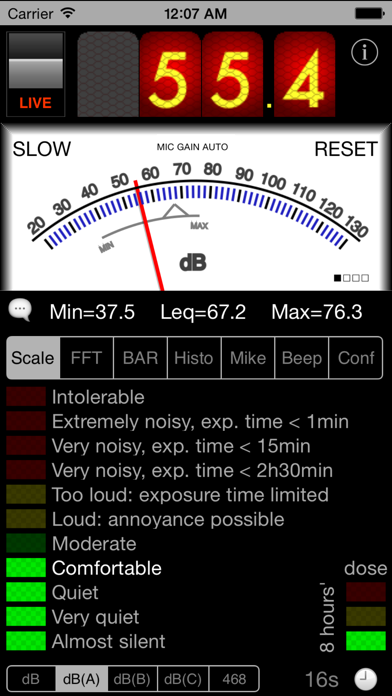
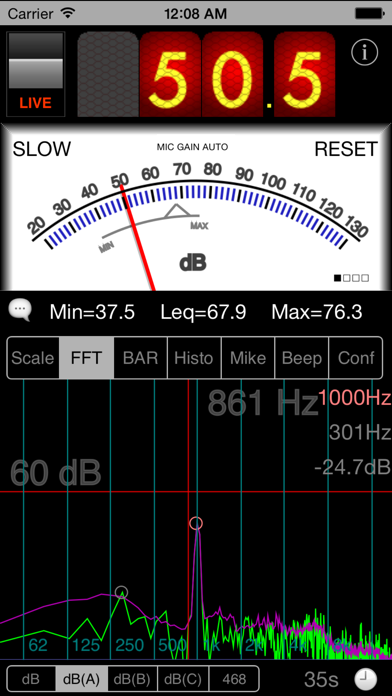
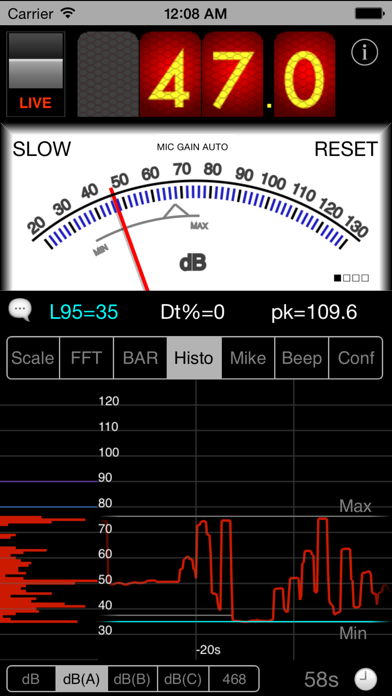
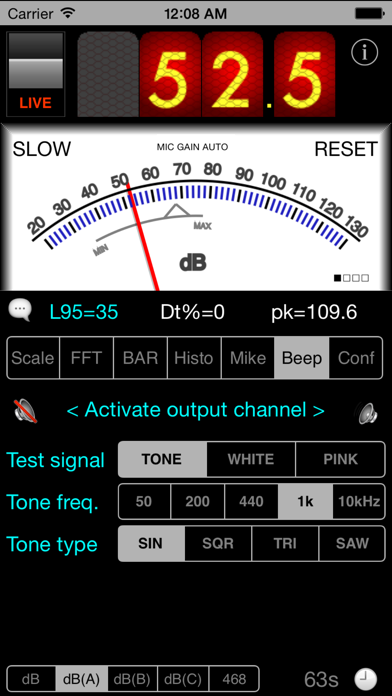
SPLnFFT is a sound level meter (noise meter) for your iPhone or iPad with many advanced features: frequency analyzer, frequency meter, test signal generator, dosimeter, ... This soundmeter App is the only one for iOS recommended by the "Laborers' Health and Safety Fund of North America". Here are extracts from other reviews: "our favorite sound measurement app" SafetyAwakenings.com "SPLnFFT is comprehensive, easy to use" TapeOp.com You will find more reviews here: https://www.facebook.com/SPLnFFT For daily use, a very simple interface displays the level of exposure: if orange or red, protect your ears ! Professional users will take advantage of a wide range of accurate and reliable measurements: Leq, peak, L10, L95, taktmaximal, frequency analysis, histogram, dosemetering, ... A&C weightings are compliant with ANSI® S1.42 standard. "468" refers to ITU-R 468-4 *** Some KEY INFORMATION *** : - you absolutely need to allow access to microphone to use this App - screen rotation must be un-locked - there are built-in help messages (speech bubble). Need more ? Contact us !: email, blog, Facebook,... - do not expect to measure as low as 0dB(A) in a quiet room, for these 2 reasons: 30-130dB(A) is the standard usable range for sound level meters and anyway a standard quiet room is around 30dB(A) whereas a typical anechoic chamber is 10 to 20dB(A) Top digital display is for measurement of sound power in 'slow' mode (averaged on 1s). Central analog display is for 'fast' mode (averaged on 1/8th s). But it can display 'slow' mode as well on request: just click on 'fast' label. Peak and average values are displayed below and are held until you touch the 'reset' label. The videos on Youtube reveal more details. Bottom view is a real time FFT (frequency analysis). You will notice that predominant frequency and next one are highlighted. Their frequencies and relative power are displayed on the right. If your input signal is a pure tone then this App will lock on its frequency and display a very accurate result. Green line is the result of a real time FFT done with 1024 points. Purple line is the averaged FFT (exponential filtering done on power of each frequency). Blue line is a copy of what the purple line was when the user froze the display the last time. A test tone at 1kHz or a white noise or a pink noise can be generated and sent to right and/or left outputs (select the type you want in BEEP tab). This FFT view - more precisely an upsized version of it - can be exported as a picture in your own photo library, using the camera button (when display is frozen only). This picture can be exported in a mail as well. The display can be flipped upside-down to ease reading: just rotate your iPhone while holding it vertically. As for ALL sound meters (thus including this one and all others at any price), calibration is suggested if you want to reach extreme precision. This is enabled in this App thanks to a slider to apply some compensation and to three non volatile memories (choice to be made in MIC. tab). How to ? For calibration, you need and external reference, either a calibrated sound meter, or a calibrated noise source. Note as well that the tiny embedded loudspeaker cannot reproduce extreme frequencies. Thus if you want to hear a real white or pink noise, you will need to use a quality headphone or HiFi system. This App was designed seriously for our own needs, by a signal processing expert, and is regularly updated to maintain accuracy and reliability. ***** Any comment, any feedback ? Click on 'support' in iTunes: there is a blog for this. You can even contact us directly by email or through the dedicated FaceBook page (note 'send email' top right) *****
Publisher websiteStore creative
Screenshots

Competitive set
Similar apps
Deterministic links to real stored apps matched by category, publisher, and comparable performance bands.

3d Scanner App™
AI Photo Editor Lab SRL

Adult Emoji Animated GIFs
艳 王

Anywhere Proxy
Argsment Limited

Avira Mobile Security
Avira Holding GmbH & Co. KG

CG Balancer
Vincent Toegel

CHOP VPN: Fast & Secure
Smart Soft Engineering LLC

CNH do Brasil
Servicos e Informacoes do Brasil

Decibel X PRO: dBA Noise Meter
SkyPaw Co., Limited
Methodology and provenance
Read every number with its evidence
Metadata source: Apple iTunes Search API; observed Sep 7, 2026, 11:42 PM.
Rankings: collected chart positions from the listed storefront. Missing ranks are not zeros.
Economics: downloads and gross store consumer spend are estimated, not official Apple or publisher figures.
Model: No persisted model version.
Confidence: —; intervals widen when evidence or history is limited.
Last observation: Sep 7, 2026, 11:42 PM.
See how AppTrendKit separates observations, estimates, coverage, and confidence.
Open methodology