Research answer
What AppTrendKit can say about SSTV Slow Scan TV today
SSTV Slow Scan TV has no estimate-backed download or gross-consumer-spend figure that meets the public evidence contract yet.
Observed App Store metadata, chart positions, and history are shown below. Missing, non-finite, undefined-currency, or undefined-metric evidence stays missing rather than becoming zero.
Performance intelligence
Observed trajectory and estimates
Store ranks are observations. Downloads and gross store consumer spend are AppTrendKit estimates and only appear when persisted evidence exists.
Estimated downloads · 30D
ModeledNo persisted estimate
The page does not turn missing evidence into zero.
Estimated App Store gross consumer spend · 30D
ModeledNo persisted estimate
The page does not turn missing evidence into zero.
Estimated downloads · 7D
ModeledNo persisted estimate
The page does not turn missing evidence into zero.
Estimated App Store gross consumer spend · 7D
ModeledNo persisted estimate
The page does not turn missing evidence into zero.
Evidence history
Collected daily performance
No daily metric history has been persisted yet.
Rank history
Observed chart positions
Lower rank is better. Only collected observations are shown.
Coverage note
What the ranks mean
A missing rank is not treated as zero downloads or zero revenue. Apple chart feeds are bounded and may return censored or not-ranked observations outside the visible chart depth.
Read the methodStorefront mix
Top countries by estimated contribution
Country estimates are aggregated only after country-level predictions exist.
Monetization
Observed store economics signals
These are listing and product observations. They are not company revenue, subscriber counts, or advertising revenue.
App details
Store metadata
- Version
- 2.0
- Released
- Aug 27, 2010
- Last updated
- Jan 10, 2017
- Content rating
- 4+
- Default storefront
- SE
Public IAP observations
Validated in-app purchase prices
Only persisted rows with an explicit public publication boundary are shown. Missing price, currency, country, or date values stay unknown.
Listing detail
What the store says
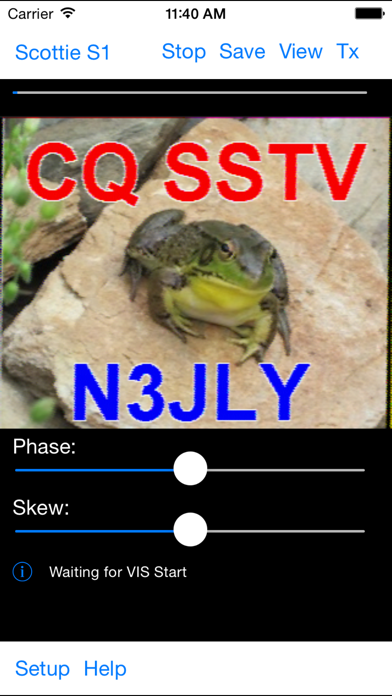
Want to display or send SSTV transmissions, without using a bulky computer? SSTV Pad lets you decode and display Ham (Amateur) Radio SSTV (Slow Scan TV) transmissions. Just connect your device to an HF radio (or even set it next to the radio's speaker), tune in an SSTV frequency, and watch the pictures. SSTV Pad decodes all of the popular SSTV modes, including Robot, Scottie, Martin, and more. Some modes are receive only. Decoding of SSTV transmissions begins automatically as soon as the start of image audio signals are detected, and the image format is automatically selected. Manual control is also available for use when receiving conditions are poor. Timing signals (phase and skew) can be adjusted to compensate for mismatches with the sending station. Received images can be saved - including automatically as they are received. You can leave the app running unattended, and come back to view all the received images. You can review saved images, as well as send them via email, and use iTunes file sharing to transfer them to your computer. You can even share them on your Facebook page, or tweet them to your followers, directly from the app! (iOS 6 and later) You can also transmit images, taken from your saved photos or taken with your device's camera. Text, such as your callsign, can be added to the sent image. Buy your copy right now, and start decoding and displaying SSTV transmissions in minutes. Just set your iPhone or iPad next to the radio speaker, and watch the pictures come rolling in. Note: If you cannot see the transmit button, go to the Accessibility settings for your device and turn Button Shapes OFF. It makes the buttons too large so you cannot see them all. Also, It is very important to have a well tuned signal of good quality, and make sure you get the audio from your radio to your device without adding additional distortion, or auto start and mode detect will not work optimally. Please see this page for tips on using the app and connecting your radio: http://www.blackcatsystems.com/ipad/iPad_SSTV_Pad_FAQ.html You can also use Bluetooth audio devices to feed audio into your device. Please be sure to use a good quality Bluetooth device, that does not distort the audio. Modes supported for reception (not all modes can be transmitted): B&W 8 sec B&W 12 sec B&W 24 sec B&W 36 sec Martin M1 Martin M1 Martin M2 Martin M3 Martin M4 MP73" MP115 MP140 MP175 MR73 MR90 MR115 MR140 MR175 PD 50 PD 90 PD 120 PD 160 PD 180 PD 240 PD 290 Robot 12C Robot 24C Robot 36C Robot 72C SC-1 32 sec SC-1 16 sec SC-1 8 sec SC-2-60 SC-2-120 SC-2-180 Scottie S1 Scottie S2 Scottie S3 Scottie S4 Scottie DX
Publisher websiteStore creative
Screenshots
Competitive set
Similar apps
Deterministic links to real stored apps matched by category, publisher, and comparable performance bands.

Feld Hellschreiber
Black Cat Systems
HF Weather Fax
Black Cat Systems

99Türkiye - Türkische Singles
BUZZMEDIA INC.

Artasy - Adult Colouring Book
ARTASY COMPANY LIMITED

Celestial Vibe
Huynh Phuong Vy Le

CV Builder - Perfect Resume
艳 王

Daymood
Sung Sil Oh

Dope Wallpapers For iPhone 4K
Uniqo Lab FZC
Methodology and provenance
Read every number with its evidence
Metadata source: Apple iTunes Search API; observed Sep 7, 2026, 8:37 PM.
Rankings: collected chart positions from the listed storefront. Missing ranks are not zeros.
Economics: downloads and gross store consumer spend are estimated, not official Apple or publisher figures.
Model: No persisted model version.
Confidence: —; intervals widen when evidence or history is limited.
Last observation: Sep 7, 2026, 8:37 PM.
See how AppTrendKit separates observations, estimates, coverage, and confidence.
Open methodology