
Research answer
What AppTrendKit can say about WiFi Album Wireless Transfer today
WiFi Album Wireless Transfer has no estimate-backed download or gross-consumer-spend figure that meets the public evidence contract yet.
Observed App Store metadata, chart positions, and history are shown below. Missing, non-finite, undefined-currency, or undefined-metric evidence stays missing rather than becoming zero.
Performance intelligence
Observed trajectory and estimates
Store ranks are observations. Downloads and gross store consumer spend are AppTrendKit estimates and only appear when persisted evidence exists.
Estimated downloads · 30D
ModeledNo persisted estimate
The page does not turn missing evidence into zero.
Estimated App Store gross consumer spend · 30D
ModeledNo persisted estimate
The page does not turn missing evidence into zero.
Estimated downloads · 7D
ModeledNo persisted estimate
The page does not turn missing evidence into zero.
Estimated App Store gross consumer spend · 7D
ModeledNo persisted estimate
The page does not turn missing evidence into zero.
Evidence history
Collected daily performance
No daily metric history has been persisted yet.
Rank history
Observed chart positions
Lower rank is better. Only collected observations are shown.
Coverage note
What the ranks mean
A missing rank is not treated as zero downloads or zero revenue. Apple chart feeds are bounded and may return censored or not-ranked observations outside the visible chart depth.
Read the methodStorefront mix
Top countries by estimated contribution
Country estimates are aggregated only after country-level predictions exist.
Monetization
Observed store economics signals
These are listing and product observations. They are not company revenue, subscriber counts, or advertising revenue.
App details
Store metadata
- Version
- 3.8
- Released
- Sep 23, 2011
- Last updated
- Jun 16, 2026
- Content rating
- 4+
- Default storefront
- VN
Public IAP observations
Validated in-app purchase prices
Only persisted rows with an explicit public publication boundary are shown. Missing price, currency, country, or date values stay unknown.
Listing detail
What the store says
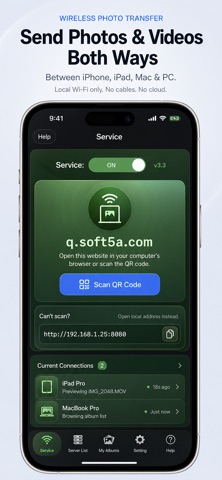
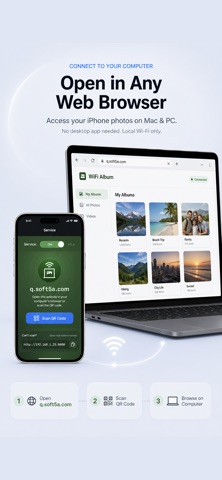
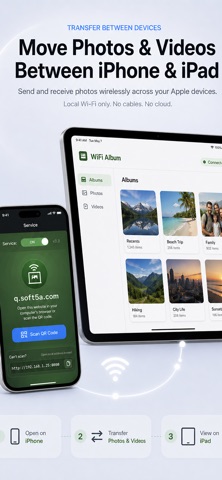
WiFi Album allows you to quickly move photos and videos between iPhone, iPad, Mac or PC using your local wifi network, no cables or extra software required. Features include: ► Easily transfer pictures and videos from your iPhone, iPad or iPod touch to your Windows or Mac Computer ► Quickly move photos from iPhone to iPad and viceversa ► Upload photos and videos from your PC or Mac to your iPad, iPhone or iPod touch ► Transfer HD videos in from iPhone or iPod Touch to your iPad and viceversa ► Transfer photos & videos in all directions over Wifi (Device to/from Computer, Device to/from Device) ► Transfer photos in full resolution, photos are not reduced in quality as with other apps ► Use any web browser on your computer or new desktop application to quickly transfer between your device and your computer. Free desktop app available for Mac and Windows computers ► Works with web browsers running in Windows, Mac and Linux computers ► Your photos and videos are transferred directly from device to device using your local wifi network. They are not stored in an external server and they never leave your local wifi network keeping your photos safe ► Pay only ONCE to install this app on your iPhone and iPad (as long as the same iTunes account is used on both devices) To manage your album in computer, Just start the app and enter the displayed address into the address bar of your browser. Works with any computer that has a modern browser (like desktop or portable computers, iPads, or even an other iPhone) and is on the same wifi network as your iPhone, iPod or iPad. - View albums on PC directly - Easy put photos/videos on iPod/iPhone/iPad without iTunes ***************** How To Use WiFi Album ******************* Online manual: http://www.soft5a.com/wifi-album/v1.48/en/ Transfer Photo & Video with iOS devices: 1 Run Wifi Album in your iOS devices, such as your iPhone and iPad, the screen display should show "Direct your computer's web browser to: http://xxx.xxx.xxx.xxx:8080", this mean you have a wifi network and run ok. 2 Switch to "Devices tab", you will see the other device, if nothing found, press the refresh button on the right and waiting. 3 Click device in "Devices" tab to view the shared files, you can download them in detail page. Transfer Photo & Video with computer: 1 Open the App, the screen display should show "Direct your computer's web browser to: http://xxx.xxx.xxx.xxx:8080", this mean you have a wifi network and run ok. 2 Open web browser in PC or other device, enter the"http://xxx.xxx.xxx.xxx:8080" in address field, you should see the web interface of Album 3 You can upload and download in this web interface.
Publisher websiteStore creative
Screenshots

Competitive set
Similar apps
Deterministic links to real stored apps matched by category, publisher, and comparable performance bands.

Adult Emoji Animated GIFs
艳 王

AI Logo Maker®Brand Design
艳 王

CV Builder - Perfect Resume
艳 王

Face Swap Booth - Switch Heads
艳 王

Find Something I
艳 王

Goalpedia
艳 王

Golingua: 5-lang Words&Grammar
艳 王

GR Link
艳 王
Methodology and provenance
Read every number with its evidence
Metadata source: Apple iTunes Search API; observed Sep 7, 2026, 10:56 PM.
Rankings: collected chart positions from the listed storefront. Missing ranks are not zeros.
Economics: downloads and gross store consumer spend are estimated, not official Apple or publisher figures.
Model: No persisted model version.
Confidence: —; intervals widen when evidence or history is limited.
Last observation: Sep 7, 2026, 10:56 PM.
See how AppTrendKit separates observations, estimates, coverage, and confidence.
Open methodology