
Kino - Pro Video Camera
Research answer
What AppTrendKit can say about Kino - Pro Video Camera today
Kino - Pro Video Camera has no estimate-backed download or gross-consumer-spend figure that meets the public evidence contract yet.
Observed App Store metadata, chart positions, and history are shown below. Missing, non-finite, undefined-currency, or undefined-metric evidence stays missing rather than becoming zero.
Performance intelligence
Observed trajectory and estimates
Store ranks are observations. Downloads and gross store consumer spend are AppTrendKit estimates and only appear when persisted evidence exists.
Estimated downloads · 30D
ModeledNo persisted estimate
The page does not turn missing evidence into zero.
Estimated App Store gross consumer spend · 30D
ModeledNo persisted estimate
The page does not turn missing evidence into zero.
Estimated downloads · 7D
ModeledNo persisted estimate
The page does not turn missing evidence into zero.
Estimated App Store gross consumer spend · 7D
ModeledNo persisted estimate
The page does not turn missing evidence into zero.
Evidence history
Collected daily performance
No daily metric history has been persisted yet.
Rank history
Observed chart positions
Lower rank is better. Only collected observations are shown.
Coverage note
What the ranks mean
A missing rank is not treated as zero downloads or zero revenue. Apple chart feeds are bounded and may return censored or not-ranked observations outside the visible chart depth.
Read the methodStorefront mix
Top countries by estimated contribution
Country estimates are aggregated only after country-level predictions exist.
Monetization
Observed store economics signals
These are listing and product observations. They are not company revenue, subscriber counts, or advertising revenue.
App details
Store metadata
- Version
- 1.4.3
- Released
- May 29, 2024
- Last updated
- Jun 10, 2026
- Content rating
- 4+
- Default storefront
- SE
Public IAP observations
Validated in-app purchase prices
Only persisted rows with an explicit public publication boundary are shown. Missing price, currency, country, or date values stay unknown.
Listing detail
What the store says
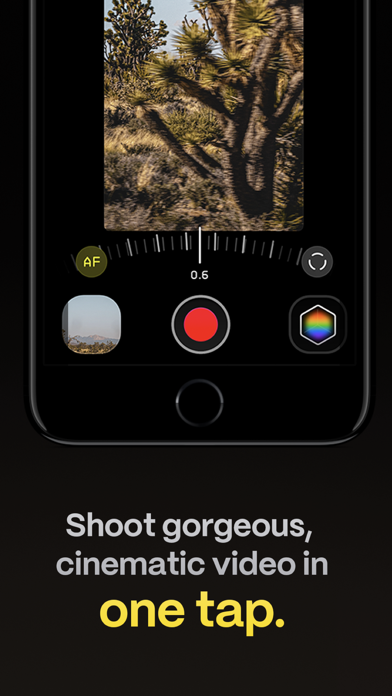
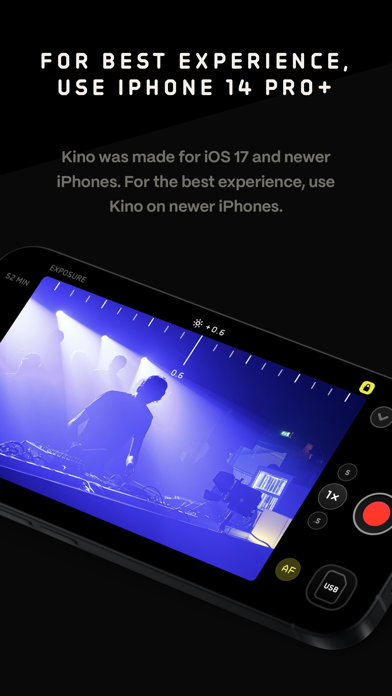
Make great video easy! Kino lets you just press record and create cinematic video with color presets created by expert filmmakers—no edit required. Plus, with “AutoMotion,” the app automatically creates that smooth "film look" you see at the movies. Shoot great video with no film school required. Are you an experienced filmmaker? Kino includes all the features you need to shoot like a Pro, such as a full manual mode, focus peaking, color waveform, audio meters, and more. If you’re experienced in color, you can import LUTs quickly and use the same powerful Instant Grade feature to output video with baked in LUTs. Regardless of your skill level, Kino adapts to your needs. Pick your experience level when setting up the app to dial things in your way or go with recommended, simple settings. The beautiful, simple interface shows only essential things, while keeping powerful features under thumb’s reach. INSTANT GRADE Kino comes packed with pro color presets by experts like Stu Maschwitz, Sandwich Video, Evan Schneider, Tyler Stalman and Kevin Ong. With one tap, you can shoot video with cinematic, film-like color by selecting a Grade preset. With Instant Grade, you don’t have to apply it later or do any editing steps: Kino just saves the processed video for you, ready to share. LEARN ALONG Getting started with video? The Kino team has a free series of lessons prepared you can dive into right away to learn filmmaking with the app. Start out with our simple recommended settings and enroll in a lesson plan to get lessons emailed to you that are easy to follow and let you unlock every feature of the app to use for making better videos. PRO TOOLS Kino’s simple interface does not mean it lacks in powerful pro tools. Start out with automatic exposure with EV adjustment and AE and WB lock, or drop into full manual mode with shutter speed, angle and ISO adjustment. Compose a shot with the grid with built in level, check exposure with the RGB waveform, and pull focus with focus peaking. Kino can store your recordings in Files instead of Photos for better and easy shot management, and even features a screen lock to prevent inadvertent taps messing up your shot. Set custom recording settings (like 4K 60FPS Apple Log ProRes422HQ on iPhone 15 Pro) or get started with presets for flexibiltiy. BEAUTIFUL INTERFACE Thoughtful touches are abound in Kino: from a screen-wide telltale ring to show you are recording, to beautiful custom typography throughout with our own bespoke fonts, Kino balances beauty and simplicity with flexibility and control for users of any skill level. AUTOMOTION Get cinematic motion like in feature films. Introducing: AutoMotion. Kino biases exposure towards a 180° shutter speed by default. If you land in this sweet spot, and available light supports it, the ‘Auto’ label turns green — showing you are in the sweet spot for great cinematic motion. Bright day out? Pop an ND filter on your iPhone and don’t worry about adjusting manual settings: Kino will take care of prioritizing shutter angle so you can just shoot and get great results. LUT FRIENDLY One of the powerful aspects of Kino is being able to download new looks from your favorite creators or your own making. Author .cube LUT files in Pixelmator Pro, Davinci Resolve, or other apps (up to 33x33) and open them in Kino with a tap. TRULY PRIVATE None of our apps gather or collect data, or analyze your videos and photos. We believe the most important thing a camera can be is private. CREATOR SPECIAL Are you a creator or filmmaker and want to get started with or love using Kino? Get in touch with us to get our ‘Creator Kit’: see the Kino website for more details. When sharing your work, tag it #shotwithkino so we can feature it online. Thanks for making it this far! Kino is made by friends — Ben Sandofsky and Sebastiaan de With, with the help of Katie-Rose Summerfield and Doug Broussard. We made this app with love and care and we hope you love it.
Publisher websiteStore creative
Screenshots



Competitive set
Similar apps
Deterministic links to real stored apps matched by category, publisher, and comparable performance bands.

8FEED
XTLab

AI Mirror: AI Photo Editor
POLYVERSE ENTERTAINMENT INC.

All Video Saver & Player
Dabhade Jagannath
APCam
Shenzhen Sricctv Technology Co., Ltd.

Background Eraser AI BG Editor
Ozgur Yuksel

CameraFi Live
Vault Micro Inc.

Carrera RC FPV
Shenzhen Logic Electronics Technology Co.,Ltd

CloneAI - AI Video Generator
PIXERY BILGI TEKNOLOJILERI ANONIM SIRKETI
Methodology and provenance
Read every number with its evidence
Metadata source: Apple iTunes Search API; observed Sep 7, 2026, 8:39 PM.
Rankings: collected chart positions from the listed storefront. Missing ranks are not zeros.
Economics: downloads and gross store consumer spend are estimated, not official Apple or publisher figures.
Model: No persisted model version.
Confidence: —; intervals widen when evidence or history is limited.
Last observation: Sep 7, 2026, 8:39 PM.
See how AppTrendKit separates observations, estimates, coverage, and confidence.
Open methodology