
Research answer
What AppTrendKit can say about KQ MIDI Modulate today
KQ MIDI Modulate has no estimate-backed download or gross-consumer-spend figure that meets the public evidence contract yet.
Observed App Store metadata, chart positions, and history are shown below. Missing, non-finite, undefined-currency, or undefined-metric evidence stays missing rather than becoming zero.
Performance intelligence
Observed trajectory and estimates
Store ranks are observations. Downloads and gross store consumer spend are AppTrendKit estimates and only appear when persisted evidence exists.
Estimated downloads · 30D
ModeledNo persisted estimate
The page does not turn missing evidence into zero.
Estimated App Store gross consumer spend · 30D
ModeledNo persisted estimate
The page does not turn missing evidence into zero.
Estimated downloads · 7D
ModeledNo persisted estimate
The page does not turn missing evidence into zero.
Estimated App Store gross consumer spend · 7D
ModeledNo persisted estimate
The page does not turn missing evidence into zero.
Evidence history
Collected daily performance
No daily metric history has been persisted yet.
Rank history
Observed chart positions
Lower rank is better. Only collected observations are shown.
Coverage note
What the ranks mean
A missing rank is not treated as zero downloads or zero revenue. Apple chart feeds are bounded and may return censored or not-ranked observations outside the visible chart depth.
Read the methodStorefront mix
Top countries by estimated contribution
Country estimates are aggregated only after country-level predictions exist.
Monetization
Observed store economics signals
These are listing and product observations. They are not company revenue, subscriber counts, or advertising revenue.
App details
Store metadata
- Version
- 1.7.1
- Released
- Mar 19, 2024
- Last updated
- Mar 22, 2026
- Content rating
- 4+
- Default storefront
- CA
Public IAP observations
Validated in-app purchase prices
Only persisted rows with an explicit public publication boundary are shown. Missing price, currency, country, or date values stay unknown.
Listing detail
What the store says
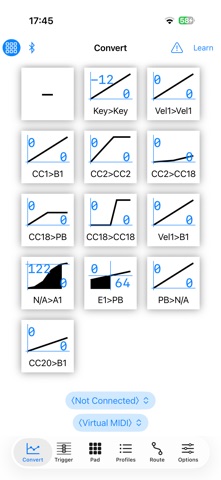
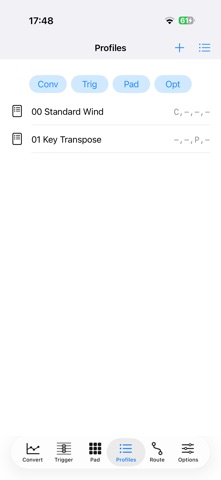
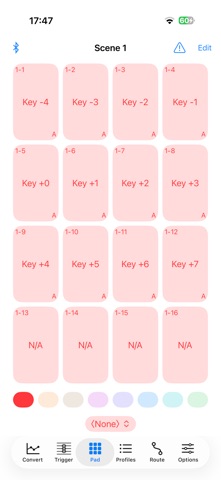
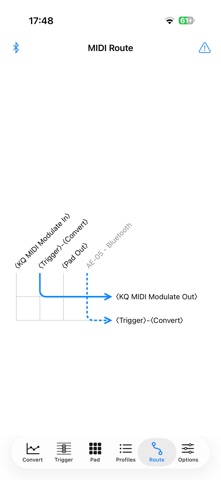
This is a tool for MIDI experts. Not recommended for beginners. - This app by itself does not produce sound. - It converts input MIDI signals and outputs them. - You can use 8x16 pads to output any MIDI signal. - You can route MIDI devices freely. - This app includes 2 AUv3 Plugins. - Compatible only with MIDI 1.0; MIDI 2.0 is not supported. - The developer uses this app conveniently with a MIDI wind controller. Convert Converts the values of control signals. Cannot be set per channel. Note Ctrl, Threshold: Transmit note on messages only if the value of the Note Ctrl is above the threshold. Key: Key of the note signal Vel1: Velocity of Note On Vel0: Velocity of Note Off CC: Control Change AT: Channel Aftertouch PB: Pitch Bend PC: Program Change N/A: Not applicable HR: High Resolution - when enabled, handles 14-bit signals. E: Envelope, tap to open the settings window. F: Filter, tap to open the settings window. LPF: Low-pass filter, smoothes out value changes. The higher the Strength value, the slower the change. HPF: High-pass filter, applies only abrupt value changes. The value automatically approaches the Return Base value. The higher the Strength value, the faster the change. Tap the graph to switch between line graph, history, and bar graph. Long press the graph and tap “Edit Curve” to edit the curve. "- 0 +" denotes the offset; this value is added to the input value. Press the button in the top left corner to switch to a minimized view. The "!" in the top right corner is the panic button. Pressing it sends All Notes Off and All Sound Off messages. Trigger Sends signals according to the rules upon receiving specified MIDI signals. You can specify channels. Harmony: Shifted note signals Channel Rewrite: Rewrite of channels Signal Trigger: Trigger of any MIDI signal Value Offset: Increment/decrement of value Filter: Suppression of transmission Pad Consists of 8x16 pads. Note: Note signal CC/AT/PB Oneshot: Control signal (when pressed) CC/AT/PB On/Off: Control signal (press/release) Program: Patch Change (bank selectable) Convert Offset: Offset specification for the Convert screen Load Preset: File loading on the Profiles screen Misc/SysEx: Any signal Latch: Pads become toggles. If a group is specified, the pads act as radio buttons. Options Key Delay: Delays Note On Velocity Convert: When outputting Vel1 in Convert, select whether to always convert or only when legato is not present MIDI Rx Channel: Receiving channel MIDI Tx Channel: Transmitting channel Filter Other Channel: Suppress transmission of channels other than receiving channel Duplicated Notes: Specifies handling of duplicated notes Note that: The application and description contain machine-translated text.
Store creative
Screenshots


Competitive set
Similar apps
Deterministic links to real stored apps matched by category, publisher, and comparable performance bands.

KQ Audio Player
Ryouta Kira

KQ Dixie 26
Ryouta Kira

KQ Dixie Legacy
Ryouta Kira

KQ MiniSynth 26
Ryouta Kira

KQ MiniSynth Legacy
Ryouta Kira

KQ Sampei 26
Ryouta Kira

KQ Sampei Legacy
Ryouta Kira

KQ Tixie
Ryouta Kira
Methodology and provenance
Read every number with its evidence
Metadata source: Apple iTunes Search API; observed Sep 7, 2026, 11:17 PM.
Rankings: collected chart positions from the listed storefront. Missing ranks are not zeros.
Economics: downloads and gross store consumer spend are estimated, not official Apple or publisher figures.
Model: No persisted model version.
Confidence: —; intervals widen when evidence or history is limited.
Last observation: Sep 7, 2026, 11:17 PM.
See how AppTrendKit separates observations, estimates, coverage, and confidence.
Open methodology