
Research answer
What AppTrendKit can say about RF Control today
RF Control has no estimate-backed download or gross-consumer-spend figure that meets the public evidence contract yet.
Observed App Store metadata, chart positions, and history are shown below. Missing, non-finite, undefined-currency, or undefined-metric evidence stays missing rather than becoming zero.
Performance intelligence
Observed trajectory and estimates
Store ranks are observations. Downloads and gross store consumer spend are AppTrendKit estimates and only appear when persisted evidence exists.
Estimated downloads · 30D
ModeledNo persisted estimate
The page does not turn missing evidence into zero.
Estimated App Store gross consumer spend · 30D
ModeledNo persisted estimate
The page does not turn missing evidence into zero.
Estimated downloads · 7D
ModeledNo persisted estimate
The page does not turn missing evidence into zero.
Estimated App Store gross consumer spend · 7D
ModeledNo persisted estimate
The page does not turn missing evidence into zero.
Evidence history
Collected daily performance
No daily metric history has been persisted yet.
Rank history
Observed chart positions
Lower rank is better. Only collected observations are shown.
Coverage note
What the ranks mean
A missing rank is not treated as zero downloads or zero revenue. Apple chart feeds are bounded and may return censored or not-ranked observations outside the visible chart depth.
Read the methodStorefront mix
Top countries by estimated contribution
Country estimates are aggregated only after country-level predictions exist.
Monetization
Observed store economics signals
These are listing and product observations. They are not company revenue, subscriber counts, or advertising revenue.
App details
Store metadata
- Version
- 2.7.2
- Released
- Jun 29, 2013
- Last updated
- Dec 1, 2025
- Content rating
- 4+
- Default storefront
- KR
Public IAP observations
Validated in-app purchase prices
Only persisted rows with an explicit public publication boundary are shown. Missing price, currency, country, or date values stay unknown.
Listing detail
What the store says
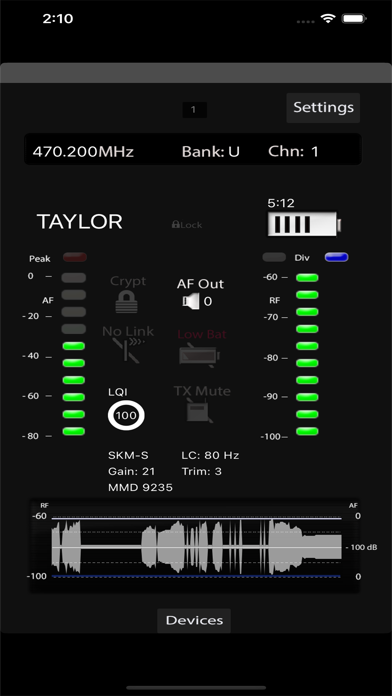
RF Control remotely controls up to 48 channels of Sennheiser* and Shure* wireless receivers in one application, side-by-side. The intuitive user interface provides a quick overview of the most vital parameters of your wireless receivers. Dedicated screens have been carefully developed to give you control to parameters that are relevant in a live situation while securing access to the ones that might be harmful to the safety of the system. Following devices are supported by utilizing the manufacturers remote control protocols: Sennheiser: EW-DX, EM 3732*, 2000* series and evolution G3 and G4* wireless receivers. Sennheiser: EM 6000 receivers Shure: ULX-D* Depending on the manufacturer of the receiver RF Control supports monitoring of the most relevant parameters including: - RF level bargraph (all) - AF Level bargraph (all) - Battery status information (all) - Remaining battery time (Shure, EM6000, EW-DX (with Li-Ion battery)) - Device name (all) - EQ type (2000 and ewG3) - Command settings (EM3732COM) - AF Out level (all) - Squelch level (Sennheiser) - Mic Offset (Shure, EM6000, EW-DX) - Lock Status (Shure, EM6000, EWDX) - Encryption Status (Shure, EM6000, EW-DX) - TX Type (Shure, EM 6000, EW-DX) - TX RF Power (Shure) - LQI (EM6000, EW-DX) - Capsule type (EM6000, EW-DX) - Warning indicators (Sennheiser: Low Bat, RX Mute, TX Mute, RF Mute, AF Peak, NoLink, Encryption mismatch) (Shure: Low Bat, Interference, RX Mute, TX Mute, Enrcryption mismatch, AF Peak) A plot of the RF and AF levels is displayed over time, making it the perfect companion for walk tests and spotting dropouts in your audio. The full screen plot window of the iPad version allows to scroll through the recorded RF and audio levels to look up for problems and drop-outs even after hours of recording. All relevant parameters can be remotely controlled: - Frequency, bank, channel (all) - Device name (all) - EQ type (2000 and ewG3) - Command type (EM3732COM) - AF Out level (all) - Squelch level (Sennheiser) - RX Mute (Shure) iPad only: The scan window allows you to use one of the recognized Sennheiser devices to scan the RF environment. The frequency plot can be used to drill down the spectrum and look for free frequencies. The RF Inspector allows for sample accurate readout of the scan data at your fingertips. The scan data can be stored as *.csv file and sent as attachment via email. The *.csv file I can be loaded from third party software for frequency coordination and planning. Scan is not supported by Shure devices. During start up RF Control will scan your network for connected devices. For Sennheiser 2000 series and evolution wireless G3 devices Firmware 1.7.0 or higher needs to be present on the receivers to support the remote control protocol. The app can monitor up to 48 channels in mixed configurations. The device list allows access to all devices in the network and selection of 48 devices for monitoring. The order of channels can be freely arranged and will be restored at the next start of the app. Notes: RF Control is the new name of the wilSmoTe app. RF Control does not support IEM transmitters! Channel count depends on hardware performance! Sennheiser, EW-DX, EM 6000, EM 3732, 2000 series, evolution G3 / G4 are brands, products or trademarks of Sennheiser electronic GmbH & Co.KG and not associated in any way with RF Control. Shure, ULXD, QLXD, Axient are brands, products or trademarks of Shure Inc. and not associated in any way with RF Control.
Publisher websiteStore creative
Screenshots


Competitive set
Similar apps
Deterministic links to real stored apps matched by category, publisher, and comparable performance bands.

AdLock: Ad Blocker for Browser
Hankuper s.r.o.

AgroRK
Kristijan Hrek

Al-Jawdah LS
Rubik Smart Solutions

AQ
Quanta Computer Inc.

AVG Secure VPN & Proxy server
AVG eCommerce CY Limited

Awesome Screenshot for Safari
Diigo

AYOA - Mind Mapping
OpenGenius Limited
BLE Scanner 4.0 – Bluetooth LE
BLUEPIXEL TECHNOLOGIES LLP
Methodology and provenance
Read every number with its evidence
Metadata source: Apple iTunes Search API; observed Sep 7, 2026, 8:39 PM.
Rankings: collected chart positions from the listed storefront. Missing ranks are not zeros.
Economics: downloads and gross store consumer spend are estimated, not official Apple or publisher figures.
Model: No persisted model version.
Confidence: —; intervals widen when evidence or history is limited.
Last observation: Sep 7, 2026, 8:39 PM.
See how AppTrendKit separates observations, estimates, coverage, and confidence.
Open methodology