
Research answer
What AppTrendKit can say about Mobile Mouse Bluetooth Remote today
Mobile Mouse Bluetooth Remote has no estimate-backed download or gross-consumer-spend figure that meets the public evidence contract yet.
Observed App Store metadata, chart positions, and history are shown below. Missing, non-finite, undefined-currency, or undefined-metric evidence stays missing rather than becoming zero.
Performance intelligence
Observed trajectory and estimates
Store ranks are observations. Downloads and gross store consumer spend are AppTrendKit estimates and only appear when persisted evidence exists.
Estimated downloads · 30D
ModeledNo persisted estimate
The page does not turn missing evidence into zero.
Estimated App Store gross consumer spend · 30D
ModeledNo persisted estimate
The page does not turn missing evidence into zero.
Estimated downloads · 7D
ModeledNo persisted estimate
The page does not turn missing evidence into zero.
Estimated App Store gross consumer spend · 7D
ModeledNo persisted estimate
The page does not turn missing evidence into zero.
Evidence history
Collected daily performance
No daily metric history has been persisted yet.
Rank history
Observed chart positions
Lower rank is better. Only collected observations are shown.
Coverage note
What the ranks mean
A missing rank is not treated as zero downloads or zero revenue. Apple chart feeds are bounded and may return censored or not-ranked observations outside the visible chart depth.
Read the methodStorefront mix
Top countries by estimated contribution
Country estimates are aggregated only after country-level predictions exist.
Monetization
Observed store economics signals
These are listing and product observations. They are not company revenue, subscriber counts, or advertising revenue.
App details
Store metadata
- Version
- 1.2.0
- Released
- Jan 15, 2026
- Last updated
- Jul 20, 2026
- Content rating
- 4+
- Default storefront
- CL
Public IAP observations
Validated in-app purchase prices
Only persisted rows with an explicit public publication boundary are shown. Missing price, currency, country, or date values stay unknown.
Listing detail
What the store says
Turn your iPhone, iPad, or Apple Watch into a real Bluetooth mouse, keyboard, touchpad, and remote for your Mac, and iPad Connect instantly using native Bluetooth — no Wi-Fi, no cables, and no companion software required. Mobile Mouse Bluetooth delivers fast, low-latency control that just works. Swipe, scroll, tap, type, and control your devices directly from the palm of your hand. Unlike other remote apps that rely on Wi-Fi networks and server software, Mobile Mouse uses a direct Bluetooth connection for reliable performance anywhere — even offline. Features • Multi-Device Control – Use your iPhone, iPad, or Apple Watch to control your Mac, iPad, iPhone, or Apple TV • Native Bluetooth Connection – Connect in an instant. No Wi-Fi, no cables, no lengthy pairing, and no server software to install • Multitouch Touchpad – Scroll, swipe, tap, and perform gestures smoothly • Air Mouse – Magically control your cursor by moving your iPhone in the air like a laser pointer • Media Remote – Play, pause, skip tracks, and adjust volume • Remote Builder - Make your own custom remotes • Full Keyboard – Standard and function keys, modifier keys, brightness, sleep, and more. Fully encrypted • Compact Convenience – Ideal for travel, presentations, accessibility, and relaxed computing • Secure - Fully encrypted Compatibility & Requirements Mobile Mouse Bluetooth supports modern Macs, iPads, and iPhones using native Bluetooth. Compatibility with older Apple devices may be limited. A free trial is available so you can test your setup before purchasing. Optional USB Dongle With the optional Bluetooth USB-C dongle, you can control virtually any device that supports a USB mouse and keyboard, including Windows PCs, Linux systems, Raspberry Pi, Meta Quest, Android and ChromeOS devices, smart TVs, and more. The dongle works as a real USB device, allowing access to login screens, BIOS, and system menus without restrictions. Learn more at: https://bluetooth.mobilemouse.com Frequently Asked Questions • Can I use my iPhone as a Bluetooth mouse? Yes. Mobile Mouse Bluetooth lets you use your iPhone as a real Bluetooth mouse for Mac and iPad. • Can I use my iPhone as a trackpad? Yes. The app includes a multitouch trackpad with scrolling, swiping, and gesture support. • Can I use my iPhone as a keyboard for my Mac or iPad? Yes. Mobile Mouse provides a full Bluetooth keyboard with standard keys, function keys, and modifier keys. • Does Mobile Mouse work without Wi-Fi or internet? Yes. It connects directly using native Bluetooth and works completely offline. • Is this a real Bluetooth device or just a remote app? It works as a real Bluetooth mouse, keyboard, and touchpad — not a screen-sharing or Wi-Fi remote. • Is Bluetooth input secure? Yes. All Bluetooth keyboard input is encrypted, just like a physical Bluetooth keyboard. • Can I control multiple devices? Yes. You can control multiple Macs, iPads, or iPhones from one device. • Does it work with Windows or Linux? Yes, using the optional Bluetooth USB-C dongle (sold separately). • Can I use it at the login screen or BIOS? Yes. With the USB dongle, Mobile Mouse works as a standard USB mouse and keyboard before the OS loads. • Is there a free trial available? Yes. A free trial is available so you can test compatibility before purchasing. • What are some additional uses for Mobile Mouse? Mobile Mouse works great as a presentation remote, and media controller. Works with web browsers like Safari, Chrome, and Firefox; video apps including YouTube, Netflix, VLC, Plex, Kodi, and OBS; music apps such as Spotify and Apple Music; presentation tools like Keynote, PowerPoint, and Google Slides; creative apps including Adobe Photoshop; and conferencing apps such as Zoom, Microsoft Teams, and Google Meet. Privacy Policy: https://bluetooth.mobilemouse.com/privacy Terms of Service: https://bluetooth.mobilemouse.com/terms
Store creative
Screenshots


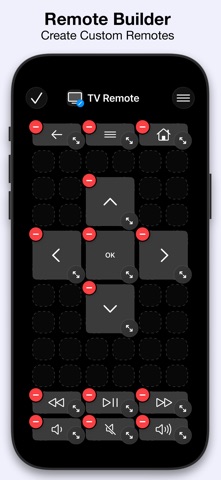

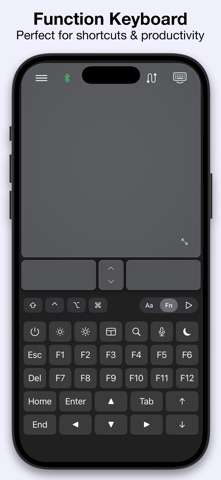


Competitive set
Similar apps
Deterministic links to real stored apps matched by category, publisher, and comparable performance bands.

3d Scanner App™
AI Photo Editor Lab SRL

Adult Emoji Animated GIFs
艳 王

Anywhere Proxy
Argsment Limited

Avira Mobile Security
Avira Holding GmbH & Co. KG

CG Balancer
Vincent Toegel

CHOP VPN: Fast & Secure
Smart Soft Engineering LLC

CNH do Brasil
Servicos e Informacoes do Brasil

Decibel X PRO: dBA Noise Meter
SkyPaw Co., Limited
Methodology and provenance
Read every number with its evidence
Metadata source: Apple iTunes Search API; observed Sep 7, 2026, 10:36 PM.
Rankings: collected chart positions from the listed storefront. Missing ranks are not zeros.
Economics: downloads and gross store consumer spend are estimated, not official Apple or publisher figures.
Model: No persisted model version.
Confidence: —; intervals widen when evidence or history is limited.
Last observation: Sep 7, 2026, 10:36 PM.
See how AppTrendKit separates observations, estimates, coverage, and confidence.
Open methodology