
QR Codes Generator & Scanner
Research answer
What AppTrendKit can say about QR Codes Generator & Scanner today
QR Codes Generator & Scanner has no estimate-backed download or gross-consumer-spend figure that meets the public evidence contract yet.
Observed App Store metadata, chart positions, and history are shown below. Missing, non-finite, undefined-currency, or undefined-metric evidence stays missing rather than becoming zero.
Performance intelligence
Observed trajectory and estimates
Store ranks are observations. Downloads and gross store consumer spend are AppTrendKit estimates and only appear when persisted evidence exists.
Estimated downloads · 30D
ModeledNo persisted estimate
The page does not turn missing evidence into zero.
Estimated App Store gross consumer spend · 30D
ModeledNo persisted estimate
The page does not turn missing evidence into zero.
Estimated downloads · 7D
ModeledNo persisted estimate
The page does not turn missing evidence into zero.
Estimated App Store gross consumer spend · 7D
ModeledNo persisted estimate
The page does not turn missing evidence into zero.
Evidence history
Collected daily performance
No daily metric history has been persisted yet.
Rank history
Observed chart positions
Lower rank is better. Only collected observations are shown.
Coverage note
What the ranks mean
A missing rank is not treated as zero downloads or zero revenue. Apple chart feeds are bounded and may return censored or not-ranked observations outside the visible chart depth.
Read the methodStorefront mix
Top countries by estimated contribution
Country estimates are aggregated only after country-level predictions exist.
Monetization
Observed store economics signals
These are listing and product observations. They are not company revenue, subscriber counts, or advertising revenue.
App details
Store metadata
- Version
- 1.0.14
- Released
- Nov 13, 2025
- Last updated
- Aug 19, 2026
- Content rating
- 4+
- Default storefront
- IE
Public IAP observations
Validated in-app purchase prices
Only persisted rows with an explicit public publication boundary are shown. Missing price, currency, country, or date values stay unknown.
Listing detail
What the store says
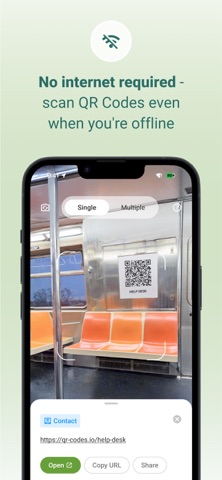
The QR Codes Generator & Scanner is your all-in-one iOS app for scanning QR codes and barcodes, and for creating fully customizable QR Codes with speed and accuracy. It works as a fast and reliable QR and barcode scanner, and a fully customizable QR Code maker — perfect for daily use, retail, marketing, education, events, and personal sharing. Scan anything instantly: product packaging, menus, bills, ID cards, barcodes in stores, tickets, coupons, app links, and more. Create branded QR Codes with colors, patterns, borders, and templates whenever you need. Why Choose the QR Codes Generator & Scanner app? - Lightweight and battery-friendly - Create custom QR Codes with colors, patterns, and templates - Generate QR Codes for URL, SMS, Email, contact, text, & more - Save, edit, and re-use your previously generated QR Codes anytime - Privacy-first — all scan data stays on your device - Safe link preview before opening URLs - Fast QR & barcode detection with real-time autofocus - Offline scanning — no internet required - Bulk scan mode for multiple codes at once - Scan QR Codes directly from gallery images - Works on small, blurry, low-light, or damaged QR Codes & barcodes QR Code Generator Features & Customization Create unique, branded, and professional QR Codes in seconds. Customization Tools - Choose solid colors or gradient color styles - Select QR patterns: dots, squares, rounded shapes - Customize eye shapes and border styles - Use ready-made QR templates for business, personal, and social sharing Creator Features - Real-time design preview - High-resolution PNG/JPG downloads - Save created QR Codes in history for future use - Static QR creation for URL, contact, text, phone, SMS, email, and more - Ideal for menus, posters, product packaging, business cards, event tickets, brochures, and digital payments QR Code Scanner Features The scanner detects QR Codes and barcodes instantly the moment they appear in the camera frame. No buttons, no extra steps. - Auto-detection for all QR Codes and barcodes - Scan QR Codes directly from gallery photos - Flashlight support for dim environments - Bulk scanning mode for scanning many codes quickly - Quick actions: open links, save contacts, connect to Wi-Fi, copy text, call numbers, send email, share instantly - View complete scan details with clean formatting - Searchable scan history with export options - Supports all major barcodes, including UPC, EAN, ISBN, Code 128, Code 39, ITF, and more - Optimized for high accuracy even with angled, faded, or low-light codes Supported Scan Types - Website URLs - Contact cards (vCard) - Text - Email - Phone numbers - SMS - Wi-Fi networks - Calendar events - Location GPS coordinates - App links - Social media profiles - Business pages - All common barcodes Supported QR Code Types for Generator - URL - Contact card - Phone - Email - SMS - Text - Phone number How to Scan a QR Code 1. Open the app and tap Scan 2. Point the camera at the QR Code/Barcode 3. The code is detected instantly 4. Tap the action: open link, connect to Wi-Fi, save contact, or share 5. Access previous scans in the History tab How to Create a QR Code 1. Tap Generate 2. Choose a QR type: URL, SMS, contact, Email, etc. 3. Enter your details 4. Customize colors, patterns, and templates 5. Download, copy or share instantly Extra Tips - Use good lighting for best scanning accuracy - Ensure printed QR Codes have strong contrast - Keep QR Codes at least 2×2 cm - Avoid blurry images when generating QR Codes - Always test your QR before publishing or printing Safe, Private, and Easy to Use The QR Codes Generator & Scanner app stores everything locally on your device. Nothing is uploaded or shared. It requires only essential permissions — camera for scanning and storage for saving your QR designs. Support support@the-qrcode-generator.com
Publisher websiteStore creative
Screenshots




Competitive set
Similar apps
Deterministic links to real stored apps matched by category, publisher, and comparable performance bands.

3d Scanner App™
AI Photo Editor Lab SRL

Adult Emoji Animated GIFs
艳 王

Anywhere Proxy
Argsment Limited

Avira Mobile Security
Avira Holding GmbH & Co. KG

CG Balancer
Vincent Toegel

CHOP VPN: Fast & Secure
Smart Soft Engineering LLC

CNH do Brasil
Servicos e Informacoes do Brasil

Decibel X PRO: dBA Noise Meter
SkyPaw Co., Limited
Methodology and provenance
Read every number with its evidence
Metadata source: Apple iTunes Search API; observed Sep 7, 2026, 8:02 PM.
Rankings: collected chart positions from the listed storefront. Missing ranks are not zeros.
Economics: downloads and gross store consumer spend are estimated, not official Apple or publisher figures.
Model: No persisted model version.
Confidence: —; intervals widen when evidence or history is limited.
Last observation: Sep 7, 2026, 8:02 PM.
See how AppTrendKit separates observations, estimates, coverage, and confidence.
Open methodology