
Research answer
What AppTrendKit can say about DD Archive ZIP & Archive today
DD Archive ZIP & Archive has no estimate-backed download or gross-consumer-spend figure that meets the public evidence contract yet.
Observed App Store metadata, chart positions, and history are shown below. Missing, non-finite, undefined-currency, or undefined-metric evidence stays missing rather than becoming zero.
Performance intelligence
Observed trajectory and estimates
Store ranks are observations. Downloads and gross store consumer spend are AppTrendKit estimates and only appear when persisted evidence exists.
Estimated downloads · 30D
ModeledNo persisted estimate
The page does not turn missing evidence into zero.
Estimated App Store gross consumer spend · 30D
ModeledNo persisted estimate
The page does not turn missing evidence into zero.
Estimated downloads · 7D
ModeledNo persisted estimate
The page does not turn missing evidence into zero.
Estimated App Store gross consumer spend · 7D
ModeledNo persisted estimate
The page does not turn missing evidence into zero.
Evidence history
Collected daily performance
No daily metric history has been persisted yet.
Rank history
Observed chart positions
Lower rank is better. Only collected observations are shown.
Coverage note
What the ranks mean
A missing rank is not treated as zero downloads or zero revenue. Apple chart feeds are bounded and may return censored or not-ranked observations outside the visible chart depth.
Read the methodStorefront mix
Top countries by estimated contribution
Country estimates are aggregated only after country-level predictions exist.
Monetization
Observed store economics signals
These are listing and product observations. They are not company revenue, subscriber counts, or advertising revenue.
App details
Store metadata
- Version
- 1.6
- Released
- Jun 3, 2026
- Last updated
- Aug 12, 2026
- Content rating
- 4+
- Default storefront
- PL
Public IAP observations
Validated in-app purchase prices
Only persisted rows with an explicit public publication boundary are shown. Missing price, currency, country, or date values stay unknown.
Listing detail
What the store says
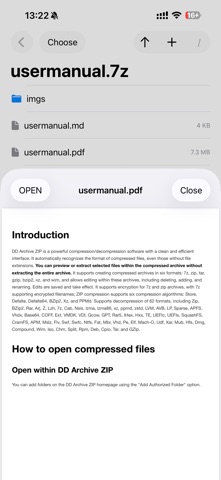
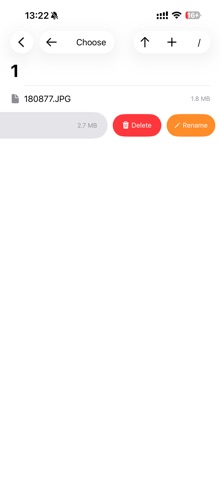
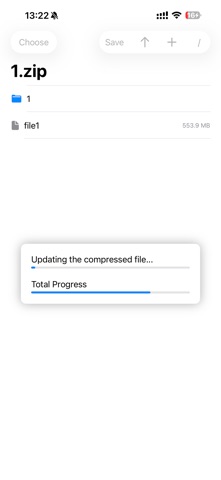
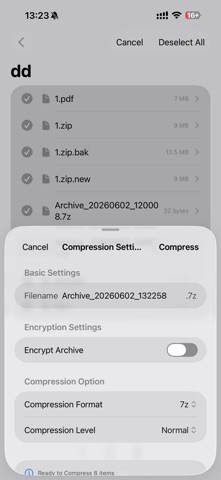
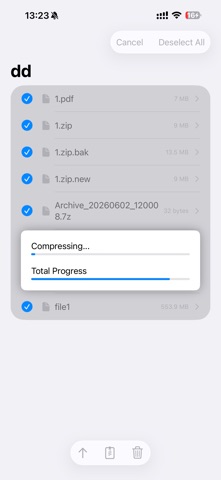
DD Archive ZIP is a powerful compression/decompression software with a clean and efficient interface. It automatically recognizes the format of compressed files, even those without file extensions. **You can preview or extract selected files within the compressed archive without extracting the entire archive.** It supports creating compressed archives in 12 formats: 7z, zip, tar, gzip, bzip2, xz, lz4, lz5, zst, br, liz, and allows editing within these archives, including deleting, adding, and renaming. Edits are saved and take effect. It supports encryption for 7z and zip archives, with 7z supporting encrypted filenames; ZIP compression supports six compression algorithms: Store, Defalte, Defalte64, BZip2, Xz, and PPMd. Supports decompression of 66 formats, including Zip, BZip2, Rar, Arj, Z, Lzh, 7z, Cab, Nsis, lzma, lzma86, xz, ppmd, zstd, lz4, lz5, liz, Lzip, LVM, AVB, LP, Sparse, APFS, Vhdx, Base64, COFF, Ext, VMDK, VDI, Qcow, GPT, Rar5, IHex, Hxs, TE, UEFIc, UEFIs, SquashFS, CramFS, APM, Mslz, Flv, Swf, Swfc, Ntfs, Fat, Mbr, Vhd, Pe, Elf, Mach-O, Udf, Xar, Mub, Hfs, Dmg, Compound, Wim, Iso, Chm, Split, Rpm, Deb, Cpio, Tar, and GZip. * How to open compressed files 1. Open within DD Archive ZIP You can add folders on the DD Archive ZIP homepage using the "Add Authorized Folder" option. After adding, you can click on the corresponding folder to access the compressed file within and click to open it. 2. Open via External Sharing When you receive a file in another app, you can choose to share it or open it with another application. In the "More" tab, find "DD Archive ZIP". The compressed file copied from an external share will be saved in "My Folders" on the main page. 3. File App Supports selecting "Open With" from the File App * Compressed files support passwords * Open Permission Issues If you receive a permission error, you need to add the directory containing the file as an authorized folder on the homepage first. * Compressed File Preview For PDF, TXT, and image formats, clicking on the compressed file will preview it directly. Clicking on the corresponding file will perform an unzip preview. Selecting "Open" will bring up a system dialog box. For other formats, clicking on the compressed file will bring up a system dialog box to select another application for processing. * File Unzipping 1. Single File Simply click the desired file. A system dialog box will pop up; select "Save to File" or open it in another app. Alternatively, use "Select" to select a file, then click the arrow "up" to choose the folder to extract to. 2. Multiple Files Click the "Select" button in the upper left corner, select the files to extract, then click the arrow "up" to choose the folder to extract to. If you haven't entered multi-select mode, clicking the arrow "up" will extract all files in the **current directory**. To extract the entire compressed file, click the "/" on the navigation bar to enter the root directory, then click the arrow "up" to choose the folder to extract to. * Add New Files to the Compressed Archive Click the "+" sign on the navigation bar to select the file or folder you want to add to the current directory of the compressed archive. If it's a folder, click to enter the folder and then click "Open" in the upper right corner to add the folder. If it's a file, simply select it and then click "Open". * Delete/Rename Files in a Compressed Package Swipe left on the item you want to operate on to delete or rename it. * Save the Compressed Package After adding, deleting, or renaming a file, you need to click "Save" to update the compressed package. * Create a Compressed Package Select the files you want to compress in the file browser, configure them according to the dialog box, and then click Compress. Compression progress is displayed in real time. * File Management Supports general file operations, such as "delete, rename, open," etc. Use "swipe left" to display the menu. Supports previewing images and PDFs.
Store creative
Screenshots

Competitive set
Similar apps
Deterministic links to real stored apps matched by category, publisher, and comparable performance bands.

Adult Emoji Animated GIFs
艳 王

AI Logo Maker®Brand Design
艳 王

CV Builder - Perfect Resume
艳 王

Face Swap Booth - Switch Heads
艳 王

Find Something I
艳 王

Goalpedia
艳 王

Golingua: 5-lang Words&Grammar
艳 王

GR Link
艳 王
Methodology and provenance
Read every number with its evidence
Metadata source: Apple iTunes Search API; observed Sep 7, 2026, 8:37 PM.
Rankings: collected chart positions from the listed storefront. Missing ranks are not zeros.
Economics: downloads and gross store consumer spend are estimated, not official Apple or publisher figures.
Model: No persisted model version.
Confidence: —; intervals widen when evidence or history is limited.
Last observation: Sep 7, 2026, 8:37 PM.
See how AppTrendKit separates observations, estimates, coverage, and confidence.
Open methodology