
Research answer
What AppTrendKit can say about Type Nine - T9 Keyboard today
Type Nine - T9 Keyboard has no estimate-backed download or gross-consumer-spend figure that meets the public evidence contract yet.
Observed App Store metadata, chart positions, and history are shown below. Missing, non-finite, undefined-currency, or undefined-metric evidence stays missing rather than becoming zero.
Performance intelligence
Observed trajectory and estimates
Store ranks are observations. Downloads and gross store consumer spend are AppTrendKit estimates and only appear when persisted evidence exists.
Estimated downloads · 30D
ModeledNo persisted estimate
The page does not turn missing evidence into zero.
Estimated App Store gross consumer spend · 30D
ModeledNo persisted estimate
The page does not turn missing evidence into zero.
Estimated downloads · 7D
ModeledNo persisted estimate
The page does not turn missing evidence into zero.
Estimated App Store gross consumer spend · 7D
ModeledNo persisted estimate
The page does not turn missing evidence into zero.
Evidence history
Collected daily performance
No daily metric history has been persisted yet.
Rank history
Observed chart positions
Lower rank is better. Only collected observations are shown.
Coverage note
What the ranks mean
A missing rank is not treated as zero downloads or zero revenue. Apple chart feeds are bounded and may return censored or not-ranked observations outside the visible chart depth.
Read the methodStorefront mix
Top countries by estimated contribution
Country estimates are aggregated only after country-level predictions exist.
Monetization
Observed store economics signals
These are listing and product observations. They are not company revenue, subscriber counts, or advertising revenue.
App details
Store metadata
- Version
- 3.0.0
- Released
- Nov 11, 2014
- Last updated
- Jul 9, 2026
- Content rating
- 4+
- Default storefront
- FI
Public IAP observations
Validated in-app purchase prices
Only persisted rows with an explicit public publication boundary are shown. Missing price, currency, country, or date values stay unknown.
Listing detail
What the store says
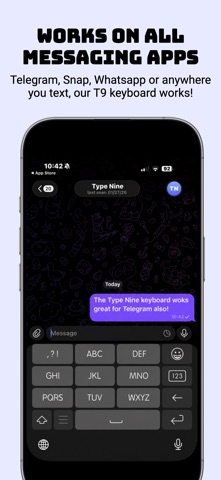
Type Nine brings classic T9-style typing to your iPhone with a retro phone keyboard built for fast, private, one-handed texting. Remember when texting felt simple? Type Nine reimagines the old-school phone keypad for modern iPhone users — combining the familiar 3x4 T9 keyboard layout with smart predictions, swipe gestures, personalization, themes, and privacy-first design. Whether you miss classic phone texting, want a simpler iPhone keyboard, prefer one-handed typing, or just want something different from the standard touchscreen keyboard, Type Nine gives you a clean, fast, nostalgic way to type. WHY PEOPLE LOVE TYPE NINE • Classic T9-style keyboard layout Type with a familiar phone keypad inspired by the keyboards many of us grew up with. • Fast one-handed typing The compact keypad layout makes it easy to text with one hand, whether you are walking, commuting, holding coffee, or multitasking. • Smart word predictions Type Nine suggests words as you type, helping you write faster with fewer taps. • Automatic language detection Type Nine can suggest words from multiple languages at the same time, so you do not need to constantly switch keyboards while typing. • Swipe typing with a keypad Type Nine combines a classic keypad layout with swipe-style movement for a modern typing experience. • Personal word learning When you manually type a word that is not in the dictionary, Type Nine can remember it and adapt to the words you use most. • Private by design Type Nine does not collect your personal data. Your typing stays yours. • VoiceOver support Type Nine was built with accessibility in mind and can be a helpful alternative keyboard for VoiceOver users. • Custom themes and colors Personalize your keyboard with different visual styles and make your iPhone feel more like your own. • Emojis, cursor movement, deletion, and more Type Nine includes the everyday keyboard tools you expect, rebuilt around a simple keypad experience. A RETRO KEYBOARD FOR MODERN TEXTING Type Nine is more than a nostalgia app. It is a practical alternative iPhone keyboard for people who want a faster, simpler, more personal way to text. Use Type Nine for: • Text messages • iMessage • WhatsApp • Telegram • Notes • Email • Social apps • Everyday typing across your iPhone OLD-SCHOOL FEEL. NEW-SCHOOL EASE. Type Nine gives you the feeling of classic phone texting with the flexibility of a modern iPhone keyboard. It is ideal for people who: • Miss old phone keyboards • Want a retro keyboard for iPhone • Prefer T9-style typing • Like one-handed texting • Want a simpler keyboard layout • Care about privacy • Want a keyboard that feels different • Use multiple languages • Want customizable themes • Prefer a keypad over a full QWERTY layout TEXT LIKE IT’S FUN AGAIN Typing on a phone used to feel simple, fast, and satisfying. Type Nine brings that feeling back — with a modern keyboard experience designed for today’s iPhone. Download Type Nine and bring back the classic T9 keyboard experience. BASIC IS BACK
Publisher websiteStore creative
Screenshots




Competitive set
Similar apps
Deterministic links to real stored apps matched by category, publisher, and comparable performance bands.

3d Scanner App™
AI Photo Editor Lab SRL

Adult Emoji Animated GIFs
艳 王

Anywhere Proxy
Argsment Limited

Avira Mobile Security
Avira Holding GmbH & Co. KG

CG Balancer
Vincent Toegel

CHOP VPN: Fast & Secure
Smart Soft Engineering LLC

CNH do Brasil
Servicos e Informacoes do Brasil

Decibel X PRO: dBA Noise Meter
SkyPaw Co., Limited
Methodology and provenance
Read every number with its evidence
Metadata source: Apple iTunes Search API; observed Sep 7, 2026, 8:39 PM.
Rankings: collected chart positions from the listed storefront. Missing ranks are not zeros.
Economics: downloads and gross store consumer spend are estimated, not official Apple or publisher figures.
Model: No persisted model version.
Confidence: —; intervals widen when evidence or history is limited.
Last observation: Sep 7, 2026, 8:39 PM.
See how AppTrendKit separates observations, estimates, coverage, and confidence.
Open methodology