
把脉Watch - HRV压力自测 脉象监测养生调理工具
Research answer
What AppTrendKit can say about 把脉Watch - HRV压力自测 脉象监测养生调理工具 today
把脉Watch - HRV压力自测 脉象监测养生调理工具 has no estimate-backed download or gross-consumer-spend figure that meets the public evidence contract yet.
Observed App Store metadata, chart positions, and history are shown below. Missing, non-finite, undefined-currency, or undefined-metric evidence stays missing rather than becoming zero.
Performance intelligence
Observed trajectory and estimates
Store ranks are observations. Downloads and gross store consumer spend are AppTrendKit estimates and only appear when persisted evidence exists.
Estimated downloads · 30D
ModeledNo persisted estimate
The page does not turn missing evidence into zero.
Estimated App Store gross consumer spend · 30D
ModeledNo persisted estimate
The page does not turn missing evidence into zero.
Estimated downloads · 7D
ModeledNo persisted estimate
The page does not turn missing evidence into zero.
Estimated App Store gross consumer spend · 7D
ModeledNo persisted estimate
The page does not turn missing evidence into zero.
Evidence history
Collected daily performance
No daily metric history has been persisted yet.
Rank history
Observed chart positions
Lower rank is better. Only collected observations are shown.
Coverage note
What the ranks mean
A missing rank is not treated as zero downloads or zero revenue. Apple chart feeds are bounded and may return censored or not-ranked observations outside the visible chart depth.
Read the methodStorefront mix
Top countries by estimated contribution
Country estimates are aggregated only after country-level predictions exist.
Monetization
Observed store economics signals
These are listing and product observations. They are not company revenue, subscriber counts, or advertising revenue.
App details
Store metadata
- Version
- 3.8
- Released
- Jun 18, 2025
- Last updated
- Jul 17, 2026
- Content rating
- 4+
- Default storefront
- PH
Public IAP observations
Validated in-app purchase prices
Only persisted rows with an explicit public publication boundary are shown. Missing price, currency, country, or date values stay unknown.
Listing detail
What the store says
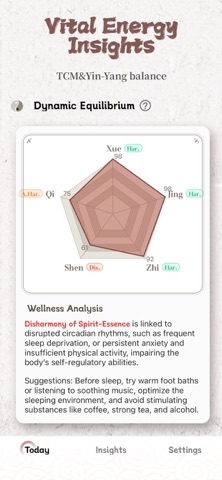
MaiWatch is the perfect fusion of ancient Traditional Chinese Medicine (TCM) theory and modern technology. This app utilizes the advanced sensors of the Apple Watch to enable real-time body data monitoring and health data analysis, helping you better understand your physical condition. Whether it's body regulation, emotional balance, or lifestyle and exercise planning, it provides personalized recommendations to comprehensively care for your health. Key Features Real-time Data Monitoring: Leverages the high-precision sensors of the Apple Watch to monitor body data in real time and generate accurate health metrics. TCM Constitution Analysis: Integrates traditional Chinese medicine theory to analyze your body constitution type based on physical data and offer targeted health advice. Personalized Health Recommendations: Automatically generates customized suggestions for body conditioning, emotional balance, lifestyle adjustments, and exercise plans based on monitoring results. Historical Data Tracking: The system records your historical pulse data and health metrics, allowing you to track trends and changes over time. User-Friendly Interface: A clean and intuitive design with easy-to-read data visualizations makes TCM pulse analysis simple and accessible. System Permission This app requests access to your camera to measure your pulse / heart rate via the camera and provide you with health status references. You can disable this permission at any time in system settings. HealthKit This app uses HealthKit. With your authorization, it can read specific health data from the Health app (including heart rate, blood oxygen, sleep analysis, activity records, and mindfulness/emotion data) for health status analysis (including measurements from Apple Watch) and body composition analysis, providing you with health references. You can manage or revoke authorization for this app at any time in the system Health app. Disclaimers The pulse analysis results of this application are generated based on intelligent algorithms, aiming to provide you with health trend references and help you better focus on your own state. Please note that this result cannot replace professional traditional Chinese medicine diagnosis or Western medicine examination and is not used as a medical diagnostic basis. Any actions taken based on this result (such as medication, delayed medical treatment, dietary adjustments, etc.) will not be the responsibility of this platform. Special Reminder: The dietary recommendations mentioned in the results are for reference only. If you have a history of food allergies or special physical conditions, please consult a professional physician before attempting. If you have any health concerns or discomfort symptoms, please consult a licensed physician from a reputable medical institution in a timely manner and strictly follow medical advice. Your health is our top concern. Compatibility Note In some system versions, when adding watch face complications via your iPhone, you may encounter a "Complication Unavailable" prompt. This is due to compatibility differences between iOS and watchOS versions, resulting in a functional limitation—not a device malfunction. For the best experience, we recommend editing directly on your Apple Watch: Long-press the watch face to enter edit mode. Swipe left or right to select the watch face you want to adjust, then tap "Edit". In the complication settings, re-add or adjust the desired modules to restore full functionality. This method ensures smooth operation regardless of iOS/watchOS version differences. Privacy Policy: https://tangerinebd.com/jiezou/private.html Terms of Use: https://tangerinebd.com/jiezou/terms.html
Publisher websiteStore creative
Screenshots



Competitive set
Similar apps
Deterministic links to real stored apps matched by category, publisher, and comparable performance bands.

Airmazing Studio
YG Invesmart Pty Ltd

AWMM Global Run Club
World Marathon Majors, LLC

Basic-Fit
Basic-Fit International b.v.

Better UK
Greenwich Leisure LTD

Blood Pressure Tracker Diary
BITTER CARROT LIMITED

Blood Pressure-Log
Kei Suefuji

Body You Want – Tone Muscles and Lose Weight
WL Online Marketing LLC

Buddhify: Guided Meditation
CELESTIAN GOLDEN APPS SL.
Methodology and provenance
Read every number with its evidence
Metadata source: Apple iTunes Search API; observed Sep 7, 2026, 8:37 PM.
Rankings: collected chart positions from the listed storefront. Missing ranks are not zeros.
Economics: downloads and gross store consumer spend are estimated, not official Apple or publisher figures.
Model: No persisted model version.
Confidence: —; intervals widen when evidence or history is limited.
Last observation: Sep 7, 2026, 8:37 PM.
See how AppTrendKit separates observations, estimates, coverage, and confidence.
Open methodology