
Budget - Expense Tracker
Research answer
What AppTrendKit can say about Budget - Expense Tracker today
Budget - Expense Tracker has no estimate-backed download or gross-consumer-spend figure that meets the public evidence contract yet.
Observed App Store metadata, chart positions, and history are shown below. Missing, non-finite, undefined-currency, or undefined-metric evidence stays missing rather than becoming zero.
Performance
Downloads, revenue and chart history
Estimates for the last 7D. Chart positions come from the App Store; downloads and revenue are AppTrendKit estimates, shown as a size band (for example 10K–50K) with a confidence level.
Estimated downloads · 30D
Upper limitUnder 20K
Below the top 100 in Finance (US)
The app is not in its category's top 100, so it has less than the app ranked #100 there. We show this limit until we have enough data for an estimate.
Estimated App Store gross consumer spend · 30D
Upper limitUnder $10K
Below the top 100 in Finance (US)
The app is not in its category's top 100, so it has less than the app ranked #100 there. We show this limit until we have enough data for an estimate.
History
Collected daily performance
No daily history yet.
Rank history
Chart positions
Lower rank is better. Only collected observations are shown.
Coverage note
What the ranks mean
A missing rank is not treated as zero downloads or zero revenue. Apple chart feeds are bounded and may return censored or not-ranked observations outside the visible chart depth.
Read the methodStorefront mix
Top countries by estimated contribution · 7D
Country figures cover the days we collected in each country, so they don't add up to the worldwide estimate. Each country shows when it was last updated.
Monetization
How the app makes money
These are listing and product observations. They are not company revenue, subscriber counts, or advertising revenue.
App details
Store metadata
- Version
- 1.0.2
- Released
- May 5, 2026
- Last updated
- Aug 9, 2026
- Content rating
- 4+
- Default storefront
- US
Public IAP observations
Validated in-app purchase prices
Only persisted rows with an explicit public publication boundary are shown. Missing price, currency, country, or date values stay unknown.
Listing detail
What the store says
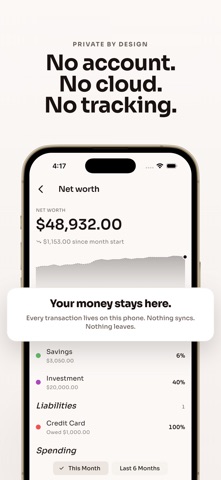
Where does your money actually go each month? Budget shows you. No ads, no account needed. Log every expense, income, transfer, charge, or payment. Pick the account, pick the category, add an optional note. Set monthly limits per category, schedule recurring bills and paychecks, and save toward goals like vacation or an emergency fund. Everything you log lives on your phone, with no sign-in and no cloud sync. Answers to your money questions • Where did all my money go this month? • How much can I still spend on groceries before I'm over budget? • What's my current net worth? • When is my next bill due? • How much have I saved for vacation so far? • Did this account move up or down this month? Transactions • Expense, income, and transfer entries • Charge and payment entries for credit cards and loans • Required fields: amount, account, category, date • Optional note on every transaction • Edit or delete with a tap Accounts • Asset accounts: cash, checking, savings, investment • Liability accounts: credit cards, loans, lines of credit • Per-account name, color, and a toggle to include or exclude from your total • Balances roll up to a Net Worth total • Bars showing each account's share of the total • Archive retired accounts and restore them later Budgets • One-off budgets per expense category, per month • Recurring budget templates that renew every month • Progress bar with remaining or over-by amount • Tap a category to see the month's transactions • End a recurring budget on any month Recurring transactions • Daily, weekly, biweekly, semimonthly, monthly, or yearly cadence • Optional end date on every series • Upcoming entries appear on the home screen • Calendar shows projected and recorded entries with different markers Saving goals • Name, optional target, optional deadline • Presets: Vacation, Car, House, Wedding, Emergency Fund • Progress ring with percent complete and a Reached state • Deposits and withdrawals create linked transactions • See remaining amount, percent complete, and days to deadline Calendar • Month grid with markers on transaction days • Different markers for recorded and projected (recurring) entries • Tap a day to see that day's transactions and projections • Projected end-of-month balance at the top Stats • Expense breakdown by category for the active range • This Month or Last 6 Months toggle • 6-month income and expense bar chart • Income, Expense, and Net columns at the bottom • Tap any category in the legend to see its transactions Net Worth • Assets minus liabilities at the top • Month-to-date change since the start of the month • Line chart of net worth over time • Per-account asset and liability breakdowns More to explore • 28 hand-built themes • Daily reminder with quiet days • Cent-accurate math, no rounding errors • Translated into 39 languages Ad-free & private • No ads • All data stays on your device • No account required. Works completely offline Your money, your phone. Disclaimer This app is for personal money tracking and is not financial advice. All figures reflect what you log. Always verify against your bank or card statements.
Publisher websiteStore creative
Screenshots



Competitive set
Similar apps
Deterministic links to real stored apps matched by category, publisher, and comparable performance bands.

Capital One Mobile
Capital One Services, LLC

Cash App
Block, Inc.

Intuit Credit Karma
Credit Karma, Inc.

PayPay
PAYPAY CORPORATION

Klarna: Smarter everyday money
Klarna Bank AB

Barclays
Barclays Services Limited

Google Pay: UPI, Cards, Loans
Google LLC

Coinbase: Buy Crypto & Stocks
Coinbase, Inc.
How we estimate
Where every number comes from
App details: Apple iTunes Search API, updated Sep 27, 2026, 9:15 PM.
Rankings: collected chart positions from the listed storefront. Missing ranks are not zeros.
Economics: downloads and gross store consumer spend are estimated, not official Apple or publisher figures.
Model: Lineage not exposed by this aggregate.
Confidence: —; intervals widen when evidence or history is limited.
Last updated: Sep 27, 2026, 9:15 PM.
See how AppTrendKit separates observations, estimates, coverage, and confidence.
Open methodology