
Tempo - Screen Time
Research answer
What AppTrendKit can say about Tempo - Screen Time today
Tempo - Screen Time has no estimate-backed download or gross-consumer-spend figure that meets the public evidence contract yet.
Observed App Store metadata, chart positions, and history are shown below. Missing, non-finite, undefined-currency, or undefined-metric evidence stays missing rather than becoming zero.
Performance
Downloads, revenue and chart history
Estimates for the last 7D. Chart positions come from the App Store; downloads and revenue are AppTrendKit estimates, shown as a size band (for example 10K–50K) with a confidence level.
Estimated downloads · 30D
Upper limitUnder 10K
Below the top 100 in Health & Fitness (US)
The app is not in its category's top 100, so it has less than the app ranked #100 there. We show this limit until we have enough data for an estimate.
Estimated App Store gross consumer spend · 30D
Upper limitUnder $200K
Below the top 100 in Health & Fitness (US)
The app is not in its category's top 100, so it has less than the app ranked #100 there. We show this limit until we have enough data for an estimate.
History
Collected daily performance
No daily history yet.
Rank history
Chart positions
Lower rank is better. Only collected observations are shown.
Coverage note
What the ranks mean
A missing rank is not treated as zero downloads or zero revenue. Apple chart feeds are bounded and may return censored or not-ranked observations outside the visible chart depth.
Read the methodStorefront mix
Top countries by estimated contribution · 7D
Country figures cover the days we collected in each country, so they don't add up to the worldwide estimate. Each country shows when it was last updated.
Monetization
How the app makes money
These are listing and product observations. They are not company revenue, subscriber counts, or advertising revenue.
App details
Store metadata
- Version
- 1.0.3
- Released
- Jun 9, 2026
- Last updated
- Sep 10, 2026
- Content rating
- 4+
- Default storefront
- US
Public IAP observations
Validated in-app purchase prices
Only persisted rows with an explicit public publication boundary are shown. Missing price, currency, country, or date values stay unknown.
Listing detail
What the store says
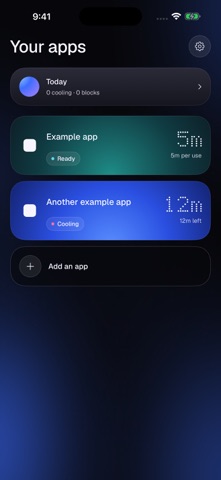
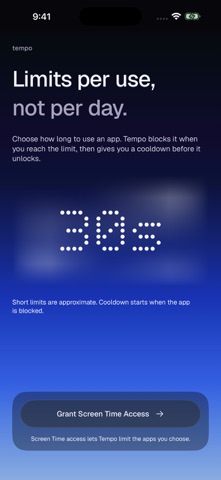
Tempo helps you keep app sessions short with per-use limits and cooldowns. Choose the apps you want to keep in check, set a usage limit for each one, and choose how long to pause after reaching that limit. Tempo uses Apple's Screen Time system to block the app during its cooldown. HOW IT WORKS - Choose the apps you want to limit. - Set a usage limit, from seconds to minutes. - Set a cooldown before another session. - Adjust your settings whenever you need to. A CALMER WAY TO CHECK IN A simple interface, clear duration controls and gently breathing blue light help you set limits without adding more distraction. Screen Time reports usage to Tempo, so short limits are approximate and blocking may be delayed. Brief switches between apps may remain part of the same session. Cooldown starts when the app is blocked. PRIVATE BY DESIGN Your usage information stays on your device. No accounts, advertising or tracking. Tempo is for limiting your own apps on your own iPhone.
Store creative
Screenshots

Competitive set
Similar apps
Deterministic links to real stored apps matched by category, publisher, and comparable performance bands.

MyFitnessPal: Calorie Counter
MyFitnessPal, Inc.

Calm
Calm.com, Inc.

AllTrails: Hike, Bike & Run
AllTrails, Inc.

Headspace: Sleep & Meditation
Headspace Inc.

Noom Weight Loss, Food Tracker
Noom, Inc.

Lose It! – Calorie Counter
FitNow, Inc.

Finch: Self-Care Pet
Finch Care Public Benefit Corporation

Carb Manager: Keto & Macro Log
Wombat Apps LLC
How we estimate
Where every number comes from
App details: Apple iTunes Search API, updated Sep 27, 2026, 9:15 PM.
Rankings: collected chart positions from the listed storefront. Missing ranks are not zeros.
Economics: downloads and gross store consumer spend are estimated, not official Apple or publisher figures.
Model: Lineage not exposed by this aggregate.
Confidence: —; intervals widen when evidence or history is limited.
Last updated: Sep 27, 2026, 9:15 PM.
See how AppTrendKit separates observations, estimates, coverage, and confidence.
Open methodology