
Days Left: Year & Countdowns
Research answer
What AppTrendKit can say about Days Left: Year & Countdowns today
Days Left: Year & Countdowns has no estimate-backed download or gross-consumer-spend figure that meets the public evidence contract yet.
Observed App Store metadata, chart positions, and history are shown below. Missing, non-finite, undefined-currency, or undefined-metric evidence stays missing rather than becoming zero.
Performance
Downloads, revenue and chart history
Estimates for the last 7D. Chart positions come from the App Store; downloads and revenue are AppTrendKit estimates, shown as a size band (for example 10K–50K) with a confidence level.
Estimated downloads · 30D
Upper limitUnder 50K
Below the top 100 in Productivity (US)
The app is not in its category's top 100, so it has less than the app ranked #100 there. We show this limit until we have enough data for an estimate.
Estimated App Store gross consumer spend · 30D
Upper limitUnder $500K
Below the top 100 in Productivity (US)
The app is not in its category's top 100, so it has less than the app ranked #100 there. We show this limit until we have enough data for an estimate.
History
Collected daily performance
No daily history yet.
Rank history
Chart positions
Lower rank is better. Only collected observations are shown.
Coverage note
What the ranks mean
A missing rank is not treated as zero downloads or zero revenue. Apple chart feeds are bounded and may return censored or not-ranked observations outside the visible chart depth.
Read the methodStorefront mix
Top countries by estimated contribution · 7D
Country figures cover the days we collected in each country, so they don't add up to the worldwide estimate. Each country shows when it was last updated.
Monetization
How the app makes money
These are listing and product observations. They are not company revenue, subscriber counts, or advertising revenue.
App details
Store metadata
- Version
- 1.0.3
- Released
- Jul 7, 2026
- Last updated
- Aug 20, 2026
- Content rating
- 4+
- Default storefront
- US
Public IAP observations
Validated in-app purchase prices
Only persisted rows with an explicit public publication boundary are shown. Missing price, currency, country, or date values stay unknown.
Listing detail
What the store says
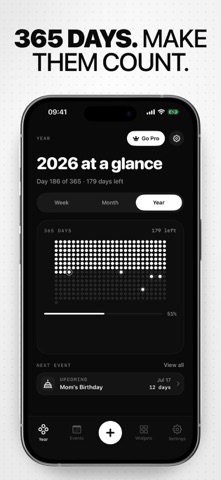
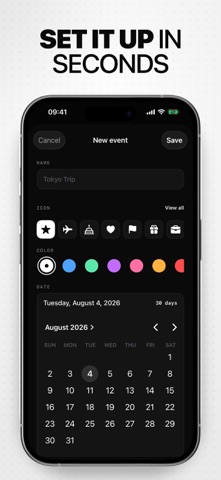
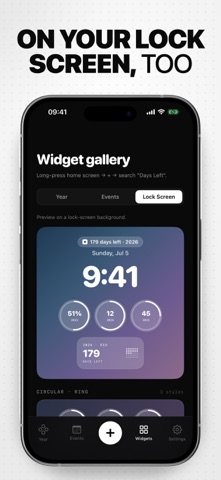
The year passes faster than we notice. Days Left turns it into something you can see, and the moments inside it, into something you can count down to. Whether you are tracking a trip, a birthday, or just trying to stay aware of how the year is moving, Days Left keeps it in front of you. Quiet. Beautiful. On every home screen. YOUR YEAR AS 365 DOTS - See the whole year at a glance, with each day a single dot. - Days lived fill up; days ahead stay open. Today is highlighted. - Three home layouts to choose from: Editorial, Centered, and Weeks. - Refreshes automatically at midnight, so what you see is always honest. COUNT DOWN TO WHAT MATTERS - Add events with a title, a date, and an icon you pick from a curated set. - Birthdays, trips, anniversaries, deadlines, holidays, marathons, or anything else. - Each event shows the days left, percent passed, and a dot-grid progress meter. - Optional reminders fire the day before, so important dates do not slip by. HOME AND LOCK SCREEN WIDGETS - 11 year-progress widgets in small, medium, and large sizes. - 7 event countdown widgets in small, medium, and large sizes. - Lock screen widgets: circular, rectangular, and inline. - Every widget reflows with your chosen color theme. MAKE IT YOURS - Eight accent themes: Classic, Electric Blue, Neon Mint, Purple Dream, Sunset Glow, Amber Fire, Crimson, and Ice. - Adaptive across light and dark mode, so contrast stays right either way. - Your accent reflows everywhere: home, events, widgets, paywall. PRIVATE BY DESIGN - Your events live on your device. No server, no account, no sign-in. - No tracking. No analytics. No third-party data sharing. - Reminders are scheduled locally on your iPhone, never routed through us. - The widget extension reads from a shared on-device store, nothing more. HOW TO USE 1. Open Days Left and watch the year fill in as 365 dots. 2. Tap the plus button on the home screen to add your first event. 3. Long-press your home screen, tap plus, and search "Days Left" to add a widget. 4. Open Settings to pick a color theme that feels like you. 5. Turn on a reminder for an event so the day before lands gently in your notifications. Stop letting the days blur. See them, count them, and make every one of them count. Free to download. Some features require a premium purchase. Privacy Policy: https://estifie.com/apps/daysleft/privacy-policy Terms of Use: https://estifie.com/apps/daysleft/terms-of-use
Store creative
Screenshots




Competitive set
Similar apps
Deterministic links to real stored apps matched by category, publisher, and comparable performance bands.

ChatGPT
OpenAI OpCo, LLC

Google Drive
Google LLC

Gmail - Email by Google
Google LLC

Google Gemini
Google LLC

VPN - Super Unlimited Proxy
Mobile Jump Pte Ltd

CamScanner - PDF Scanner App
INTSIG Information Co., Ltd

Calendar
Apple Inc.

Grok AI
TWITTER INTERNATIONAL UNLIMITED COMPANY
How we estimate
Where every number comes from
App details: Apple iTunes Search API, updated Sep 27, 2026, 9:15 PM.
Rankings: collected chart positions from the listed storefront. Missing ranks are not zeros.
Economics: downloads and gross store consumer spend are estimated, not official Apple or publisher figures.
Model: Lineage not exposed by this aggregate.
Confidence: —; intervals widen when evidence or history is limited.
Last updated: Sep 27, 2026, 9:15 PM.
See how AppTrendKit separates observations, estimates, coverage, and confidence.
Open methodology