
Hear from Another Room
Research answer
What AppTrendKit can say about Hear from Another Room today
Hear from Another Room has no estimate-backed download or gross-consumer-spend figure that meets the public evidence contract yet.
Observed App Store metadata, chart positions, and history are shown below. Missing, non-finite, undefined-currency, or undefined-metric evidence stays missing rather than becoming zero.
Performance
Downloads, revenue and chart history
Estimates for the last 7D. Chart positions come from the App Store; downloads and revenue are AppTrendKit estimates, shown as a size band (for example 10K–50K) with a confidence level.
Estimated downloads · 30D
Upper limitUnder 20K
Below the top 100 in Utilities (US)
The app is not in its category's top 100, so it has less than the app ranked #100 there. We show this limit until we have enough data for an estimate.
Estimated App Store gross consumer spend · 30D
Upper limitUnder $20K
Below the top 100 in Utilities (US)
The app is not in its category's top 100, so it has less than the app ranked #100 there. We show this limit until we have enough data for an estimate.
History
Collected daily performance
No daily history yet.
Rank history
Chart positions
Lower rank is better. Only collected observations are shown.
Coverage note
What the ranks mean
A missing rank is not treated as zero downloads or zero revenue. Apple chart feeds are bounded and may return censored or not-ranked observations outside the visible chart depth.
Read the methodApp Store search
Keywords Hear from Another Room ranks for
Observed positions in Apple's US search results, best first. Popularity is a 0–100 index, not a search count.
| Keyword | Position | Change | Popularity | Difficulty |
|---|---|---|---|---|
| hearing | #4 | new | 72 | 60 |
Storefront mix
Top countries by estimated contribution · 7D
Country figures cover the days we collected in each country, so they don't add up to the worldwide estimate. Each country shows when it was last updated.
Monetization
How the app makes money
These are listing and product observations. They are not company revenue, subscriber counts, or advertising revenue.
App details
Store metadata
- Version
- 1.0
- Released
- Jul 13, 2026
- Last updated
- Jul 13, 2026
- Content rating
- 4+
- Default storefront
- US
Public IAP observations
Validated in-app purchase prices
Only persisted rows with an explicit public publication boundary are shown. Missing price, currency, country, or date values stay unknown.
Listing detail
What the store says
Hear from Another Room is a hearing amplifier that lets you hear sound from another room at home using AirPods, Bluetooth earbuds, or wireless headphones. The Hear from Another Room app turns your iPhone into a remote microphone or audio baby monitor. Place your phone near the sound source, such as in front of a TV or near a baby crib, then listen to the amplified audio through your connected Bluetooth headphones. Use Hear from Another Room when you want to keep listening while you move around the house. You can leave your phone in the living room and continue hearing the audio from another room through your wireless earbuds or headphones. Hear from Another Room is helpful for TV listening and audio baby monitoring at home. Place your phone near the TV to hear dialogue more clearly through your headphones without turning up the volume for everyone else. You can also use Hear from Another Room as a simple audio baby monitor to listen for baby sounds from another room at home. Hear TV From Another Room Hear from Another Room is useful when you are watching TV but need to step away for a short time. Place your iPhone near the TV, connect your AirPods or Bluetooth headphones, and continue listening from another room while you cook, clean, do laundry, use the washroom, or move around the house. Hear from Another Room helps you follow TV dialogue, movies, news, sports, shows, and programs through your headphones while keeping the TV volume comfortable for everyone else nearby. Audio Baby Monitoring at Home Hear from Another Room can also be used as a simple audio baby monitor. Place your iPhone safely near the baby crib area or baby room, then listen for baby sounds through your wireless headphones from another room. Use Hear from Another Room to listen for crying, movement, soft sounds, and other baby sounds while you are in the kitchen, living room, home office, or another part of the house. Live Remote Microphone Hear from Another Room captures sound through your iPhone microphone and streams the live audio directly to your connected headphones. Your iPhone works like a wireless microphone, helping you hear sound from another room in real time. Simply connect your AirPods, Bluetooth earbuds, or wireless headphones, tap Listen, and place your phone near the sound you want to hear. Use Hear from Another Room to: • Hear TV audio from another room • Follow TV dialogue while you move around the house • Listen through AirPods or Bluetooth headphones • Monitor baby sounds from another room at home • Keep TV volume lower for others nearby • Hear important home sounds more clearly Place your phone: • Near a television • Close to a speaker • Near a baby crib area • In the room with the sound source Then listen privately through your AirPods, Bluetooth earbuds, or wireless headphones. Listening Features Hear from Another Room includes helpful audio tools for everyday home listening: • Live audio listening • Audio boost controls • Noise reduction • Equalizer presets • Manual equalizer sliders • Audio recording Free features include live audio listening, audio recording, equalizer presets, 25% Boost, and 30% Noise Reduction. Some advanced features require an upgrade, including full Boost, full Noise Reduction, and Manual Equalizer Sliders for adjusting sound quality. Customize your listening experience with: • Sound Boost — 25% free boost; full Boost requires upgrade • Noise Reduction — 25% free noise reduction included; full Noise Reduction requires upgrade • Equalizer Presets • Manual Equalizer Sliders — requires upgrade • Audio Recording — requires upgrade Optimized for: • AirPods • Bluetooth earbuds • Wireless headphones Hear from Another Room makes home listening simple. Place your iPhone near the sound source, connect your headphones, and hear live audio from another room in real time.
Store creative
Screenshots


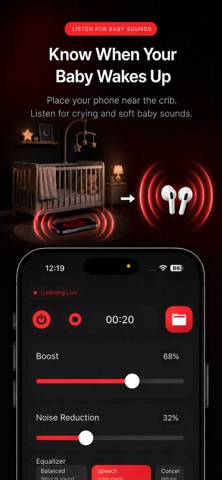

Competitive set
Similar apps
Deterministic links to real stored apps matched by category, publisher, and comparable performance bands.

Google LLC

Google Chrome
Google LLC

My Spectrum
Charter Communications Operating, LLC

DuckDuckGo, optional Duck.ai
Duck Duck Go, Inc.

leboncoin
LBC France

Türk Telekom
TT Mobil Iletisim Hizmetleri A.S.

My au(マイエーユー)-料金・ギガ残量の確認アプリ
KDDI CORPORATION

My Vodafone (UK)
Vodafone Ltd
How we estimate
Where every number comes from
App details: Apple iTunes Search API, updated Sep 28, 2026, 7:31 PM.
Rankings: collected chart positions from the listed storefront. Missing ranks are not zeros.
Economics: downloads and gross store consumer spend are estimated, not official Apple or publisher figures.
Model: Lineage not exposed by this aggregate.
Confidence: —; intervals widen when evidence or history is limited.
Last updated: Sep 28, 2026, 7:31 PM.
See how AppTrendKit separates observations, estimates, coverage, and confidence.
Open methodology