
PDF Squeeze: PDF Compressor
Research answer
What AppTrendKit can say about PDF Squeeze: PDF Compressor today
PDF Squeeze: PDF Compressor has no estimate-backed download or gross-consumer-spend figure that meets the public evidence contract yet.
Observed App Store metadata, chart positions, and history are shown below. Missing, non-finite, undefined-currency, or undefined-metric evidence stays missing rather than becoming zero.
Performance
Downloads, revenue and chart history
Estimates for the last 7D. Chart positions come from the App Store; downloads and revenue are AppTrendKit estimates, shown as a size band (for example 10K–50K) with a confidence level.
Estimated downloads · 30D
Upper limitUnder 20K
Below the top 100 in Utilities (US)
The app is not in its category's top 100, so it has less than the app ranked #100 there. We show this limit until we have enough data for an estimate.
Estimated App Store gross consumer spend · 30D
Upper limitUnder $50K
Below the top 100 in Utilities (US)
The app is not in its category's top 100, so it has less than the app ranked #100 there. We show this limit until we have enough data for an estimate.
History
Collected daily performance
No daily history yet.
Rank history
Chart positions
Lower rank is better. Only collected observations are shown.
Coverage note
What the ranks mean
A missing rank is not treated as zero downloads or zero revenue. Apple chart feeds are bounded and may return censored or not-ranked observations outside the visible chart depth.
Read the methodApp Store search
Keywords PDF Squeeze: PDF Compressor ranks for
Observed positions in Apple's US search results, best first. Popularity is a 0–100 index, not a search count.
| Keyword | Position | Change | Popularity | Difficulty |
|---|---|---|---|---|
| compressor | #14 | new | 63 | 53 |
Storefront mix
Top countries by estimated contribution · 7D
Country figures cover the days we collected in each country, so they don't add up to the worldwide estimate. Each country shows when it was last updated.
Monetization
How the app makes money
These are listing and product observations. They are not company revenue, subscriber counts, or advertising revenue.
App details
Store metadata
- Version
- 3.5
- Released
- Jul 23, 2026
- Last updated
- Sep 7, 2026
- Content rating
- 4+
- Default storefront
- US
Public IAP observations
Validated in-app purchase prices
Only persisted rows with an explicit public publication boundary are shown. Missing price, currency, country, or date values stay unknown.
Listing detail
What the store says
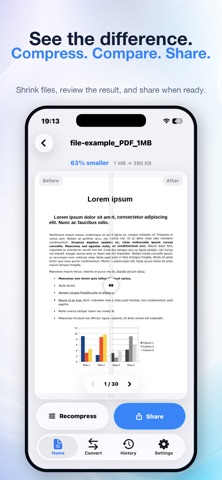
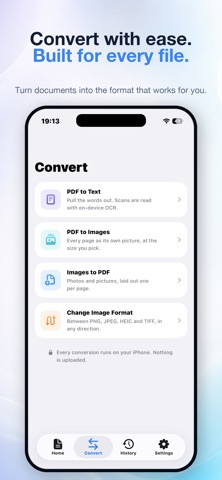
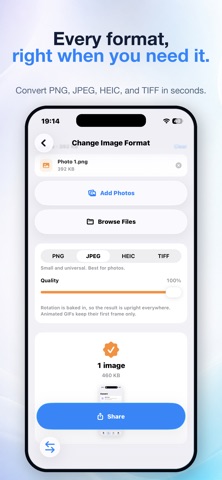
PDF Squeeze is a private PDF compressor, reader, editor, and signing tool for iPhone and iPad. Make large PDFs smaller, ask questions about what’s inside, sign documents, mark up pages, and organize your files — all on your device. ASK YOUR PDF ANYTHING Open a contract, lease, manual, research paper, or any other PDF and ask questions in plain language: “What’s the cancellation policy?” “When does this renew?” “What did they agree to pay?” PDF Squeeze answers with page references you can tap to jump directly to the source. Check the original wording yourself instead of relying on an answer without context. AI answers run entirely on your device. Devices with Apple Intelligence use the system model. Other compatible devices can add an optional on-device model. Your documents are not uploaded to a server. Scanned, photographed, and faxed documents work too, thanks to on-device OCR. SIGN WITHOUT PRINTING Sign with your finger, or type your name and choose a handwriting style. Your signature is stored as strokes and letterforms instead of a photograph, so it stays sharp at any zoom and adds almost no extra file size. Signatures are embedded directly into the PDF page rather than added as a floating annotation. They remain part of the document when you compress it or share it with someone else. MARK UP LIKE PAPER Highlight important passages, draw freehand, and add text boxes that you can resize to fit your page. Made a mistake? Undo your changes all the way back. COMPRESS WITHOUT THE BLUR PDF Squeeze starts with a vector-preserving compression pass whenever possible, keeping text crisp and selectable. Pages are only re-rendered when doing so actually reduces the file size. Your compressed PDF will never be larger than the original. HIT AN EXACT FILE SIZE Need to meet an email limit or upload portal requirement? Use Target Size and choose 1 MB, 2 MB, 5 MB, 10 MB, or 25 MB. PDF Squeeze searches for the best visual quality that fits just under your chosen limit. If a target cannot be reached, PDF Squeeze tells you honestly and produces the smallest file possible. SEE THE DIFFERENCE Drag the Before & After slider across any page to compare the original document with the compressed version. See the result for yourself. EVERYTHING ELSE YOU NEED • Four quality presets: Light, Balanced, Strong, and Extreme • Automatic grayscale detection for additional savings on scanned documents • Rearrange, rotate, and delete pages by dragging thumbnails • Extract selected pages into a new PDF • Merge multiple PDFs into one document • Turn one or more photos into a PDF • Search the full text of your document • Open PDFs directly from Files with “Open with PDF Squeeze” • Keep a history of compressed documents and lifetime storage savings • Choose Light, Dark, or System appearance PRIVATE BY DESIGN Compression, OCR, signatures, markup, and AI answers happen on your iPhone or iPad. Your documents are never uploaded. No servers, no account, no tracking, and no ads. TRY IT FREE One purchase unlocks the full app permanently. No subscription.
Store creative
Screenshots





Competitive set
Similar apps
Deterministic links to real stored apps matched by category, publisher, and comparable performance bands.

Google LLC

Google Chrome
Google LLC

My Spectrum
Charter Communications Operating, LLC

DuckDuckGo, optional Duck.ai
Duck Duck Go, Inc.

leboncoin
LBC France

Türk Telekom
TT Mobil Iletisim Hizmetleri A.S.

My au(マイエーユー)-料金・ギガ残量の確認アプリ
KDDI CORPORATION

My Vodafone (UK)
Vodafone Ltd
How we estimate
Where every number comes from
App details: Apple iTunes Search API, updated Sep 28, 2026, 5:04 PM.
Rankings: collected chart positions from the listed storefront. Missing ranks are not zeros.
Economics: downloads and gross store consumer spend are estimated, not official Apple or publisher figures.
Model: Lineage not exposed by this aggregate.
Confidence: —; intervals widen when evidence or history is limited.
Last updated: Sep 28, 2026, 5:04 PM.
See how AppTrendKit separates observations, estimates, coverage, and confidence.
Open methodology