
15minutes: Screen Time Limit
Research answer
What AppTrendKit can say about 15minutes: Screen Time Limit today
15minutes: Screen Time Limit has no estimate-backed download or gross-consumer-spend figure that meets the public evidence contract yet.
Observed App Store metadata, chart positions, and history are shown below. Missing, non-finite, undefined-currency, or undefined-metric evidence stays missing rather than becoming zero.
Performance
Downloads, revenue and chart history
Estimates for the last 7D. Chart positions come from the App Store; downloads and revenue are AppTrendKit estimates, shown as a size band (for example 10K–50K) with a confidence level.
Estimated downloads · 30D
Upper limitUnder 50K
Below the top 100 in Productivity (US)
The app is not in its category's top 100, so it has less than the app ranked #100 there. We show this limit until we have enough data for an estimate.
Estimated App Store gross consumer spend · 30D
Upper limitUnder $500K
Below the top 100 in Productivity (US)
The app is not in its category's top 100, so it has less than the app ranked #100 there. We show this limit until we have enough data for an estimate.
History
Collected daily performance
No daily history yet.
Rank history
Chart positions
Lower rank is better. Only collected observations are shown.
Coverage note
What the ranks mean
A missing rank is not treated as zero downloads or zero revenue. Apple chart feeds are bounded and may return censored or not-ranked observations outside the visible chart depth.
Read the methodStorefront mix
Top countries by estimated contribution · 7D
Country figures cover the days we collected in each country, so they don't add up to the worldwide estimate. Each country shows when it was last updated.
Monetization
How the app makes money
These are listing and product observations. They are not company revenue, subscriber counts, or advertising revenue.
App details
Store metadata
- Version
- 1.0.46
- Released
- Jul 30, 2026
- Last updated
- Aug 31, 2026
- Content rating
- 4+
- Default storefront
- US
Public IAP observations
Validated in-app purchase prices
Only persisted rows with an explicit public publication boundary are shown. Missing price, currency, country, or date values stay unknown.
Listing detail
What the store says
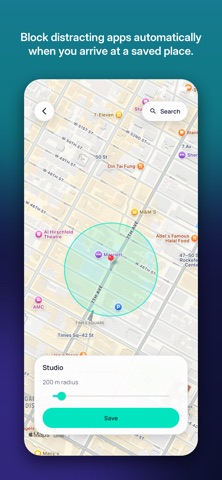
Social media is not always the problem. Losing track of time inside it is. 15minutes gives the feed a beginning and an end. Choose the apps that tend to pull you in, use them for up to 15 minutes, and then take a one-hour break. When the hour is over, your minutes return and the cycle can begin again. Those 15 minutes are shared across your whole selection, so switching from Instagram to TikTok to Reddit does not reset the clock. You decide exactly what belongs in that selection, whether it is a social network, game, browser, or messaging app. There is no daily allowance to burn through before lunch and regret that evening. Instead, 15minutes creates a rhythm you can live with all day. The hour away gives the urge time to fade and gives something else time to begin. Closing 15minutes or restarting your phone will not bypass an active block. A BETTER PLACE TO LAND Reach for a blocked app and you will find a short, surprising fact instead of a blank screen. Browse discoveries from science, history, language, and the everyday myths many of us still believe. It turns a reflexive tap into a small moment of curiosity without reopening the feed. TIME AWAY CAN EARN TIME BACK Premium rewards the hours when you could scroll but choose not to. Each uninterrupted hour away from your selected feeds adds five bonus minutes, up to twice your usual budget. Open one of those apps and the earning streak starts over. AN EXIT THAT MAKES YOU PAUSE If you genuinely need an app before the hour is over, you can always get back in. The free version asks you to complete a 20-second breathing exercise. Premium lets you adjust the exercise or replace it with a few mental-math questions. Breathing remains available as a fallback, so you are never trapped; the brief moment of intention is the point. You can also end a session early. Any unused minutes are set aside and the one-hour break begins immediately, giving you an easy way to act the moment you realize you have had enough. ROUTINES FOR REAL LIFE With Premium, Work, Free Time, and Sleep can each have their own schedule and app list. Work and Free Time rules can also start automatically when you arrive at a saved place such as the office, gym, or home. Depending on the moment, you can block an app completely or give it a separate repeating budget. Every routine is off until you choose to set it up. PROGRESS WITHOUT MAKE-BELIEVE MATH See today’s completed breaks, your day streak, minutes used, and trends over 7, 30, or 60 days. “Time reclaimed” includes only breaks you actually kept. Unlock early and the counter stops, because progress should reflect what really happened. THE CORE STAYS FREE The 15/60 cycle, block screen, 20-second breathing unlock, progress view, and off switch are free for good. Premium adds earned minutes, the complete fact collection, custom cycle lengths, automatic routines, and more unlock options. The essential blocker itself is never held behind a subscription. NO ACCOUNT REQUIRED There is no signup, login, or profile to create. Your history and settings stay on your device; only subscription billing communicates with a server. Choose your apps once, then let 15minutes hold the boundary when your attention is somewhere else. Standard Apple Terms of Use (EULA): https://www.apple.com/legal/internet-services/itunes/dev/stdeula/
Store creative
Screenshots



Competitive set
Similar apps
Deterministic links to real stored apps matched by category, publisher, and comparable performance bands.

ChatGPT
OpenAI OpCo, LLC

Google Drive
Google LLC

Gmail - Email by Google
Google LLC

Google Gemini
Google LLC

VPN - Super Unlimited Proxy
Mobile Jump Pte Ltd

CamScanner - PDF Scanner App
INTSIG Information Co., Ltd

Calendar
Apple Inc.

Grok AI
TWITTER INTERNATIONAL UNLIMITED COMPANY
How we estimate
Where every number comes from
App details: Apple iTunes Search API, updated Sep 27, 2026, 9:15 PM.
Rankings: collected chart positions from the listed storefront. Missing ranks are not zeros.
Economics: downloads and gross store consumer spend are estimated, not official Apple or publisher figures.
Model: Lineage not exposed by this aggregate.
Confidence: —; intervals widen when evidence or history is limited.
Last updated: Sep 27, 2026, 9:15 PM.
See how AppTrendKit separates observations, estimates, coverage, and confidence.
Open methodology