
Research answer
What AppTrendKit can say about LG EnerVu Plus today
LG EnerVu Plus has no estimate-backed download or gross-consumer-spend figure that meets the public evidence contract yet.
Observed App Store metadata, chart positions, and history are shown below. Missing, non-finite, undefined-currency, or undefined-metric evidence stays missing rather than becoming zero.
Performance intelligence
Observed trajectory and estimates
Store ranks are observations. Downloads and gross store consumer spend are AppTrendKit estimates and only appear when persisted evidence exists.
Estimated downloads · 30D
ModeledNo persisted estimate
The page does not turn missing evidence into zero.
Estimated App Store gross consumer spend · 30D
ModeledNo persisted estimate
The page does not turn missing evidence into zero.
Estimated downloads · 7D
ModeledNo persisted estimate
The page does not turn missing evidence into zero.
Estimated App Store gross consumer spend · 7D
ModeledNo persisted estimate
The page does not turn missing evidence into zero.
Evidence history
Collected daily performance
No daily metric history has been persisted yet.
Rank history
Observed chart positions
Lower rank is better. Only collected observations are shown.
Coverage note
What the ranks mean
A missing rank is not treated as zero downloads or zero revenue. Apple chart feeds are bounded and may return censored or not-ranked observations outside the visible chart depth.
Read the methodStorefront mix
Top countries by estimated contribution
Country estimates are aggregated only after country-level predictions exist.
Monetization
Observed store economics signals
These are listing and product observations. They are not company revenue, subscriber counts, or advertising revenue.
App details
Store metadata
- Version
- 1.2.0
- Released
- Dec 10, 2019
- Last updated
- May 15, 2024
- Content rating
- 4+
- Default storefront
- NL
Public IAP observations
Validated in-app purchase prices
Only persisted rows with an explicit public publication boundary are shown. Missing price, currency, country, or date values stay unknown.
Listing detail
What the store says
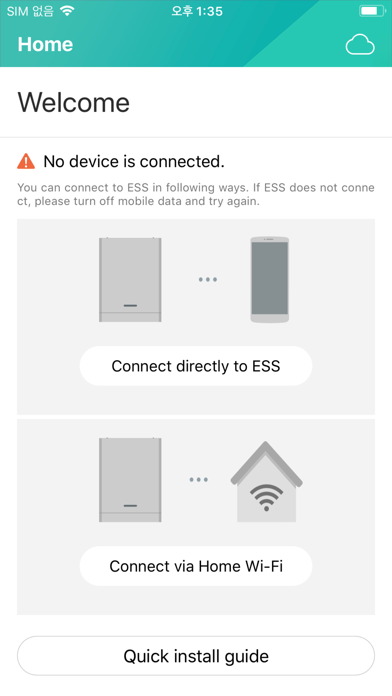
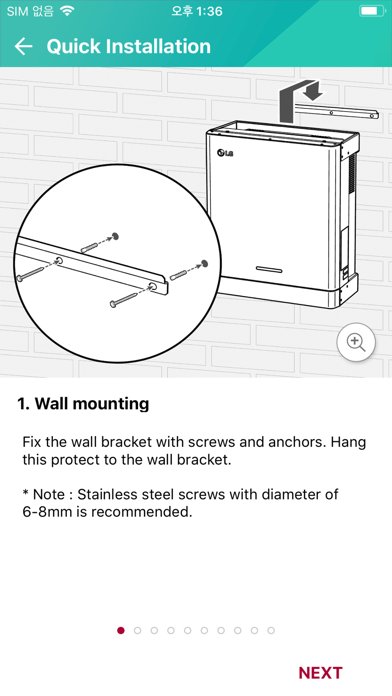
LG ESS is a dedicated app that allows easy installation and easy monitoring of user's solar power generation, charge and power usage information. * When connecting the app and the device for the first time, the wireless LAN Dongle must be installed in the LG ESS console. * In order to check LG ESS operation status and accumulated usage information remotely using the app, LG ESS must be connected to the Internet. The LG EnerVu Plus app is an application that is bundled with LG's solar-powered household energy storage products. This application can be installed on a smartphone of a professional installer and the person who purchased the LG ESS product. Using this, professional installers can finalize the installation by taking advantage of initial setup and commissioning functions when installing the product. The end user can also check the operation status, cumulative power generation, charge and power consumption information of the product through the app. [main function] 1. System Information Registration (Enter the hardware information of the major components of the LG ESS to manage the installation status of the product.) Installation information of PV module connected to LG ESS (installation capacity, installation angle, etc.) Energy meter information 2. PCS settings (Set the optimum PCS operating environment by inputting the requirements in the installed region and country.) PV Feed-in Limitation setting (can be set in 10% increments) Set the system country code 3. Network Settings (Enter information to connect the LG ESS to the Internet, which is not provided by LG Electronics. The cost of using the data may be charged by the consumer's contracted Internet service product.) Internet connection setting (wired / wireless) 4. Test operation mode (It provides the function to check if LG ESS installation is normal.) Charge Mode Test (System Charge Mode Normal Operation Confirmation) Charge mode test (solar charge mode normal operation check) Discharge mode test (check system operation mode normal operation) Inverter test (solar power generation and grid connection function check normal operation) 5. Battery setting Winter mode SoC setting (function for over discharge protection of battery) Battery first installation date and additional battery installation date setting (management date of each battery pack) 6. Join EnerVu Web monitoring service * In order to use this function, LG ESS can connect to internet. (Create user ID for monitoring service subscription) -System Log (Logs generated during system operation can be saved and checked if necessary) -Reboot (Reboot function if necessary during installation) -Change Password - factory reset (Set the product to the factory default state.) -LG ESS Product Information Registration (Registered product to LG EnerVu to use remote monitoring function through EnerVu service) -activation (The ability to start remote monitoring for the first time after product registration is completed)
Store creative
Screenshots


Competitive set
Similar apps
Deterministic links to real stored apps matched by category, publisher, and comparable performance bands.

LG AV Remote
LG Electronics

LG CAC Partner
LG Electronics

LG CreateBoard Share
LG Electronics

LG Energy Payback
LG Electronics

LG gram Link
LG Electronics

LG HVAC Augmented Reality
LG Electronics

LG HVAC Service
LG Electronics

LG Mobile Gamepad : Wi-Fi
LG Electronics
Methodology and provenance
Read every number with its evidence
Metadata source: Apple iTunes Search API; observed Sep 7, 2026, 8:37 PM.
Rankings: collected chart positions from the listed storefront. Missing ranks are not zeros.
Economics: downloads and gross store consumer spend are estimated, not official Apple or publisher figures.
Model: No persisted model version.
Confidence: —; intervals widen when evidence or history is limited.
Last observation: Sep 7, 2026, 8:37 PM.
See how AppTrendKit separates observations, estimates, coverage, and confidence.
Open methodology