
Research answer
What AppTrendKit can say about SQLiteFlow - SQLite Editor today
SQLiteFlow - SQLite Editor has no estimate-backed download or gross-consumer-spend figure that meets the public evidence contract yet.
Observed App Store metadata, chart positions, and history are shown below. Missing, non-finite, undefined-currency, or undefined-metric evidence stays missing rather than becoming zero.
Performance intelligence
Observed trajectory and estimates
Store ranks are observations. Downloads and gross store consumer spend are AppTrendKit estimates and only appear when persisted evidence exists.
Estimated downloads · 30D
ModeledNo persisted estimate
The page does not turn missing evidence into zero.
Estimated App Store gross consumer spend · 30D
ModeledNo persisted estimate
The page does not turn missing evidence into zero.
Estimated downloads · 7D
ModeledNo persisted estimate
The page does not turn missing evidence into zero.
Estimated App Store gross consumer spend · 7D
ModeledNo persisted estimate
The page does not turn missing evidence into zero.
Evidence history
Collected daily performance
No daily metric history has been persisted yet.
Rank history
Observed chart positions
Lower rank is better. Only collected observations are shown.
Coverage note
What the ranks mean
A missing rank is not treated as zero downloads or zero revenue. Apple chart feeds are bounded and may return censored or not-ranked observations outside the visible chart depth.
Read the methodStorefront mix
Top countries by estimated contribution
Country estimates are aggregated only after country-level predictions exist.
Monetization
Observed store economics signals
These are listing and product observations. They are not company revenue, subscriber counts, or advertising revenue.
App details
Store metadata
- Version
- 6.8.5
- Released
- Aug 3, 2018
- Last updated
- Aug 4, 2026
- Content rating
- 4+
- Default storefront
- IE
Public IAP observations
Validated in-app purchase prices
Only persisted rows with an explicit public publication boundary are shown. Missing price, currency, country, or date values stay unknown.
Listing detail
What the store says
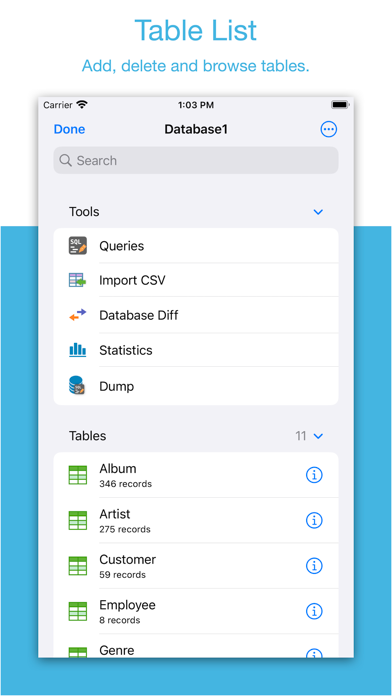
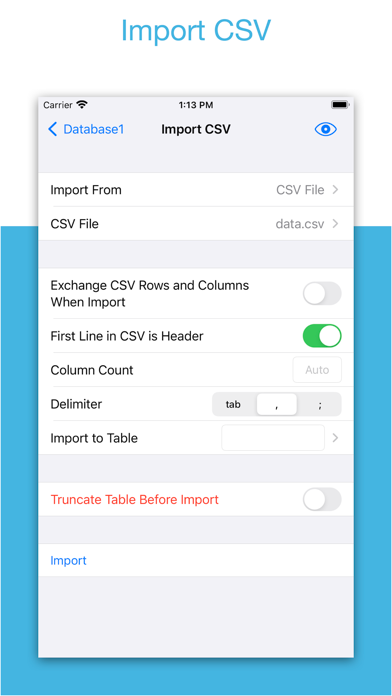
Two-week free trial! So you can purchase SQLiteFlow after you know you like it! SQLiteFlow is an SQLite editor for Mac & iOS which is intuitive, stable and reliable to use. It contains features as described below: Browse • Manage files. Supports add, remove, duplicate, rename folders, SQLite databases, SQL files, CSV files, etc. • Supports import database from iCloud Drive by the file picker. • Supports open external SQL files, CSV files and Filter files. • Supports open external folders. Requires iOS 13.0 or iPadOS 13.0. • Supports show recents files. Query Editor • Multi-query execution. • Syntax highlighting. • SQL auto-completion. • Format query. Data Editor • View, edit or add table data. • Multiple cells/rows/columns selection. • View table data with a convenient filter. • Sort records by tapping on column title. • Edit blob data as hex or show it as preview if possible. Alter Table • View, edit or add table fields, indexes, foreign keys, checks. • View triggers. • View DDL. Table List • Supports display each table's name and records count. Connect • Supports let SQLiteFlow(macOS) connect databases in this app. One use case is that you can debug query performance issue on your iPhone or iPad directly through your Mac. Drag and Drop • Supports drag and drop to import or export SQLite databases and SQL files in iPad. Database Statistics • Supports show records count of each table. • Supports show total size of each table • Supports show size of each table's content. • Supports show size of each table's index. This feature may help you get more insight about your SQLite databases' data storage information, which may let you see if there're any chances to let SQLite working in a more effective way in your device. ER Diagram • Supports display ER diagram. • Supports toggle field type hide or show. • Supports Relationship Guessing. • Supports copy as Mermaid markdown. Database Diff • Supports generate SQL text that can let you transform a database content into another. • Supports show a summary of the differences between two databases. Import • Supports import CSV data. • Supports import JSON data. Export • In Data Editor or Query Results, supports export data to CSV, JSON, Markdown or List. • In Data Editor, supports export data to Insert Statement or Update Statement if possible. Multiple Windows • Supports multiple windows for iPadOS 13 or later. Dark Mode • Supports dark mode. visionOS • Supports visionOS. Shortcuts • Supports "Run Query" action. • Supports "Import CSV" action. • Supports "Import JSON" action. Create Function • Supports create scalar function using a simple JavaScript routine. Terms of Use: https://www.apple.com/legal/internet-services/itunes/dev/stdeula/
Publisher websiteStore creative
Screenshots





Competitive set
Similar apps
Deterministic links to real stored apps matched by category, publisher, and comparable performance bands.

Adult Emoji Animated GIFs
艳 王

AI Logo Maker®Brand Design
艳 王

Bluetooth Debugger & Inspector
艳 王

CV Builder - Perfect Resume
艳 王

DesignToCode for SwiftUI
艳 王

Face Swap Booth - Switch Heads
艳 王

Find Something I
艳 王

Goalpedia
艳 王
Methodology and provenance
Read every number with its evidence
Metadata source: Apple iTunes Search API; observed Sep 7, 2026, 8:37 PM.
Rankings: collected chart positions from the listed storefront. Missing ranks are not zeros.
Economics: downloads and gross store consumer spend are estimated, not official Apple or publisher figures.
Model: No persisted model version.
Confidence: —; intervals widen when evidence or history is limited.
Last observation: Sep 7, 2026, 8:37 PM.
See how AppTrendKit separates observations, estimates, coverage, and confidence.
Open methodology