
iArtbook
Research answer
What AppTrendKit can say about iArtbook today
iArtbook has no estimate-backed download or gross-consumer-spend figure that meets the public evidence contract yet.
Observed App Store metadata, chart positions, and history are shown below. Missing, non-finite, undefined-currency, or undefined-metric evidence stays missing rather than becoming zero.
Performance
Downloads, revenue and chart history
Estimates for the last 7D. Chart positions come from the App Store; downloads and revenue are AppTrendKit estimates, shown as a size band (for example 10K–50K) with a confidence level.
Estimated downloads · 30D
Upper limitUnder 5K
Below the top 100 in Graphics & Design (US)
The app is not in its category's top 100, so it has less than the app ranked #100 there. We show this limit until we have enough data for an estimate.
Estimated App Store gross consumer spend · 30D
Upper limitUnder $10K
Below the top 100 in Graphics & Design (US)
The app is not in its category's top 100, so it has less than the app ranked #100 there. We show this limit until we have enough data for an estimate.
History
Collected daily performance
No daily history yet.
Rank history
Chart positions
Lower rank is better. Only collected observations are shown.
Coverage note
What the ranks mean
A missing rank is not treated as zero downloads or zero revenue. Apple chart feeds are bounded and may return censored or not-ranked observations outside the visible chart depth.
Read the methodStorefront mix
Top countries by estimated contribution · 7D
Country figures cover the days we collected in each country, so they don't add up to the worldwide estimate. Each country shows when it was last updated.
Monetization
How the app makes money
These are listing and product observations. They are not company revenue, subscriber counts, or advertising revenue.
App details
Store metadata
- Version
- 10.9.8
- Released
- Feb 8, 2019
- Last updated
- Jan 7, 2026
- Content rating
- 4+
- Default storefront
- US
Public IAP observations
Validated in-app purchase prices
Only persisted rows with an explicit public publication boundary are shown. Missing price, currency, country, or date values stay unknown.
Listing detail
What the store says
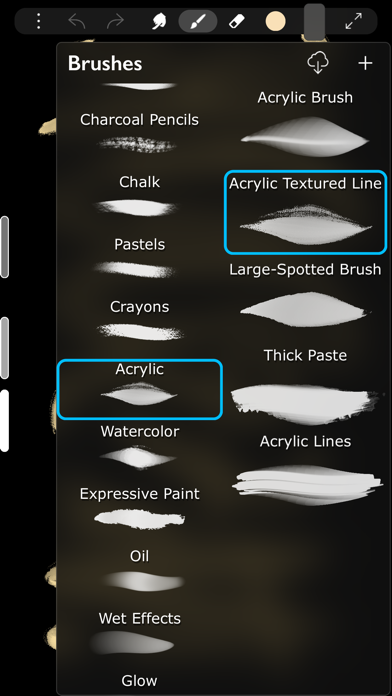
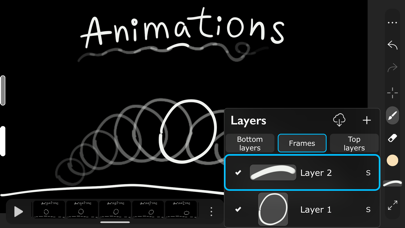
Fun painting app, based on Unlimited Layers with Blend Modes and Masks Any brush can be used with 3 professional-level realtime technologies of calligraphy: Line Delay, Rope Stabilization and Correction, combine it for best results. With 100% calligraphy the line will be very smooth even if you are drawing with your finger Brushes can be Dry, Glossy and Wet. There are 3 types of Wet brushes: Without Pull, With Pull and Super-Precise. Any brush can instantly became Smudge-brush with Finger instrument. Textured brushes are also supported If you like to draw with simple round brush, there are quick settings for Hardness, Ovality & Rotation of your brush shape. Or, if you prefer realistic brushes, large Pro-Library of shapes (>1000 textures) can be used to create new brushes of any type Apple Pencil is fully supported, including Touch Force, Tilt, Azimuth and Predicted Points. There are settings for each Pencil ability. You also can disable finger-painting, if you never use it Gestures: 2-fingers tap for Undo and 3-fingers tap for Redo any action For color choosing there are 2 different Color Pickers and Palettes with Gradient Mixer. Use long-pressure gesture for quick color choosing Time-Lapse video recording is enabled by default FEATURES LIST: Create Animation: * Unlimited frames of animation * Multiple animation layers * Export to mp4, hevc, gif, apng Learn How to Draw by copying Professional Art: * Use any Painting or Sketch as a Lesson * Tap left side of screen to switch between your painting and the lesson * 4 lesson types: "Equal size", "First Layer", "Horizontal split", "Vertical split" Brushes: * Preinstalled professional brushes * Glossy brushes * 50+ brush settings * Shapes library * Calligraphy * Apple Pencil support * Smudge brushes with 3 different smudge technologies * Export-import of brushes * Dynamic shape * Realistic brushes * Any brush can became a smudge brush with Smudge tool Colors: * 2 Color Pickers * Color mixer * Palettes * Import/Export of palettes Interface: * Right and left handed interface * Light or dark interface * Custom interface color Layers: * Unlimited layers * Dynamic ssd/operative memory using for layers * Masks * Clear / Fill / Select / Sort / Duplicate * Blend modes * Opacity and visibility * Import any image as a layer * Transform without loosing image quality Gestures: * 2-Fingers tap for Undo * 3-Fingers tap for Redo * Long pressure for quick color choosing * Bucket Tool: Drag the Color circle onto the canvas * Only-gestures control with Swipes Advanced: * Flip canvas horizontally * Time-Lapse video recording * Transform instrument * Selection tool * PNG with transparency creation
Store creative
Screenshots


Competitive set
Similar apps
Deterministic links to real stored apps matched by category, publisher, and comparable performance bands.

Reface: AI Face Swap & Editor
NEOCORTEXT, INC.

Pixelcut AI Photo Editor
Pixelcut Inc.

Pose: AI Photo Video Generator
SPARK DYNAMICS YAZILIM HIZMETLERI LIMITED SIRKETI

WOMBO Dream - AI Art Generator
Wombo Studios, Inc.

Wonder - AI Art Generator
DEEP FLOW SOFTWARE SERVICES - FZCO

Tattoo AI - Tattoo Design
HUBX YAZILIM HIZMETLERI ANONIM SIRKETI

WallPics - Live Wallpapers 4K
IgKnight Technologies Ltd

うちわ文字作成 アプリ ファンサください!
Shiho Sadamizu
How we estimate
Where every number comes from
App details: Apple iTunes Search API, updated Sep 27, 2026, 9:15 PM.
Rankings: collected chart positions from the listed storefront. Missing ranks are not zeros.
Economics: downloads and gross store consumer spend are estimated, not official Apple or publisher figures.
Model: Lineage not exposed by this aggregate.
Confidence: —; intervals widen when evidence or history is limited.
Last updated: Sep 27, 2026, 9:15 PM.
See how AppTrendKit separates observations, estimates, coverage, and confidence.
Open methodology