
Smart Alarm Clock - Waking Up
Research answer
What AppTrendKit can say about Smart Alarm Clock - Waking Up today
Smart Alarm Clock - Waking Up has no estimate-backed download or gross-consumer-spend figure that meets the public evidence contract yet.
Observed App Store metadata, chart positions, and history are shown below. Missing, non-finite, undefined-currency, or undefined-metric evidence stays missing rather than becoming zero.
Performance
Downloads, revenue and chart history
Estimates for the last 7D. Chart positions come from the App Store; downloads and revenue are AppTrendKit estimates, shown as a size band (for example 10K–50K) with a confidence level.
Estimated downloads · 30D
Upper limitUnder 20K
Below the top 100 in Utilities (US)
The app is not in its category's top 100, so it has less than the app ranked #100 there. We show this limit until we have enough data for an estimate.
Estimated App Store gross consumer spend · 30D
Upper limitUnder $50K
Below the top 100 in Utilities (US)
The app is not in its category's top 100, so it has less than the app ranked #100 there. We show this limit until we have enough data for an estimate.
History
Collected daily performance
No daily history yet.
Rank history
Chart positions
Lower rank is better. Only collected observations are shown.
Coverage note
What the ranks mean
A missing rank is not treated as zero downloads or zero revenue. Apple chart feeds are bounded and may return censored or not-ranked observations outside the visible chart depth.
Read the methodApp Store search
Keywords Smart Alarm Clock - Waking Up ranks for
Observed positions in Apple's US search results, best first. Popularity is a 0–100 index, not a search count.
| Keyword | Position | Change | Popularity | Difficulty |
|---|---|---|---|---|
| alarm clock | #15 | new | 80 | 70 |
Storefront mix
Top countries by estimated contribution · 7D
Country figures cover the days we collected in each country, so they don't add up to the worldwide estimate. Each country shows when it was last updated.
Monetization
How the app makes money
These are listing and product observations. They are not company revenue, subscriber counts, or advertising revenue.
App details
Store metadata
- Version
- 2.2
- Released
- Mar 22, 2022
- Last updated
- Jul 1, 2026
- Content rating
- 4+
- Default storefront
- US
Public IAP observations
Validated in-app purchase prices
Only persisted rows with an explicit public publication boundary are shown. Missing price, currency, country, or date values stay unknown.
Listing detail
What the store says
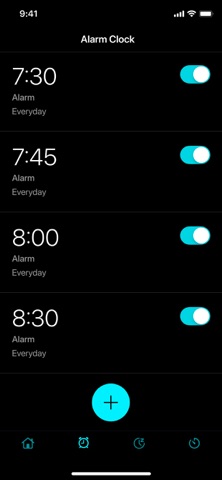
Alarm Clock is a universal app for your ultimate awakening. Wake up on time and enjoy listening to your favorite tunes! Forget about a bunch of non-working alarm clocks with meaningless functionality! Our application will help you: always arrive at work earlier in the morning, make it to important meetings in the afternoon, and set the time for cooking your favorite dishes in the evening. ~~~ FEATURES ~~~ ~ Use your favorite ringtones and melodies Wake up to beautiful music and sounds. Make your awakening enjoyable! ~ Solve math problems and wake up your brain Do some mental exercises and stretch your mind in the morning. Choose the difficulty, solve the example and turn off the alarm! ~ Train your memory with patterns and different colors Turning off the alarm with memory games: What could be better? Repeat the pattern or the sequence of colors on the screen, and make the morning useful and exciting. ~ Sleep mode Sleep comfortably! Activate the fast sleep mode and enjoy beautiful melodies until you are completely immersed in sleep. The application will automatically turn off the melody after a special timer is triggered. ~ Countdown timer Do you want to count down to a specific time, but you don't want to set a stopwatch? Start the timer and the signal will alert you when a specified time has passed. ~ Talking the time Turn the Alarm Clock into bedside clock mode and it will always tell you the exact time, wherever you are. ~ Flashlight Always keep a light source handy. Activate the flashlight in one click! The app does not drain the battery and always works on time. Our alarm clock is multifunctional, cute and easy to use. Download your favorite ringtones, set each alarm clock for a specific event, keep an eye on the weather and plan your day with ease! IMPORTANT INFORMATION: - The app needs to be running in the background so you can see the alarm that has gone off. - The application needs access to the location to update the weather forecast. - The application needs to activate the notification system. SUBSCRIPTION Subscribe and get: 1. Dial customization 2. Additional methods to turn off the alarm 3. Unlimited sleep timer 4. Talking clock 5. No ads Unlock all the cool themes with premium access: - Evaluate its benefits by getting a free 3-day trial period. After 3 days, the trial period will automatically switch to a weekly paid subscription. - Paid subscription is divided into 3 types: weekly, monthly and annual. - The cost of a weekly paid subscription is $5.99. Monthly - $19.99. Annual - $49.99. - The amount will be charged to your Apple ID account at confirmation of purchase. - You can cancel your subscription or trial period at any time, but no later than 24 hours before the end of the current period. OTHERWISE it will be automatically renewed. - Your account will be charged for renewal within 24-hours prior to the end of the current period. - After payment, you can manage your subscription and turn off auto-renewal in your account settings. - Any unused portion of the free period will be forfeited upon purchase of the subscription. - Read our privacy policy https://appenvisions.com/privacy.html. And EULA https://appenvisions.com/eula.html
Publisher websiteStore creative
Screenshots




Competitive set
Similar apps
Deterministic links to real stored apps matched by category, publisher, and comparable performance bands.

Secure VPN & Fast Proxy Master
Appenvision Ltd

Grid post & Photo layout maker
Appenvision Ltd

Horror Games & Chat Stories
Appenvision Ltd

Google LLC

Google Chrome
Google LLC

DuckDuckGo, optional Duck.ai
Duck Duck Go, Inc.

leboncoin
LBC France

My au(マイエーユー)-料金・ギガ残量の確認アプリ
KDDI CORPORATION
How we estimate
Where every number comes from
App details: Apple iTunes Search API, updated Sep 28, 2026, 3:59 PM.
Rankings: collected chart positions from the listed storefront. Missing ranks are not zeros.
Economics: downloads and gross store consumer spend are estimated, not official Apple or publisher figures.
Model: Lineage not exposed by this aggregate.
Confidence: —; intervals widen when evidence or history is limited.
Last updated: Sep 28, 2026, 3:59 PM.
See how AppTrendKit separates observations, estimates, coverage, and confidence.
Open methodology