
Epson iProjection
Research answer
What AppTrendKit can say about Epson iProjection today
Epson iProjection has no estimate-backed download or gross-consumer-spend figure that meets the public evidence contract yet.
Observed App Store metadata, chart positions, and history are shown below. Missing, non-finite, undefined-currency, or undefined-metric evidence stays missing rather than becoming zero.
Performance
Downloads, revenue and chart history
Estimates for the last 7D. Chart positions come from the App Store; downloads and revenue are AppTrendKit estimates, shown as a size band (for example 10K–50K) with a confidence level.
Estimated downloads · 30D
Upper limitUnder 50K
Below the top 100 in Productivity (US)
The app is not in its category's top 100, so it has less than the app ranked #100 there. We show this limit until we have enough data for an estimate.
Estimated App Store gross consumer spend · 30D
Upper limitUnder $500K
Below the top 100 in Productivity (US)
The app is not in its category's top 100, so it has less than the app ranked #100 there. We show this limit until we have enough data for an estimate.
History
Collected daily performance
No daily history yet.
Rank history
Chart positions
Lower rank is better. Only collected observations are shown.
Coverage note
What the ranks mean
A missing rank is not treated as zero downloads or zero revenue. Apple chart feeds are bounded and may return censored or not-ranked observations outside the visible chart depth.
Read the methodApp Store search
Keywords Epson iProjection ranks for
Observed positions in Apple's US search results, best first. Popularity is a 0–100 index, not a search count.
| Keyword | Position | Change | Popularity | Difficulty |
|---|---|---|---|---|
| epson | #3 | new | 79 | 65 |
Storefront mix
Top countries by estimated contribution · 7D
Country figures cover the days we collected in each country, so they don't add up to the worldwide estimate. Each country shows when it was last updated.
Monetization
How the app makes money
These are listing and product observations. They are not company revenue, subscriber counts, or advertising revenue.
App details
Store metadata
- Version
- 4.2.0
- Released
- May 15, 2013
- Last updated
- Oct 31, 2025
- Content rating
- 4+
- Default storefront
- US
Public IAP observations
Validated in-app purchase prices
Only persisted rows with an explicit public publication boundary are shown. Missing price, currency, country, or date values stay unknown.
Listing detail
What the store says
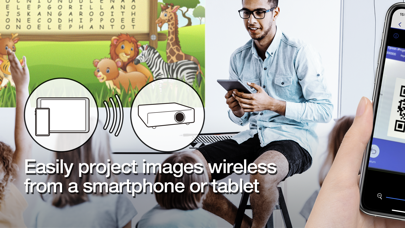
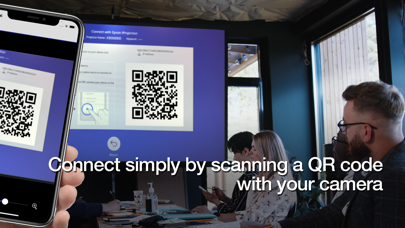
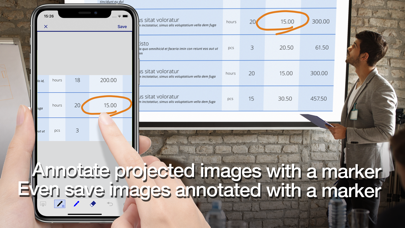
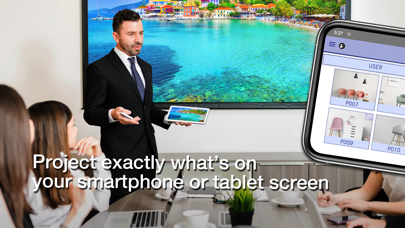
Epson iProjection is a wireless projection app for iPhone®, iPad®, or iPod® touch. This app makes it easy to mirror your device's screen, and project documents and photos wirelessly to a supported Epson projector. [Key Features] 1. Mirror your device’s screen and output your device’s audio from the projector. 2. Project your photos in the "Photos" app, project documents loaded in this app, and project in real-time video from your device's camera. 3. Easily connect your device by scanning a projected QR code. 4. Connect up to 50 devices to the projector, display up to four screens simultaneously, and share your projected image with the other connected devices. 5. Annotate projected images with a pen tool and save the edited images on your device. 6. Control the projector like a remote control. [Notes] • For supported projectors, visit https://support.epson.net/projector_appinfo/iprojection/en/. You can also check "Supported Projectors" in the app's support menu. • While mirroring your device’s screen, video and audio may be delayed depending on the device and network specifications. Only unprotected content can be projected. • Use the mirroring feature to project videos in the "Photos" app. [About Projecting Documents] • The following file types are supported when projecting using "Documents". - Microsoft® Word - Microsoft® Excel - Microsoft® PowerPoint - Keynote - PDF - JPG - PNG - The file types mentioned above are also supported when stored in cloud file services • Depending on the document, the projected image may differ from the image on the computer or at the time of creation, for example, some characters may not be projected correctly. If this occurs, use the mirroring feature ("Mirror device screen") instead. • Animations and screen transition effects, videos, and audio are not played. Use the mirroring feature to play them. • We recommend testing the projection in advance when using this app for presentations. [Using the App] Make sure that the network settings for the projector have been completed. 1. Switch the input source on the projector to "LAN". Network information is displayed. 2. Connect to the same network as the projector from "Settings" > "Wi-Fi" on your iPhone/iPad/iPod touch. 3. Start Epson iProjection and connect to the projector. 4. Select and project from "Mirror device screen", "Photos", "Documents", "Web Page", or "Camera". [App permissions] The app requires the following permissions for specific features. 【Required】 Local Network - Search for and connect to the projector. 【Optional】] Photo - Project selected photos from the device to the projector. * You can use the app without granting the optional permissions, but some features may not work. All images are examples and may differ from the actual screens.
Store creative
Screenshots
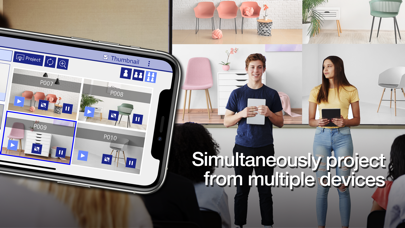
Competitive set
Similar apps
Deterministic links to real stored apps matched by category, publisher, and comparable performance bands.

Epson iPrint
Seiko Epson Corporation

Epson Smart Panel
Seiko Epson Corporation

Epson FastFoto
Seiko Epson Corporation

ChatGPT
OpenAI OpCo, LLC

豆包 - 随时帮忙的 AI 助手
Beijing Chuntian Zhiyun Technology Co., Ltd.

Gmail - Email by Google
Google LLC

Google Gemini
Google LLC

VPN - Super Unlimited Proxy
Mobile Jump Pte Ltd
How we estimate
Where every number comes from
App details: Apple iTunes Search API, updated Sep 28, 2026, 6:33 PM.
Rankings: collected chart positions from the listed storefront. Missing ranks are not zeros.
Economics: downloads and gross store consumer spend are estimated, not official Apple or publisher figures.
Model: Lineage not exposed by this aggregate.
Confidence: —; intervals widen when evidence or history is limited.
Last updated: Sep 28, 2026, 6:33 PM.
See how AppTrendKit separates observations, estimates, coverage, and confidence.
Open methodology