
Verba: Auto Captions AI
Research answer
What AppTrendKit can say about Verba: Auto Captions AI today
Verba: Auto Captions AI has no estimate-backed download or gross-consumer-spend figure that meets the public evidence contract yet.
Observed App Store metadata, chart positions, and history are shown below. Missing, non-finite, undefined-currency, or undefined-metric evidence stays missing rather than becoming zero.
Performance
Downloads, revenue and chart history
Estimates for the last 7D. Chart positions come from the App Store; downloads and revenue are AppTrendKit estimates, shown as a size band (for example 10K–50K) with a confidence level.
Estimated downloads · 7D
UnavailableNo estimate yet
We only show an estimate once we have enough data. Missing numbers are never shown as zero.
Estimated App Store gross consumer spend · 7D
UnavailableNo estimate yet
We only show an estimate once we have enough data. Missing numbers are never shown as zero.
History
Collected daily performance
No daily history yet.
Rank history
Chart positions
Lower rank is better. Only collected observations are shown.
Coverage note
What the ranks mean
A missing rank is not treated as zero downloads or zero revenue. Apple chart feeds are bounded and may return censored or not-ranked observations outside the visible chart depth.
Read the methodApp Store search
Keywords Verba: Auto Captions AI ranks for
Observed positions in Apple's US search results, best first. Popularity is a 0–100 index, not a search count.
| Keyword | Position | Change | Popularity | Difficulty |
|---|---|---|---|---|
| captions | #11 | new | 66 | 58 |
Storefront mix
Top countries by estimated contribution · 7D
Country figures cover the days we collected in each country, so they don't add up to the worldwide estimate. Each country shows when it was last updated.
Monetization
How the app makes money
These are listing and product observations. They are not company revenue, subscriber counts, or advertising revenue.
App details
Store metadata
- Version
- 3.67.0
- Released
- Jan 1, 2024
- Last updated
- Sep 14, 2026
- Content rating
- 12+
- Default storefront
- FI
Public IAP observations
Validated in-app purchase prices
Only persisted rows with an explicit public publication boundary are shown. Missing price, currency, country, or date values stay unknown.
Listing detail
What the store says
Verba is an AI-powered video editor and caption generator for short-form video creators who want to record, edit, and publish polished videos faster. Whether you're adding dynamic AI captions, cleaning up background noise, or styling subtitles to match your brand - Verba handles it all in one place. Rated 4.9 by creators who say Verba captures audio accurately even in noisy environments, where other apps fall short. • Dynamic AI captions - AI auto-generates, positions, and styles subtitles to match your video. 50+ presets, unlimited custom styles. • Publish in 1080p or 4K - your content looks sharp on any platform and any screen. • Make subtitles yours - 50+ caption presets, custom fonts, colors, animations, and gradient styles to match your brand. • Studio-quality audio - Audio Enhancement removes background noise so your voice sounds clear and professional. • Reach a global audience - translate your subtitles into 25+ languages with a single tap. KEY FEATURES Smart Captions Verba's AI analyzes every frame of your video and automatically positions, sizes, and styles your subtitles to match the visual context - or take full control with 50+ ready-made presets, custom fonts, colors, animations, gradient text, and background options so subtitles feel like part of your brand. Now with trending presets, a liquid glass effect, and more languages. High Resolution Export Export every video at 1080p or 4K so your content looks sharp on any platform and any screen. Teleprompter Record while reading your script on screen. Scrolls at your pace, available in portrait and landscape mode. Plus dual-camera, Bluetooth remote, exposure, and white balance - shoot like a pro. Audio Enhancement One tap removes background noise and brings your voice to studio-quality clarity - no external mic needed. AI Translation Translate your subtitles into 25+ languages in one tap and reach audiences worldwide - without re-recording a single word. AI Voiceover Add a voice to your video without recording. Choose language, style, and pacing - Verba generates the audio and syncs it automatically. Beat-Sync Edit AI analyzes your audio track and cuts your footage to the beat automatically - perfect for vlog-format content without manual timeline work. Clean Speech Removes pauses, filler words, and dead air from your talking videos automatically - so every sentence lands clean. AI B-Roll Never shoot B-roll again - AI generates matching photorealistic footage the moment you say it. Regenerate any shot to get exactly what you imagined. Pro Editor Tools Pro-level control - masks, blurs, transparency, keyframes, animations, freeze-frame, and cinematic zoom (0.5x-10x, custom curve). Download Verba and publish your next video today. Q: Can Verba add captions to my video automatically? A: Yes - drop in your video and AI generates accurate subtitles in seconds. Works reliably even with background noise or multiple speakers. Q: Is Verba built for short-form video? A: Yes - Verba is designed for short-form content. It handles AI captions, teleprompter, beat-sync editing, voiceover, and 4K export in one place, optimized for vertical formats. Q: Can Verba translate my video captions into other languages? A: Yes - AI Translation converts your subtitles into 25+ languages in one tap, so you can reach a global audience without re-recording anything. SUBSCRIPTION Unlock the full Verba experience - more AI tools, higher export quality, and everything you need to create faster. Start free - no commitment needed. Subscriptions auto-renew unless cancelled at least 24 hours before the end of the current period. Privacy Policy: https://static.verba.digital/verba-privacy-policy.pdf Terms of Use: https://static.verba.digital/verba-terms-and-conditions.pdf Support: support@verba.digital
Store creative
Screenshots
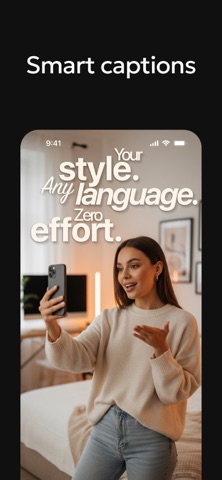


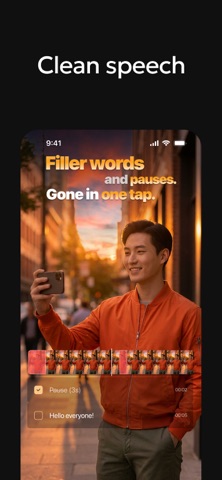

Competitive set
Similar apps
Deterministic links to real stored apps matched by category, publisher, and comparable performance bands.

YouTube
Google LLC

Instagram, Inc.

剪映 - 抖音官方AI创作神器
Shenzhen Lianmeng Technology Co.Ltd.

Snapchat
Snap, Inc.

快手极速版
Beijing Huayi Huilong Network Technology Co., Ltd.

Canva AI Photo & Video Editor
Canva Pty Ltd

InShot - Video Editor
SHANTANU PTE. LTD.

PicCollage: Magic Photo Editor
Cardinal Blue Software, Inc
How we estimate
Where every number comes from
App details: Apple iTunes Search API, updated Sep 28, 2026, 3:51 PM.
Rankings: collected chart positions from the listed storefront. Missing ranks are not zeros.
Economics: downloads and gross store consumer spend are estimated, not official Apple or publisher figures.
Model: Lineage not exposed by this aggregate.
Confidence: —; intervals widen when evidence or history is limited.
Last updated: Sep 28, 2026, 4:59 PM.
See how AppTrendKit separates observations, estimates, coverage, and confidence.
Open methodology