
Left: Widgets for Time Left
Research answer
What AppTrendKit can say about Left: Widgets for Time Left today
Left: Widgets for Time Left has no estimate-backed download or gross-consumer-spend figure that meets the public evidence contract yet.
Observed App Store metadata, chart positions, and history are shown below. Missing, non-finite, undefined-currency, or undefined-metric evidence stays missing rather than becoming zero.
Performance
Downloads, revenue and chart history
Estimates for the last 7D. Chart positions come from the App Store; downloads and revenue are AppTrendKit estimates, shown as a size band (for example 10K–50K) with a confidence level.
Estimated downloads · 30D
Upper limitUnder 50K
Below the top 100 in Productivity (US)
The app is not in its category's top 100, so it has less than the app ranked #100 there. We show this limit until we have enough data for an estimate.
Estimated App Store gross consumer spend · 30D
Upper limitUnder $500K
Below the top 100 in Productivity (US)
The app is not in its category's top 100, so it has less than the app ranked #100 there. We show this limit until we have enough data for an estimate.
History
Collected daily performance
No daily history yet.
Rank history
Chart positions
Lower rank is better. Only collected observations are shown.
Coverage note
What the ranks mean
A missing rank is not treated as zero downloads or zero revenue. Apple chart feeds are bounded and may return censored or not-ranked observations outside the visible chart depth.
Read the methodStorefront mix
Top countries by estimated contribution · 7D
Country figures cover the days we collected in each country, so they don't add up to the worldwide estimate. Each country shows when it was last updated.
Monetization
How the app makes money
These are listing and product observations. They are not company revenue, subscriber counts, or advertising revenue.
App details
Store metadata
- Version
- 2026.9.5
- Released
- Jan 13, 2025
- Last updated
- Sep 24, 2026
- Content rating
- 4+
- Default storefront
- US
Public IAP observations
Validated in-app purchase prices
Only persisted rows with an explicit public publication boundary are shown. Missing price, currency, country, or date values stay unknown.
Listing detail
What the store says
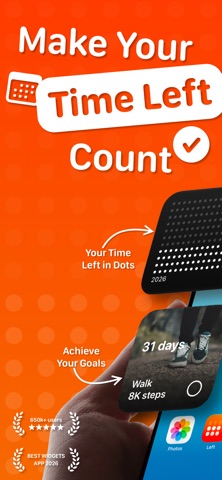
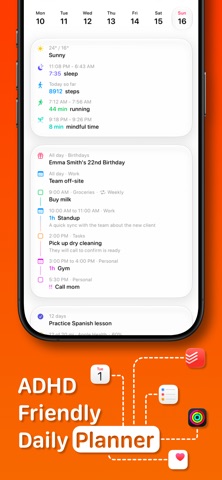
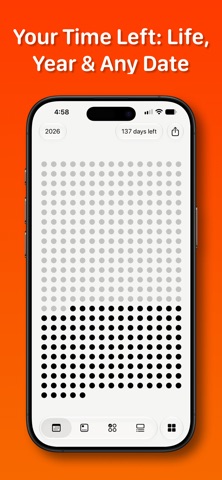
Left is a time-awareness app built on one idea: your time is limited, and seeing it changes how you use it. Left turns time into something you can see, then helps you act on it with habits, streaks, countdowns, and a planner for your day. TIME LEFT See where you are in the year, month, week, day, hour, and your life. Each unit is a symbol; the past dims, what remains stays in view. Your life in weeks, year progress, and life progress, made tangible. Choose dots, symbols, colors, and layouts. A quiet, honest way to face limited time without it becoming morbid. HABITS, STREAKS & AIMS Left is a habit tracker for the person you are trying to become. Build habits on any schedule: daily, several times a day, weekly, monthly, or custom. Track streaks and protect them, count the days since anything that matters, and set reminders so nothing slips. And you don't have to do it alone: share a habit or streak with a friend, keep each other accountable, and send kudos, cheers, and encouragement when it counts. With aims, you have a flexible goal tracker for anything you can count, helping you build up or cut down. Stay on track and see your progress every day. AHEAD - COUNTDOWNS & DATES Add the dates that pull you forward: trips, birthdays, holidays, anniversaries, weddings, deadlines, retirement, and personal milestones. Count down to each one, import from Apple Calendar, and track both the days until and the days since. New: every Ahead date now has its own to-do list, so you can plan the small tasks that make the date happen and check them off as it approaches. Share an Ahead date with a friend, follow it side by side, comment, and add to-dos together on joint dates. PLANNER Planner pulls everything that matters into one beautiful, time-first view: your habits, streaks, Ahead dates, Apple Calendar events, Apple Reminders, weather, sleep, and workouts, together at last. Not another calendar, but a clear, calm picture of what the day is actually asking of you. Because everything lives in one place instead of five apps, Planner is a quiet ally for ADHD minds: see the whole day at a glance and miss nothing. Two new widgets come with it: a Planner widget and a Calendar widget for your Home Screen. FASTING TOOL A simple yet beautiful fasting tool inside Left. Pick a fasting window, start it in a tap, and follow every fast live from your Lock Screen, widgets and the Dynamic Island. Your history and stats are all there too. FRIENDS All-new. Add the people who matter and keep each other moving. Stay accountable on the habits and streaks you share, join an Ahead date together, comment, add to-dos, and stay in the loop as it counts down. Private by design, with no public feed. WHY LEFT Other apps give you habits without design, or aesthetics without depth. Left combines both: the widget range, the design quality, and the full set of time tools, in one app made with restraint and taste. Terms: https://www.apple.com/legal/internet-services/itunes/dev/stdeula/
Publisher websiteStore creative
Screenshots





Competitive set
Similar apps
Deterministic links to real stored apps matched by category, publisher, and comparable performance bands.

ChatGPT
OpenAI OpCo, LLC

Google Drive
Google LLC

Gmail - Email by Google
Google LLC

Google Gemini
Google LLC

VPN - Super Unlimited Proxy
Mobile Jump Pte Ltd

CamScanner - PDF Scanner App
INTSIG Information Co., Ltd

Calendar
Apple Inc.

Grok AI
TWITTER INTERNATIONAL UNLIMITED COMPANY
How we estimate
Where every number comes from
App details: Apple iTunes Search API, updated Sep 27, 2026, 9:15 PM.
Rankings: collected chart positions from the listed storefront. Missing ranks are not zeros.
Economics: downloads and gross store consumer spend are estimated, not official Apple or publisher figures.
Model: Lineage not exposed by this aggregate.
Confidence: —; intervals widen when evidence or history is limited.
Last updated: Sep 27, 2026, 9:15 PM.
See how AppTrendKit separates observations, estimates, coverage, and confidence.
Open methodology