
PhotoGlow AI: Portrait Editor
Research answer
What AppTrendKit can say about PhotoGlow AI: Portrait Editor today
PhotoGlow AI: Portrait Editor has no estimate-backed download or gross-consumer-spend figure that meets the public evidence contract yet.
Observed App Store metadata, chart positions, and history are shown below. Missing, non-finite, undefined-currency, or undefined-metric evidence stays missing rather than becoming zero.
Performance intelligence
Observed trajectory and estimates
Store ranks are observations. Downloads and gross store consumer spend are AppTrendKit estimates and only appear when persisted evidence exists.
Estimated downloads · 30D
ModeledNo persisted estimate
The page does not turn missing evidence into zero.
Estimated App Store gross consumer spend · 30D
ModeledNo persisted estimate
The page does not turn missing evidence into zero.
Estimated downloads · 7D
ModeledNo persisted estimate
The page does not turn missing evidence into zero.
Estimated App Store gross consumer spend · 7D
ModeledNo persisted estimate
The page does not turn missing evidence into zero.
Evidence history
Collected daily performance
No daily metric history has been persisted yet.
Rank history
Observed chart positions
Lower rank is better. Only collected observations are shown.
Coverage note
What the ranks mean
A missing rank is not treated as zero downloads or zero revenue. Apple chart feeds are bounded and may return censored or not-ranked observations outside the visible chart depth.
Read the methodStorefront mix
Top countries by estimated contribution
Country estimates are aggregated only after country-level predictions exist.
Monetization
Observed store economics signals
These are listing and product observations. They are not company revenue, subscriber counts, or advertising revenue.
App details
Store metadata
- Version
- 1.1.5
- Released
- Mar 25, 2025
- Last updated
- Sep 7, 2026
- Content rating
- 17+
- Default storefront
- GB
Public IAP observations
Validated in-app purchase prices
Only persisted rows with an explicit public publication boundary are shown. Missing price, currency, country, or date values stay unknown.
Listing detail
What the store says
PortraitAce AI | AI Photo Retouching in One Tap PortraitAce AI combines AI retouching, photo enhancement, one-tap color, batch workflows, and creative AI tools. From portraits and children’s photography to travel, street, and group photos, simple controls help create clear, natural, polished results. AI RETOUCHING IN ONE TAP No advanced editing experience is required. Choose a photo and quickly create natural, refined results. • Single Retouch for detailed portrait, lifestyle, and travel-photo editing • Fast Retouch for generating and comparing multiple looks • Batch Retouch for applying one consistent style across multiple photos • 2K and 4K output for high-resolution results and sharing • Before-and-after previews for an immediate comparison CREATIVE AI TOOLBOX Use focused AI tools for common photo fixes and creative edits. • Remove unwanted people and distracting objects • Smooth and brighten skin; refine face and body • Blur backgrounds, automatically reframe, and expand images • Sharpen blurry photos and enhance image quality • Fix backlighting and restore old photos • Open closed eyes, correct eye asymmetry, and repair hair • Straighten photos and correct distorted building lines • Describe an edit in your own words, like working with an AI retouching assistant ONE-TAP COLOR AND STYLES Explore color presets and filters for social posts, profile photos, portraits, travel memories, and creative expression. • Film-inspired, cinematic, vintage, and fresh looks • Portrait color grading, Japanese film-inspired looks, and caramel tones • Atmospheric travel looks, street-style tones, and clean, natural color • Fine-tune portrait details such as skin smoothing, brightening, and face slimming CUSTOM PRESETS Save common editing instructions and quickly apply them to one photo or a batch. Build repeatable looks for studio retouching, photography post-production, and consistent delivery. WORKS AND CLIENT ALBUMS Keep retouching, organization, and delivery in one workflow. • Manage individual works and batch projects • Create client albums and add finished photos • Give clients a preview page and display photographer information • Manage download permissions and sharing links Create polished photos with one-tap enhancement, batch processing, and high-resolution output. Use all features only for lawful photo enhancement, image editing, and creative expression. We process only photos you choose. Before the first AI upload, the app separately explains photo upload and processing by the third-party AI provider Alibaba Cloud and asks for your explicit consent. No photo is uploaded if you decline. AI results may be imperfect; review them before saving, sharing, or commercial use. MEMBERSHIP AND AUTO-RENEWAL • Some AI processing, batch retouching, 4K export, and client album features require a membership or points. • Plans and periods: Weekly, monthly, and annual auto-renewable memberships may be available. Benefits, billing periods, and localized prices appear in the app and on the App Store confirmation screen. • Payment: Your Apple Account is charged when you confirm the purchase. • Renewal: Unless auto-renewal is turned off at least 24 hours before the current subscription period ends, your Apple Account is charged for the next period within 24 hours before expiration at the price of the selected plan. • Manage or cancel: Manage or cancel the subscription under Subscriptions in your Apple Account settings. After cancellation, access continues until the end of the paid period. • Restore Purchases: Eligible previous purchases can be restored in the app. Privacy Policy: https://comp.ddznzj.com/xs/protocol/privacy?locale=en Auto-Renewal Agreement: https://comp.ddznzj.com/xs/protocol/auto-renewal?locale=en Terms of Service: https://comp.ddznzj.com/xs/protocol/user?locale=en
Store creative
Screenshots

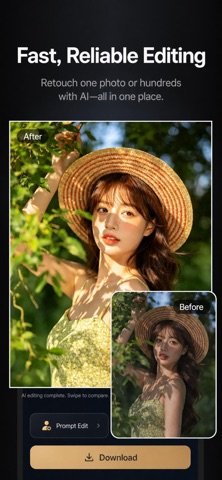


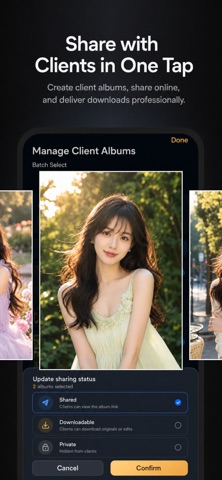
Competitive set
Similar apps
Deterministic links to real stored apps matched by category, publisher, and comparable performance bands.

AI Art Generator Wonder Dream
Vu Xuan Loc

AI Logo Maker: Graphic Design
Whistle Studios LLC

AI Logo Maker®Brand Design
艳 王

Animal Posing
Akihisa Sakai

Anime Couple: Avatar Maker
Nam Dang Hoang

AR Drawing: Easy Sketch & Draw
masaki matsushita

AR Text - 3D text to AR
AR Code Pte. Ltd.

AR Tracing: Learn How to Draw
PLAY AND LEARN EDUCATIONAL GAMES FOR KIDS PLEI END LERN EDYUKESHINAL GEIMS FO KIDS, TOO
Methodology and provenance
Read every number with its evidence
Metadata source: Apple iTunes Search API; observed Sep 7, 2026, 11:30 PM.
Rankings: collected chart positions from the listed storefront. Missing ranks are not zeros.
Economics: downloads and gross store consumer spend are estimated, not official Apple or publisher figures.
Model: No persisted model version.
Confidence: —; intervals widen when evidence or history is limited.
Last observation: Sep 7, 2026, 11:30 PM.
See how AppTrendKit separates observations, estimates, coverage, and confidence.
Open methodology