
Drawsy: AR Draw for Sketching
Research answer
What AppTrendKit can say about Drawsy: AR Draw for Sketching today
Drawsy: AR Draw for Sketching has no estimate-backed download or gross-consumer-spend figure that meets the public evidence contract yet.
Observed App Store metadata, chart positions, and history are shown below. Missing, non-finite, undefined-currency, or undefined-metric evidence stays missing rather than becoming zero.
Performance intelligence
Observed trajectory and estimates
Store ranks are observations. Downloads and gross store consumer spend are AppTrendKit estimates and only appear when persisted evidence exists.
Estimated downloads · 30D
ModeledNo persisted estimate
The page does not turn missing evidence into zero.
Estimated App Store gross consumer spend · 30D
ModeledNo persisted estimate
The page does not turn missing evidence into zero.
Estimated downloads · 7D
ModeledNo persisted estimate
The page does not turn missing evidence into zero.
Estimated App Store gross consumer spend · 7D
ModeledNo persisted estimate
The page does not turn missing evidence into zero.
Evidence history
Collected daily performance
No daily metric history has been persisted yet.
Rank history
Observed chart positions
Lower rank is better. Only collected observations are shown.
Coverage note
What the ranks mean
A missing rank is not treated as zero downloads or zero revenue. Apple chart feeds are bounded and may return censored or not-ranked observations outside the visible chart depth.
Read the methodStorefront mix
Top countries by estimated contribution
Country estimates are aggregated only after country-level predictions exist.
Monetization
Observed store economics signals
These are listing and product observations. They are not company revenue, subscriber counts, or advertising revenue.
App details
Store metadata
- Version
- 2.6
- Released
- Jun 27, 2025
- Last updated
- Aug 14, 2026
- Content rating
- 4+
- Default storefront
- PL
Public IAP observations
Validated in-app purchase prices
Only persisted rows with an explicit public publication boundary are shown. Missing price, currency, country, or date values stay unknown.
Listing detail
What the store says
Bring Your Imagination to Life with Drawsy: AR Draw for Sketching! Our art AR Drawing app turns your iPhone into a virtual projector that helps you simply draw with precision. Here’s exactly how the process works: 1. Select an Image Start by choosing an sketch from the app’s built-in gallery — like a cartoon character, animal, flower. 2. Position Your Paper Place a blank sheet of paper on a flat surface (like a desk or table) in a well-lit environment. Make sure your phone can see the entire sheet. 3. Activate AR Mode Open the image in AR mode. Your phone will use its camera to detect the paper and overlay the image directly on top of it through the screen. 4. Adjust the View Move your phone until the image is perfectly aligned with the paper. You can resize or rotate the image using your fingers to make sure it fits exactly the way you want. 5. Start Tracing the sketch Now, simply look at your phone screen while keeping your pencil on the paper. The image appears “on the paper” in your screen view, allowing you to trace the lines precisely. It feels like you’re copying a transparent image that’s floating above your paper — but with total control! 6. Finish & Save Once your outline is done, you can finish the drawing with your own style — add colors, shading, or extra details. If you want, you can record a video of your drawing process, as well as take a photo of your finished work and save or share it directly from the app. Why It’s So Effective Traditional tracing requires light tables or printed guides. With AR Drawing, you trace using your eyes and hands guided by real-time AR projection — no special tools, no printing, no setup. Just your iphone, a pencil, and paper. Discover a fun new way to sketch and paint using Augmented Reality. Whether you’re a beginner or a pro, simply AR Draw App helps you trace anything with precision and ease. Our app also lets you record your drawing process. Share the video with friends and show off your skills! Subscription Information: Unlock the full experience of Drawsy with a subscription. - Payment will be charged to your iTunes account at confirmation of purchase. - Subscriptions automatically renew unless canceled at least 24 hours before the end of the current period. - Renewal charges will apply within 24 hours prior to the end of the current period, indicating the cost of the renewal. - Manage or cancel subscriptions in your account settings after purchase. - Free trial periods will be canceled when your subscription is activated. - If your subscription is not canceled before the end of the free trial period, your subscription will be activated for the selected period and your account will be charged automatically. Terms and Conditions: https://telegra.ph/Terms-Of-Use-12-30-4 Privacy Policy: https://telegra.ph/Privacy-Policy-12-30-117
Publisher websiteStore creative
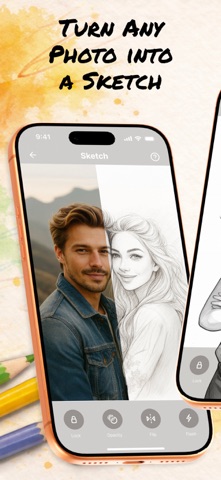
Screenshots


Competitive set
Similar apps
Deterministic links to real stored apps matched by category, publisher, and comparable performance bands.

AI Art Generator Wonder Dream
Vu Xuan Loc

AI Logo Maker: Graphic Design
Whistle Studios LLC

AI Logo Maker®Brand Design
艳 王

Animal Posing
Akihisa Sakai

Anime Couple: Avatar Maker
Nam Dang Hoang

AR Drawing: Easy Sketch & Draw
masaki matsushita

AR Text - 3D text to AR
AR Code Pte. Ltd.

AR Tracing: Learn How to Draw
PLAY AND LEARN EDUCATIONAL GAMES FOR KIDS PLEI END LERN EDYUKESHINAL GEIMS FO KIDS, TOO
Methodology and provenance
Read every number with its evidence
Metadata source: Apple iTunes Search API; observed Sep 7, 2026, 8:37 PM.
Rankings: collected chart positions from the listed storefront. Missing ranks are not zeros.
Economics: downloads and gross store consumer spend are estimated, not official Apple or publisher figures.
Model: No persisted model version.
Confidence: —; intervals widen when evidence or history is limited.
Last observation: Sep 7, 2026, 8:37 PM.
See how AppTrendKit separates observations, estimates, coverage, and confidence.
Open methodology