
Screen Time App Limit
Research answer
What AppTrendKit can say about Screen Time App Limit today
Screen Time App Limit has no estimate-backed download or gross-consumer-spend figure that meets the public evidence contract yet.
Observed App Store metadata, chart positions, and history are shown below. Missing, non-finite, undefined-currency, or undefined-metric evidence stays missing rather than becoming zero.
Performance
Downloads, revenue and chart history
Estimates for the last 7D. Chart positions come from the App Store; downloads and revenue are AppTrendKit estimates, shown as a size band (for example 10K–50K) with a confidence level.
Estimated downloads · 30D
Upper limitUnder 50K
Below the top 100 in Productivity (US)
The app is not in its category's top 100, so it has less than the app ranked #100 there. We show this limit until we have enough data for an estimate.
Estimated App Store gross consumer spend · 30D
Upper limitUnder $500K
Below the top 100 in Productivity (US)
The app is not in its category's top 100, so it has less than the app ranked #100 there. We show this limit until we have enough data for an estimate.
History
Collected daily performance
No daily history yet.
Rank history
Chart positions
Lower rank is better. Only collected observations are shown.
Coverage note
What the ranks mean
A missing rank is not treated as zero downloads or zero revenue. Apple chart feeds are bounded and may return censored or not-ranked observations outside the visible chart depth.
Read the methodApp Store search
Keywords Screen Time App Limit ranks for
Observed positions in Apple's US search results, best first. Popularity is a 0–100 index, not a search count.
| Keyword | Position | Change | Popularity | Difficulty |
|---|---|---|---|---|
| screen time | #23 | new | — | — |
Storefront mix
Top countries by estimated contribution · 7D
Country figures cover the days we collected in each country, so they don't add up to the worldwide estimate. Each country shows when it was last updated.
Monetization
How the app makes money
These are listing and product observations. They are not company revenue, subscriber counts, or advertising revenue.
App details
Store metadata
- Version
- 1.0.2
- Released
- Apr 17, 2026
- Last updated
- May 21, 2026
- Content rating
- 4+
- Default storefront
- US
Public IAP observations
Validated in-app purchase prices
Only persisted rows with an explicit public publication boundary are shown. Missing price, currency, country, or date values stay unknown.
Listing detail
What the store says
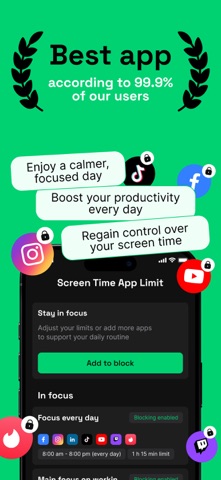
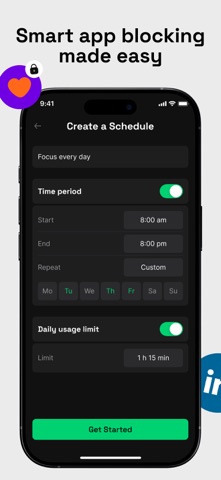
Screen Time App Limit helps you stay focused by blocking distracting apps and setting clear usage boundaries. Take control of your time with flexible restrictions, smart schedules, and meaningful insights into your app activity. APP BLOCK Block selected apps based on your personal rules. 1. Block chosen apps instantly 2. Set daily usage time limits 3. Limit the number of app launches 4. Create custom blocking schedules 5. See current blocking status at a glance When a restricted app is opened, a lock screen clearly explains the reason — time period, usage limit, or launch limit reached. CREATE A SCHEDULE Build powerful focus scenarios with three types of limits: Time Period Set start and end times, choose weekdays, weekends, or custom days of the week. Create multiple time periods for different days. Usage Limit Set a daily time allowance. Once exceeded, the app is automatically blocked. Start Counter Limit how many times an app can be opened per day. Restrictions can work independently or together, depending on your plan. STATISTICS Track your progress and build healthier digital habits. – Daily and weekly usage overview – Time spent per selected app – Clear charts and summary metrics – Focus-driven insights Premium users get advanced statistics including detailed app history, launch counts, average session duration, blocking reasons, and comparative analysis across day, week, and month. SETTINGS & PROTECTION Enable or disable blocking with a global switch. Premium includes Delay Protection — a safeguard against impulsive disabling. When attempting to turn off blocking, a countdown pause is triggered to help you stay committed to your focus goals. FREE VERSION • Block up to 3 apps • One active blocking scenario • Basic statistics PREMIUM VERSION • Unlimited schedules • Multiple restriction types per app • Advanced statistics • Delay Protection against instant disabling Stay intentional. Stay productive. Take control of your screen time. Privacy Policy: https://docs.google.com/document/d/1YE14BlvZaR6RLtu2SXvSEWNKFCV439YWnmv7yzYViCs/edit?usp=sharing Term of Use: https://docs.google.com/document/d/1QhNedZK8zLFmuNkAGigHDZRg5jvXIErsEn9djjx9EAA/edit?usp=sharing
Store creative
Screenshots

Competitive set
Similar apps
Deterministic links to real stored apps matched by category, publisher, and comparable performance bands.

Opal: Screen Time Control
OPAL OS CORPORATION

ChatGPT
OpenAI OpCo, LLC

豆包 - 随时帮忙的 AI 助手
Beijing Chuntian Zhiyun Technology Co., Ltd.

Gmail - Email by Google
Google LLC

Google Gemini
Google LLC

VPN - Super Unlimited Proxy
Mobile Jump Pte Ltd

CamScanner - PDF Scanner App
INTSIG Information Co., Ltd

Calendar
Apple Inc.
How we estimate
Where every number comes from
App details: Apple iTunes Search API, updated Sep 27, 2026, 9:15 PM.
Rankings: collected chart positions from the listed storefront. Missing ranks are not zeros.
Economics: downloads and gross store consumer spend are estimated, not official Apple or publisher figures.
Model: Lineage not exposed by this aggregate.
Confidence: —; intervals widen when evidence or history is limited.
Last updated: Sep 27, 2026, 9:15 PM.
See how AppTrendKit separates observations, estimates, coverage, and confidence.
Open methodology