
Auto Clicker™: Automatic Tap
Research answer
What AppTrendKit can say about Auto Clicker™: Automatic Tap today
Auto Clicker™: Automatic Tap has no estimate-backed download or gross-consumer-spend figure that meets the public evidence contract yet.
Observed App Store metadata, chart positions, and history are shown below. Missing, non-finite, undefined-currency, or undefined-metric evidence stays missing rather than becoming zero.
Performance
Downloads, revenue and chart history
Estimates for the last 7D. Chart positions come from the App Store; downloads and revenue are AppTrendKit estimates, shown as a size band (for example 10K–50K) with a confidence level.
Estimated downloads · 30D
Upper limitUnder 50K
Below the top 100 in Productivity (US)
The app is not in its category's top 100, so it has less than the app ranked #100 there. We show this limit until we have enough data for an estimate.
Estimated App Store gross consumer spend · 30D
Upper limitUnder $500K
Below the top 100 in Productivity (US)
The app is not in its category's top 100, so it has less than the app ranked #100 there. We show this limit until we have enough data for an estimate.
History
Collected daily performance
No daily history yet.
Rank history
Chart positions
Lower rank is better. Only collected observations are shown.
Coverage note
What the ranks mean
A missing rank is not treated as zero downloads or zero revenue. Apple chart feeds are bounded and may return censored or not-ranked observations outside the visible chart depth.
Read the methodApp Store search
Keywords Auto Clicker™: Automatic Tap ranks for
Observed positions in Apple's US search results, best first. Popularity is a 0–100 index, not a search count.
| Keyword | Position | Change | Popularity | Difficulty |
|---|---|---|---|---|
| auto clicker | #3 | new | 84 | 69 |
Storefront mix
Top countries by estimated contribution · 7D
Country figures cover the days we collected in each country, so they don't add up to the worldwide estimate. Each country shows when it was last updated.
Monetization
How the app makes money
These are listing and product observations. They are not company revenue, subscriber counts, or advertising revenue.
App details
Store metadata
- Version
- 1.0.2
- Released
- Jul 6, 2026
- Last updated
- Aug 24, 2026
- Content rating
- 17+
- Default storefront
- US
Public IAP observations
Validated in-app purchase prices
Only persisted rows with an explicit public publication boundary are shown. Missing price, currency, country, or date values stay unknown.
Listing detail
What the store says
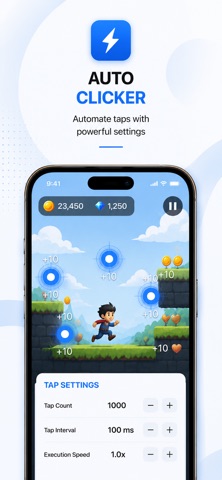
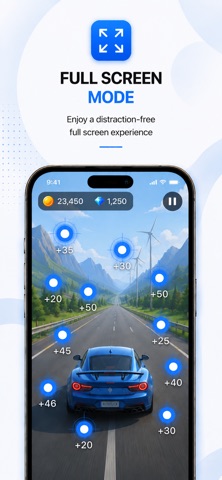
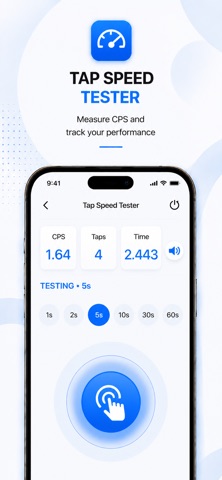
Auto Clicker: Automatic Tap+ is a productivity app designed to automate repetitive touch actions with customizable timing controls and precise automation settings. Configure tap count, tap interval, and execution speed to create consistent tap sessions through a simple and intuitive interface. Designed for productivity, accessibility, and repetitive workflows, the app helps simplify routine touch interactions while keeping all processing local on your device. No account is required, and your settings are automatically saved for future sessions. Key Features • Auto Clicker with customizable tap count, interval, and speed. • Smart Touch Assistant for simple and efficient automation. • Draggable touch target for accurate positioning. • Full Screen Mode for a distraction-free experience. • Tap Speed Tester with CPS measurement and score tracking. • Saved preferences stored locally on your device. • Optimized for iPhone and iPad. • Fast, responsive, and fully on-device. Important Notice Auto Clicker works only inside the application’s integrated browser. It does not control other applications, games, system functions, device settings, background processes, or the iOS Home Screen. All touch automation is performed exclusively within the application. Integrated Browser The application includes a built-in browser where touch automation can be performed. Position the touch target, configure automation settings, and start automation directly within the browser. The integrated browser supports address navigation, back and forward controls, refresh, and Full Screen Mode. Premium The free version includes Tap Speed Tester and basic application features. Premium unlocks the complete Auto Clicker experience, including: • Integrated Browser • Unlimited automation sessions • Advanced tap controls • Extended customization options Premium is available as Weekly, Monthly, Yearly, and Lifetime In-App Purchases. Premium purchases unlock additional functionality within the application only. No external content, online services, or server-based features are included. Subscription Information Payment will be charged to your Apple ID account at confirmation of purchase. Subscriptions renew automatically unless canceled at least 24 hours before the end of the current billing period. You can manage or cancel subscriptions at any time through Apple Account Settings. Lifetime Purchase is a one-time purchase and does not renew. Purchases are non-refundable except where required by Apple policy or applicable law. Privacy The application does not collect, store, transmit, or share personal information. No registration or login is required. All settings remain stored locally on your device. No backend servers, cloud synchronization, analytics, tracking technologies, or server-side storage are used. Privacy Policy: https://sites.google.com/view/32383 Terms of Use: https://sites.google.com/view/32802 End User License Agreement: https://sites.google.com/view/323902
Publisher websiteStore creative
Screenshots


Competitive set
Similar apps
Deterministic links to real stored apps matched by category, publisher, and comparable performance bands.

ChatGPT
OpenAI OpCo, LLC

豆包 - 随时帮忙的 AI 助手
Beijing Chuntian Zhiyun Technology Co., Ltd.

Gmail - Email by Google
Google LLC

Google Gemini
Google LLC

VPN - Super Unlimited Proxy
Mobile Jump Pte Ltd

CamScanner - PDF Scanner App
INTSIG Information Co., Ltd

Calendar
Apple Inc.

Grok AI
X Corp.
How we estimate
Where every number comes from
App details: Apple iTunes Search API, updated Sep 28, 2026, 7:39 PM.
Rankings: collected chart positions from the listed storefront. Missing ranks are not zeros.
Economics: downloads and gross store consumer spend are estimated, not official Apple or publisher figures.
Model: Lineage not exposed by this aggregate.
Confidence: —; intervals widen when evidence or history is limited.
Last updated: Sep 28, 2026, 7:39 PM.
See how AppTrendKit separates observations, estimates, coverage, and confidence.
Open methodology